Your shopping cart
😊 Product added to cart successfully
Product removed to cart successfully

Couldn't load pickup availability
Izdelek bomo predvidoma poslali čez: 5 dni
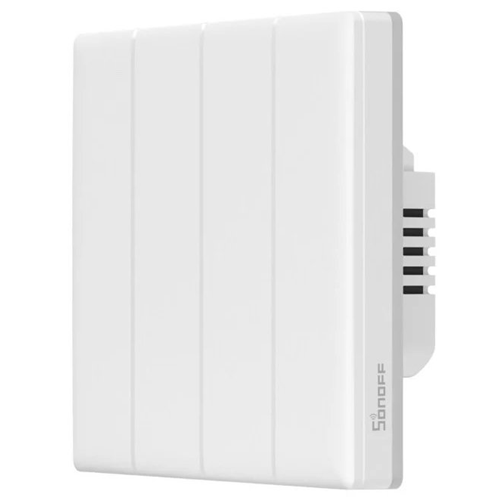




The four-channel smart touch switch is suitable for users who want to easily control multiple lights or devices in their home, both locally and remotely.
Create a smart home with Sonoff. TX T5 4C is a 4-channel wall switch that allows you to conveniently control your lighting. It can also be controlled remotely with voice commands or the eWeLink app. What's more, the product offers a timer function and colorful LED backlighting that you can customize. You can also customize the appearance of the switch with color plates (not included).

Want to turn off the lights in your living room without having to get up from the couch? No problem with the Sonoff TX T5 4C. The wall switch works with assistants like Amazon Alexa, Google Home and Alice. All it takes is a simple voice command - you don't have to tear yourself away from your favorite show anymore.

The switch can be used as an eWeLink gateway. This allows you to create smart scenes that allow both TX T5 4C and R5 or S-MATE (not included) to control the operation of a single lamp. Enjoy the possibilities that Sonoff offers without all the unnecessary wiring.

The switch has a built-in timer that will allow you to adjust the time at which the light will automatically turn off, and the colored backlight around the switch will be activated. This makes it easy to find the device in the dark. What's more, it is possible to enable smart scenes.

The TX T5 4C is equipped with four buttons, so you can conveniently turn on the light, for example. The device will communicate the command with a beep and gentle vibration. It also offers 8 types of colored backlighting - including Party, Night Light and Color modes. Choose the right one for you!

| Manufacturer | Sonoff |
|---|---|
| Model | TX T5 4C |
| Number of channels | 4 |
| Input voltage | 100-240 V ~ 50/60 Hz max. 16 A |
| Output voltage | 100-240 V ~ 50/60 Hz max. 4 A per channel, 16 A total |
| Power | 960 W maximum (240 V) per channel, 3840 W total |
| LED load | 150 W maximum (240 V) per channel / 75 W maximum (100 V) per channel |
| Wifi | IEEE 802.11 b/g/n 2.4 GHz |
| color | White |
| Material | PC, CRS |
| Dimensions | 86 x 86 x 39 mm |
| Weight | 181g |
| Operating systems | iOS, Android |
| Bluetooth | 4.2 |
| application | eWeLink |
| Voice control | Amazon Alexa, Google Home, Alice |
Warranty: 12 months
The text is machine translated.
The Sonoff TX T5 4C (4-channel) smart Wi-Fi wall switch is suitable for users who want to easily upgrade their existing wall switch to a smart version and have multi-point control of various devices or lights via a Wi-Fi connection. Due to its four channels, it allows convenient control of multiple light sources or devices from one point, but compatibility with your home wiring and Wi-Fi network must be checked in advance. The latter switch is less suitable for users looking for more advanced automation in larger systems (e.g. Zigbee or Z-Wave), although the Wi-Fi protocol is sufficient for most households for everyday use. Before choosing, it is recommended to check that the device suits your usage pattern and home ecosystem.
Recommendation source: Enaa guides and team experiences.
The switch is most often chosen by individuals or families who want a smart living experience, but without complex interventions in the existing electrical wiring. It is useful in apartments or houses where multi-point control of lights, fans or other electrical devices is important - for example in larger living rooms, hallways, children's rooms or on staircases. The ease of touch control and the possibility of remote activation via the app allow for a flexible routine and greater transparency of the home even from a distance.
The advantage of the product is the reliability and simple interface provided by the Sonoff brand, as it allows for easy connection and expansion of the smart home with compatible devices from the same manufacturer.
On Enaa you will find expertly illustrated technical details and practical explanations of use, making it easier to choose the solution that suits your needs. In addition to the simple choice of smart controllers and switches in the same category, you can quickly compare different models and see how they integrate into your smart home.
The switch is designed to replace standard wall switches, but before installing, check the size of the wall box and compatibility with the wiring in your home.
No, the Sonoff TX T5 4C switch works directly via Wi-Fi and does not require an additional hub.
The device is compatible primarily with other Wi-Fi smart solutions and is intended to be connected to the Sonoff ecosystem, so it is recommended to check the list of supported devices or applications before purchasing.
Yes, you can turn it on or off even when you're not at home using the appropriate application, as long as it's connected to the internet.
In the event of an internet outage, the switch will function as a regular touch switch, but remote control via the app will not be possible until the connection is re-established.
Description updated: April 2026


