-
Liquid level sensor MOES ZSS-LM01-EU-GY-MS1 X €56,72
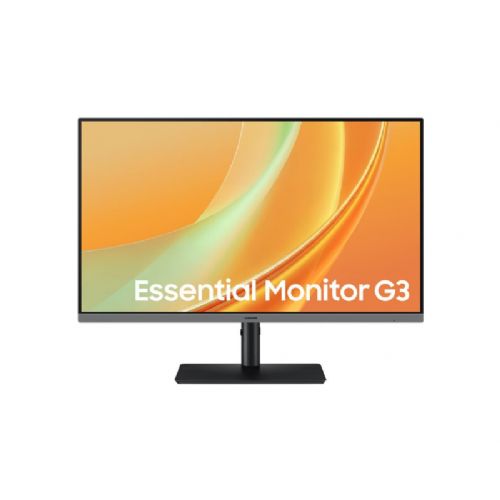
Samsung Essential G3 G32H LS27HG322EUXEN Monitor, 68.6 cm (27"), Full HD, IPS, 144 Hz, 1 ms, AMD FreeSync, black
- Regular price
- €155,73
- Sale price
- €155,73
- Regular price
-
- Unit price
- per
Couldn't load pickup availability
Čas dostave
Izdelek bomo predvidoma poslali čez: 1 dni


Monitor Samsung Essential G3 G32H
The 27-inch Full HD monitor is aimed at gamers looking for a responsive display for their desktop setup.
- The 144 Hz refresh rate ensures smooth motion in games.
- The 1ms response time helps to display rapid changes on the screen more clearly.
- AMD FreeSync helps reduce screen tearing while gaming.
- The IPS display provides good visibility even when viewed from the side.
Samsung LS27HG322EUXEN 27" Full HD IPS 144 Hz monitor with ergonomic stand
The Samsung LS27HG322EUXEN is a 27-inch monitor with a flat IPS screen, Full HD 1920 × 1080 resolution, a refresh rate of up to 144 Hz and a response time of 1 ms MPRT. It offers 95% sRGB color space coverage, AMD FreeSync technology, four USB-A 3.2 Gen 1 ports, as well as HDMI, DisplayPort and VGA ports. The ergonomic stand with height, tilt, swivel and pivot adjustment allows you to customize your workspace, while Eye Saver Mode and Flicker Free technologies contribute to more comfortable use.
Product description
The Samsung LS27HG322EUXEN is a versatile 27-inch monitor designed for office work, everyday use and occasional gaming. The flat screen with IPS technology and Full HD 1920 × 1080 resolution allows for clear display of documents, spreadsheets, web pages, photos and multimedia content. The 16:9 aspect ratio ensures compatibility with a wide range of computer applications.
IPS technology provides wide viewing angles of 178° horizontally and vertically, so the image is clearly visible even when viewed from different positions. The monitor achieves a typical brightness of 250 cd/m² and a static contrast ratio of 1000:1. With 95% coverage of the sRGB color space and display of up to 16.7 million colors, it provides high-quality color reproduction for everyday tasks and multimedia use.
A refresh rate of up to 144 Hz ensures smooth motion when scrolling through documents, browsing websites, and playing games. Compared to traditional 60 Hz monitors, it allows for more frequent image refreshes, contributing to a more responsive feel during use. A 1 ms MPRT response time helps reduce the perceived blur of fast-moving objects.
AMD FreeSync technology dynamically synchronizes the display's refresh rate with the frame rate of a compatible graphics card, helping to reduce screen tearing and stuttering while gaming, making the monitor ideal for users who want a smooth gaming experience while working.
Eye Saver Mode and Flicker Free are available for more comfortable use. Eye Saver Mode reduces the amount of blue light, while Flicker Free helps reduce screen flicker. Eco Saving Plus allows you to adjust power consumption, and the ability to adjust the picture size further expands the possibilities of displaying different content.
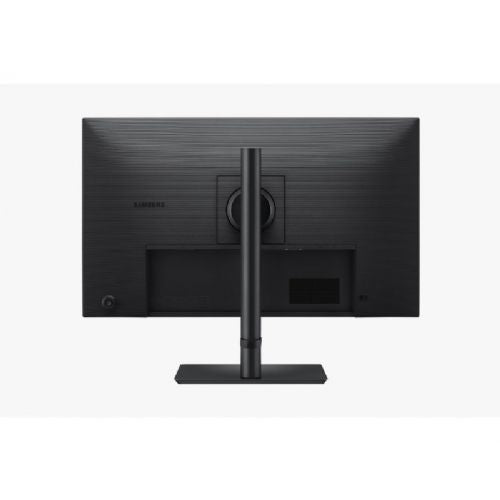
The monitor offers a wide range of video connections, including HDMI 1.4, DisplayPort 1.2 and analog VGA or D-Sub. This allows you to connect to modern and older computers. The Auto Source Switch feature makes it easy to switch between connected devices when the monitor detects an active input signal.
A built-in USB hub with four USB-A 3.2 Gen 1 ports allows you to connect additional devices such as a keyboard, mouse, USB storage and other compatible peripherals. A USB-B upstream port is available to connect the hub to your computer, and a corresponding connection cable is included. This means that the monitor can also serve as a practical connection center on your desk.
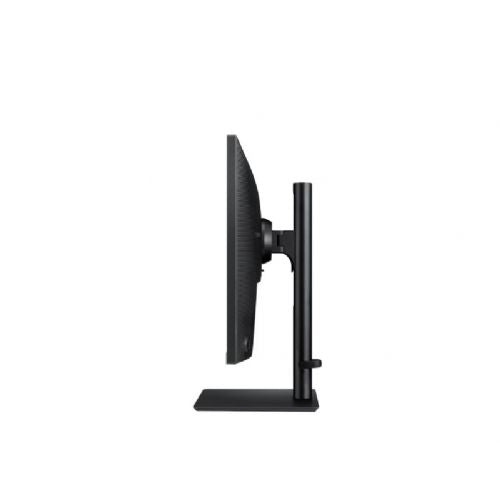
A special advantage of the monitor is the ergonomic stand, which allows for height adjustment by 130 mm, tilt from approximately -5° to +24°, horizontal rotation up to 45° in both directions and screen rotation to a portrait position. This flexibility allows for optimal placement when working with documents, programming and using multiple displays. For additional mounting options, the VESA standard 100 × 100 mm is supported.
The monitor also features a built-in power supply, energy class B, TCO certification and EPEAT Gold in the listed markets. According to the manufacturer, it contains 82.1% recycled plastic. The Samsung LS27HG322EUXEN thus combines a smooth display, flexible ergonomics, diverse connectivity and low typical power consumption for a modern work environment.

Basic functions
27" Full HD IPS display
The flat screen with a resolution of 1920 × 1080, wide viewing angles of 178° and 95% sRGB coverage enables high-quality display of everyday content.
144Hz and 1ms MPRT
A refresh rate of up to 144 Hz and a 1 ms MPRT response time ensure smooth motion and reduced perceived blur in fast-moving scenes.
Ergonomic stand
130 mm height adjustment, tilt, swivel and pivot allow for customization to suit different work needs.
USB hub with four ports
Four USB-A 3.2 Gen 1 and USB-B upstream ports allow you to connect computer peripherals through the monitor.
FreeSync and eye protection
AMD FreeSync, Eye Saver Mode, and Flicker Free enable smooth display and screen adjustments for more comfortable use.
HDMI, DisplayPort and VGA
Three different video inputs allow you to connect to different generations of computers and other compatible devices.
Key benefits
- 27-inch Samsung LS27HG322EUXEN
- Flat IPS display
- Full HD resolution 1920 × 1080
- Aspect ratio 16:9
- Refresh rate up to 144 Hz
- Response time 1 ms MPRT
- AMD FreeSync
- Typical brightness 250 cd/m²
- Contrast ratio 1000:1
- 95% sRGB coverage
- 72% NTSC coverage
- Display up to 16.7 million colors
- Viewing angle 178° / 178°
- Eye Saver Mode
- Flicker Free
- Eco Saving Plus
- Adjusting the image size
- Auto Source Switch
- 1 × HDMI 1.4
- 1 × DisplayPort 1.2
- 1 × VGA (D-Sub)
- 4 × USB-A 3.2 Gen 1
- 1 × USB-B upstream
- Windows 11 compatibility
- Height-adjustable stand
- 130 mm height adjustment
- Tilt from –5° to +24°
- Horizontal rotation ±45°
- Vertical screen rotation (Pivot)
- VESA 100 × 100 mm
- Built-in power supply
- Typical consumption 11 W
- Energy class B
- TCO certificate
- EPEAT Gold in the listed markets
- 82.1% recycled plastic according to manufacturer
- HDMI, DisplayPort and USB-A–USB-B cables included
Technical specifications
| Manufacturer | Samsung |
| Model | LS27HG322EUXEN |
| Product type | Computer monitor |
| Screen size | 27" |
| Panel type | IPS |
| Screen format | Level |
| Aspect ratio | 16:9 |
| Resolution | 1920 × 1080 (Full HD) |
| Active screen area | 597.888 × 336.312 mm |
| Refresh rate | Up to 144Hz |
| Response time | 1ms MPRT |
| Typical brightness | 250 cd/m² |
| Minimum brightness | 200 cd/m² |
| Static contrast ratio | 1000:1 |
| Viewing angle | 178° horizontal / 178° vertical |
| sRGB color space | 95% |
| NTSC color space | 72% |
| Number of colors | Up to 16.7 million |
| HDR | Not listed in the specification |
| AMD FreeSync | Yes, FreeSync |
| Eye Saver Mode | Yes |
| Flicker Free | Yes |
| Eco Saving Plus | Yes |
| Adjusting the image size | Yes |
| Auto Source Switch | Yes |
| Operating system compatibility | Windows 11 |
| VGA (D-Sub) | 1 × |
| HDMI | 1 × HDMI 1.4, HDCP 2.2 |
| DisplayPort | 1 × DisplayPort 1.2, HDCP 2.2 |
| USB-B upstream | 1 × |
| USB-A downstream | 4 × USB-A 3.2 Gen 1 |
| USB-C | Not listed |
| Headphone output | Not listed |
| Built-in speakers | Not listed |
| Stand type | HAS Pivot, ergonomically adjustable |
| Height adjustment | 130 ± 2mm |
| Tilt | –5° to +24° (tolerance ±2°) |
| Horizontal rotation | –45° to +45° (tolerance ±2°) |
| Vertical rotation (Pivot) | –2° to +92° (tolerance ±2°) |
| VESA mounting | 100 × 100 mm |
| Dimensions with stand (W × H × D) | 611.6 × 539.2 × 219.7mm |
| Dimensions without stand (W × H × D) | 611.6 × 361.9 × 57.2mm |
| Packaging dimensions (W × H × D) | 830 × 154 × 442mm |
| Net weight with stand | 5.6 kg |
| Net weight without stand | 3.7 kg |
| Gross weight with packaging | 7.8 kg |
| Power supply | Built-in power supply, AC 100-240 V, 50/60 Hz |
| Typical power consumption | 11W |
| Maximum power consumption | 43W |
| Idle power consumption (DPMS) | 0.5W |
| Off-state power consumption | 0.3W |
| Annual energy consumption | 16 kWh/year (manufacturer's data) |
| Energy class | B |
| TCO certificate | Yes |
| EPEAT | Gold (AT, DK, FR, IT, NL, ES, SE, CH, UK) |
| Percentage of recycled plastic | 82.1% (manufacturer's data) |
| Display uniformity | ≥ 75% (manufacturer's data) |
| Case and stand color | Black |
| Operating temperature | 10–40°C |
| Operating humidity | 10-80%, non-condensing |
| Power cord length | 1.5m |
| Signal cables included | HDMI, DisplayPort and USB-A-USB-B upstream |
It is important to know
The key when choosing is the ratio between smooth display and image sharpness. For games, the screen is interesting due to its responsive display, but when working with fine text for a long time, it makes sense to consider that at this screen size, Full HD resolution is less sharp than QHD.
- Spreadsheets, documents, and web pages with a lot of fine text will have less image detail than on a 27-inch display with a higher resolution.
- For combined use, preference should be given: gaming features do not eliminate the compromise in text sharpness.
Source of editorial recommendations: ENAA guides and team experience.
In practice
🎮 Faster games
🟢 Very suitable - high refresh rate, short response time and AMD FreeSync support are suitable for use where smooth display and responsiveness are important.
📄 Basic office work
🟡 Suitable with limitations - useful for email and general work, but small text will be less sharp than on a 27-inch monitor with a higher resolution.
📊 Long-term work with large spreadsheets
🔴 Less suitable - when working for hours with a lot of text or details, Full HD resolution on this diagonal is a compromise for readability and sharpness.
Answers to frequently asked questions
Is a 27-inch Full HD display suitable for long-term text work?
It's usable for basic tasks, but text won't be as sharp as on a 27-inch QHD display. If you spend most of your day reading documents or working with spreadsheets, this is a significant trade-off.
Is a higher refresh rate also beneficial for work outside of gaming?
Yes, scrolling through documents and web pages may appear smoother. However, a higher refresh rate does not increase the sharpness of text.
Description updated: November 2026
Read also
If you are still deciding, the following content may also be helpful.
Best products
Products for various purposes
Why buy from ENAA?
- Product descriptions are designed neutrally, with summaries of benefits and functionality, and the decision is left to the customer.