Your shopping cart
😊 Product added to cart successfully
Product removed to cart successfully

Couldn't load pickup availability
Izdelek bomo predvidoma poslali čez: 5 dni
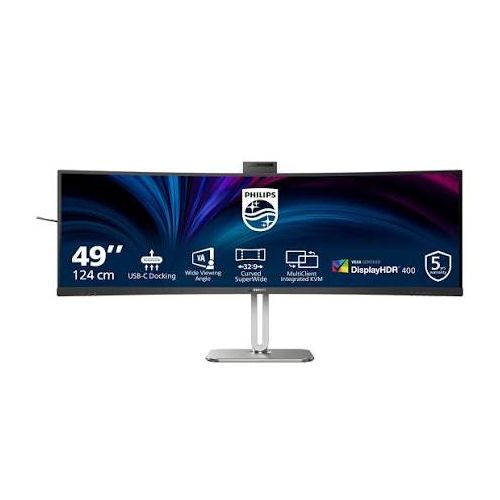
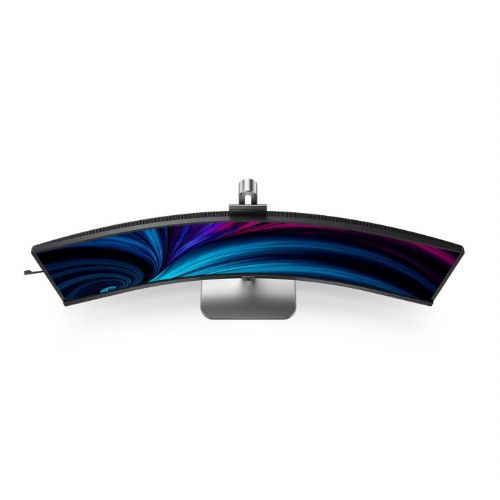
The 49-inch curved monitor is aimed at business users and analysts who need an expanded workspace or to replace two monitors in one device.
The Philips 49B2U5900CH/00 monitor is a curved business monitor in the 32:9 ultrawide segment, designed for professionals who want to combine multiple workspaces and reduce the need for multiple monitors. With a 124 cm (48.8") diagonal, it offers an exceptionally wide field of view, enabling efficient work in environments where control over multiple applications, analytics or data is crucial. An integrated webcam further supports the modern needs of video conferencing and remote collaboration.
The VA panel with a resolution of 5120 x 1440 pixels ensures high-definition images, which is essential when working with large spreadsheets, graphics or editing multiple documents at once. The curvature of the screen improves ergonomics, helping to reduce eye movement from one end to the other and maintaining a natural perspective of the image even in the corners of the screen. The average brightness, rated at 450 cd/m 2 , ensures good readability even in brighter offices, without excessive glare.
The monitor includes a USB-C docking station (100W power delivery), which means you can power your laptop or other compatible device, transmit video and data, and connect additional peripherals via a single cable. This significantly simplifies your desktop by reducing the number of cables needed and making it easier to connect and disconnect equipment, which is practical in modern work environments with changing workstations or hybrid work.
The 4ms response time and Adaptive Sync technology deliver a smooth experience with fast-moving images, which is important when viewing graphs, animations, occasional gaming or video editing. Additional flexibility of the monitor includes multiple connectivity options with HDMI, DisplayPort and USB-C ports, making it suitable for use with a variety of devices and operating systems.
Key product features
| Property | Value | Rating |
|---|---|---|
| Field of application | Business monitor | |
| Size | 124cm (48.8") | 🟢 9.5 |
| Resolution | 5120 x 1440 (5K UHD) | 🟢 9.5 |
| Panel type | VA | |
| HDMI connector | Yes | |
| USB-C connector | Yes | |
| Built-in docking station | Yes, 100W | 🟢 9.0 |
| Aspect ratio | 32:9 | 🟢 10 |
| Touch screen | No | |
| Curved screen | Yes | 🟢 9.0 |
| Response time (ms) | 4 | 🟢 8.0 |
| Brightness (cd/m2) | 450 | 🟢 8.5 |
⚖️ Compare features with other products of your choice
| Screen diagonal | 124 cm (48.8 inches) | ||
| Screen resolution | 5120 x 1440 pixels | ||
| type | LED monitor | ||
| Color | black/silver | ||
| EAN | 8712581802578 | ||
| Manufacturer's no. | 49B2U5900CH/00 | ||
| series | Series 5000 | ||
| Suitable for | Business | ||
| Picture | format | 32:9 | |
| Curved | Yes | ||
| Technology | LED light | ||
| Panel technology | VA | ||
| Backlight | White LED | ||
| functions | HDR Ready, Picture in Picture (PiB), Picture by Picture (PbP) | ||
| brightness | 450 cd/m² | ||
| refresh rate | 75Hz | ||
| Viewing angle (10:1) | Horizontal | 178° | |
| Vertical | 178° | ||
| Pixel pitch | Horizontal | 0.233mm | |
| Vertical | 0.233mm | ||
| Colors | 1.070 million | ||
| reaction time | GtG | 4ms | |
| contrast | Dynamic | 80,000,000 : 1 | |
| Static | 3,000 : 1 | ||
| frequency | Vertical | 48–75 Hz | |
| Horizontal | 30–140 kHz | ||
| Links | 2x HDMI input (HDMI version: 2.0), 1x DisplayPort input (DisplayPort version: 1.4), 1x 3.5 mm audio output, 2x USB-A 3.2 Gen 1 (5 Gbit/s), 1x USB-B 3.2 (5 Gbit/s), 1x USB-C, 1x USB-C 3.2 Gen 1 (5 Gbit/s), 1x RJ45 | ||
| USB-C | USB-C DP Alternative Mode | ||
| USB Note | The USB 3.2 Gen 1 designation corresponds to the previous USB 3.1 Gen 1 and USB 3.0 designations. | ||
| ergonomics | type | Rotatable, tiltable, height adjustable | |
| Rotating | 30° left, 30° right | ||
| Tilting | 5° forward, 15° backward | ||
| Adjustable height | 150mm | ||
| power supply | Eco-off | 0.3 watts | |
| Speakers | Number | 2 | |
| Total capacity | 6 watts | ||
| Standards | video | 97% NTSC, 119% sRGB, Delt E < 2 | |
| Features | Flicker-free, LowBlue mode, EasyRead, ambient light sensor | ||
| Adaptive Sync, Picture in Picture, Kensington Lock, Microphone, Webcam | |||
| VESA DisplayHDR standard | DisplayHDR 400 | ||
| Additional information | USB-C port supports DisplayPort switching mode and up to 100 watts of power delivery | Combo audio-out and microphone jack | Ethernet port supports Wake on LAN | HDCP 1.4 (HDMI/DisplayPort/USB-C), HDCP 2.2 (HDMI/DisplayPort/USB-C) | Sampling rates: HDMI: 30 to 140 kHz (H)/48-75 Hz (V), DP: 30 to 114 kHz (H)/48-75 Hz (V), USB-C: 30 to 114 kHz (H)/30-75 Hz (V) | Built-in headphone jack | 5.0-megapixel pop-up camera with microphone and LED status indicator (for Windows Hello) | Built-in KVM switch | Dimensions without stand: 1193 x 373 x 164 mm (W x H x D) | Weight without stand: 11580 grams | ||
| Accessories | Available | HDMI cable, DisplayPort cable, USB-C to C/A splitter, power cable, user documentation | |
| Dimensions | Width: 119.3 cm x Height: 58.3 cm x Depth/Length: 26.8 cm | ||
When choosing an ultrawide monitor like the Philips 49B2U5900CH/00, size and resolution play a key role in everyday usability. Buyers should pay special attention to desk space, connectivity options, and whether they really need the expansive workspace that a 49-inch curved display offers. Before you buy, make sure your devices and workflows will take advantage of the monitor's full potential.
Source of editorial recommendations: ENAA guides and team experience.
The monitor is well suited for advanced multitasking, as it allows you to view multiple open documents at the same time without borders between screens.
An excellent choice for reviewing large Excel tables, graphs or specialized programs with panoramic displays, where maximum workspace is crucial.
Suitable with limitations – The widescreen offers an exceptional experience in games that support extended aspect ratios, but you may encounter support limitations or lower refresh rates in some games or with older graphics cards.
The built-in webcam and unified display allow for natural integration of video calls into your workflow, without additional cables or devices.
Suitable with limitations – due to the size of the monitor, sufficient depth and width of the desk is required; on a desk that is too small, it may be awkward to use or too close to the eyes.
Yes, a 5120 x 1440 resolution display offers the equivalent space of two 27-inch QHD monitors with no bezels in between.
Yes, if your laptop supports the appropriate video output via USB-C (DisplayPort Alt Mode); we recommend checking your laptop's specifications before purchasing.
The curvature of the screen helps with full-width visibility and reduces eye strain during prolonged use with many open windows or panoramic timelines.
Yes, the built-in camera allows direct video calls without additional devices or cables and supports basic quality for business conversations.
With a 49-inch monitor, it is important to ensure a desk that is wide and deep enough; optimal eye distance and appropriate height increase comfort of use.
Description updated: October 2026
If you are still deciding, the following content may also be helpful.
Best products
Products for various purposes
Monitors for working from home


