Your shopping cart
😊 Product added to cart successfully
Product removed to cart successfully

Couldn't load pickup availability
Izdelek bomo predvidoma poslali čez: 3 dni

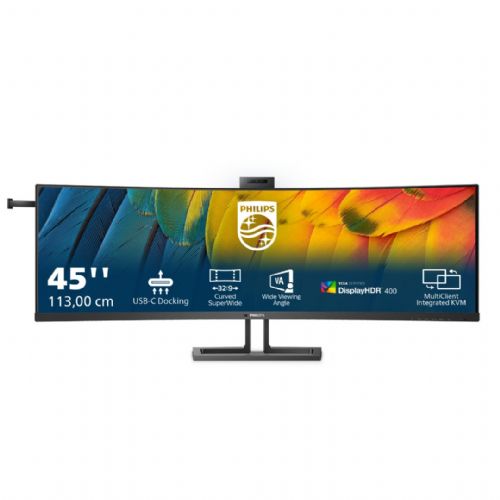
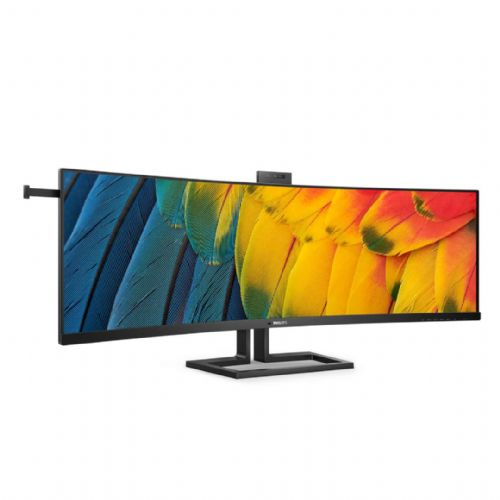


The Philips 45B1U6900CH is a 44.5-inch (113 cm) curved VA monitor with Dual QHD (5120 × 1440) resolution and a 75 Hz refresh rate, providing an exceptionally wide working area and rich colors. The built-in 5 MP pop-up camera with microphone and LED indicator enables clear video calls, while the USB-C port with up to 100 W power delivery (PD 3.0) and KVM switch make it easy to manage multiple devices. Speakers (2 × 5 W) and an ergonomic stand with height adjustment, swivel and tilt ensure complete comfort.
Specifications:
Screen diagonal: 113cm / 44.5"
Display type: VA
Screen format: 32:9
Maximum resolution: 5120 x 1440
Refresh rate: 75Hz
Response time: 4ms
Contrast: 3000 : 1 (Mega Infinity DCR)
Brightness: 450 cd/m²
Color Gamut (Typical): NTSC 107%*, sRGB 123%*
Viewing angle (horizontal/vertical): 178°/178°
Inputs: 2x HDMI 2.0, DisplayPort 1.4, USB-C 3.2 Gen1, RJ45 (Gigabit ethernet)
Outputs: audio out, USB-C 3.2 Gen1, 4x USB-A 3.2 Gen1
HBR3: USB-C/DisplayPort
Speakers: yes, 5W x 2
Power Delivery: yes, PD version 3.0, up to 100W
Wall mountable: yes, VESA 100mm
Tilt: -5 to +15°
Height adjustment: 150 mm
Rotation: +-45°
Twist: no
Curved screen: yes, 1500R
KVM switch: yes, USB-C/USB-C
5.0 megapixel pop-up camera with microphone and LED indicator
Package contents: monitor with stand, HDMI cable, DisplayPort cable, USB-C to C cable, power cable, user documentation
Link to the factsheet: http://eprel.ec.europa.eu/fiches/electronicdisplays/Fiche_1406148_SL.pdf
Link to the energy label: https://eprel.ec.europa.eu/labels/electronicdisplays/Label_1406148.svg
The Philips 45B1U6900CH monitor with an ultra-wide diagonal and curved screen is tailored for advanced business users, analysts and anyone who needs multitasking without overlapping windows. Thanks to its high resolution of 5120 x 1440 and integrated camera, it enables efficient hybrid work, video conferencing and professional data processing on a single, clear surface. It works best in environments with a spacious desk and appropriate viewing distance; due to its size, it may be less suitable for compact corners or users who prefer classic dual-monitor setups. The absence of extremely high refresh rates and sharp response times may mean a compromise for competitive gamers.
Recommendation source: Enaa guides and team experiences.
Typical users of this curved SuperWide monitor include advanced office workers, programmers, digital content creators, and those who need visibility across multiple windows or complex timelines for their work. In practice, it is particularly useful for data analysis, video editing, financial planning, and multitasking, as it replaces dual-monitor setups and reduces the need for additional cables. It is also often chosen by those who value the neat look of their desk and the convenience of a flexible curved view. If you are not sure whether an ultrawide monitor suits your needs, check out our guide to choosing a monitor size , which also shows practical comparisons.
The Philips brand has established trust among users due to its consistent focus on image quality, ergonomics, and innovation in the business monitor segment.
At Enaa, we provide professional advice on choosing a monitor, regularly update our offer with the most current models, and ensure that we monitor modern technologies in the business and ultrawide display segment so that users can choose the most suitable solution for themselves.
A curved monitor with a 44.5-inch diagonal requires more desk space and a slightly greater viewing distance from the user, so it is ideal to place it on a wider work surface with adequate depth.
Thanks to its extremely wide screen area and high resolution, the monitor effectively replaces two 27-inch monitors, enables visibility of multiple applications at the same time, and simplifies cable connectivity, which is also described in our guide to dual monitors and ultrawide solutions .
Although the large diagonal and wide field of view allow for a more immersive gaming experience, this model is not technically geared towards competitive or fast gaming, where a higher refresh rate and low response time are key.
The built-in camera allows you to quickly set up video conferences without additional devices and reduces the number of cables on your desk, which is especially practical for hybrid and remote working methods.
Before purchasing, check whether your laptop or computer supports the selected connectors and whether it can handle such a high resolution. We also recommend using a high-quality, appropriate cable for optimal image display.
Description updated: April 2026


