Your shopping cart
😊 Product added to cart successfully
Product removed to cart successfully

Couldn't load pickup availability
Izdelek bomo predvidoma poslali čez: 2 dni
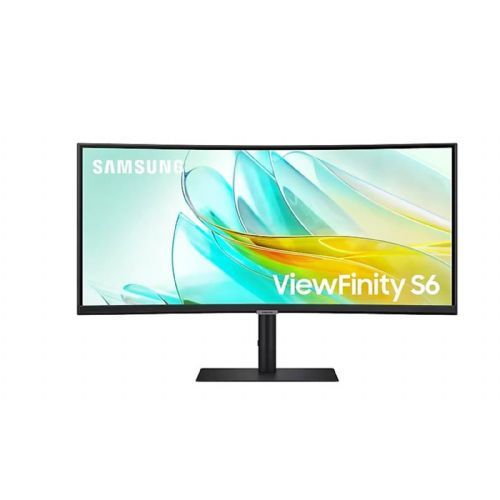
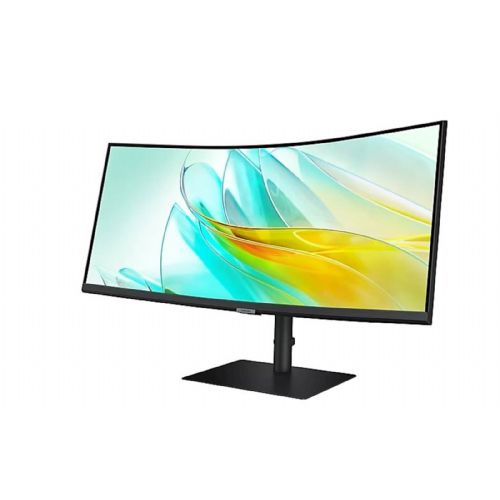


The Samsung S34A650 34P monitor is an extremely versatile ultrawide display designed for demanding business users, modern gamers and consumers who value image quality and productivity. With its high resolution and advanced connections, it enables uncompromising multitasking and efficient adaptation to different tasks.
This monitor is an ideal choice for anyone looking for a powerful workstation or a larger screen area for document editing, data processing, creative work or immersive gaming. With a curved, wide IPS panel with UWQHD resolution, it is primarily aimed at users who demand an immersive user experience and greater clarity and comfort during long-term use.
Evaluation of key product features
| Property | Value | Rating |
|---|---|---|
| Field of application | Standard use | 🟢 9.0 |
| Size | 86.36 cm (34.0") | 🟢 9.5 |
| Resolution | 3440 x 1440 (UWQHD) | 🟢 9.5 |
| Panel type | IPS | 🟢 9.0 |
| HDMI connector | Yes | |
| USB-C connector | Yes | 🟢 8.5 |
| Built-in docking station | Yes, 65W | 🟢 9.0 |
| Aspect ratio | 21:9 | 🟢 9.5 |
| Touch screen | No | |
| Curved screen | Yes | 🟢 8.5 |
| Response time (ms) | 5 | 🟡 7.5 |
| Brightness (cd/m2) | 350 | 🟢 8.0 |
Equipped with a 34-inch (86.36 cm) curved IPS panel with a resolution of 3440 x 1440 (UWQHD), it offers extremely sharp and realistic images and a wide viewing angle. This 21:9 format allows significantly more space on the work surface compared to traditional monitors, making it easier to multitask, compare documents and work professionally with large spreadsheets.
The monitor stands out with a built-in USB-C docking station that supports up to 65W charging, fast data transfer, and easy connection to your laptop or mobile devices. HDMI, USB-C, and auxiliary inputs provide connectivity flexibility for the diverse needs of the modern user or work environment.
Technical features such as a 5 ms response time and a 100 Hz refresh rate ensure smooth motion display, which will also please fans of games or fast-changing visual content. The brightness of 350 cd/m2 allows for a clear image even in brighter rooms, and the IPS matrix ensures optimal color reproduction and image quality at different viewing angles.
The thoughtful curvature of the screen makes the user experience even more immersive, reduces eye strain and allows for more natural viewing of content across the entire screen area. The combination of advanced technical solutions, excellent connections and modern design makes this model stand out as an excellent partner for work efficiency and entertainment enjoyment.
The Samsung S34A650 monitor with a 34-inch ultrawide diagonal and UWQHD resolution is especially suitable for users who need to multitask on a single screen - whether for working with multiple open windows, editing documents or spreadsheets. Thanks to the IPS panel, it is also useful for work where good viewing angles and reliable color display are important. Compared to conventional 27-inch models, it provides significantly more space for organizing work or arranging applications without the need for an additional monitor.
For those who mostly need a simple display for basic tasks or don't have enough desk space, such a large diagonal may be a less sensible choice. The model stands out for its combination of HDMI, USB-C (90W) ports, and a higher frequency of 100 Hz, which is useful for advanced work setups and for smoother image movement.
Taken from: Enaa guides and team experiences.
Such an ultrawide monitor is most often used by business users, analysts and modern workers who often manage multiple programs or documents at the same time and appreciate transparency without "seams" between screens. A wide screen is also very useful in home offices, especially when working with long spreadsheets, editing content or in environments where the additional width of the work surface is more important than height. Casual gamers who value a panoramic view and greater involvement can take advantage of a higher refresh rate for more dynamic games, but the model is not primarily intended for competitive e-sports due to its 100 Hz.
For more practical advice on choosing the right monitor size and aspect ratio, check out our monitor size guide . Samsung products are often chosen by consumers for their confidence in quality, wide range of connectivity options and long-standing presence in monitor technology.
At Enaa, you can choose from quality monitors, where we inform you with neutral guides and expert descriptions, and we also provide a simple overview of available models and all the key information you need to make a decision.
Ultrawide monitors are recommended primarily where you want to replace two separate screens – for example, when working with multiple open windows, analysis, programming, or large spreadsheets, as well as for hybrid work with one laptop and multiple virtual desktops.
This type of monitor offers high-quality image display and good color gamut thanks to the IPS panel, but for the most demanding graphics or photography tasks, we recommend checking the color specifications and possibly calibrating it. It is suitable for basic visual work and general creative use.
Thanks to its diverse ports, especially USB-C (90W), it is easy to connect to the latest laptops that support image transfer and power delivery via the same cable. It is recommended to check whether your laptop supports image output via USB-C before purchasing.
If you often do work that involves vertical information or have limited desk space, a classic 27-inch monitor may be more practical. You can also find more tips in our guide to multiple monitors .
For casual gaming and games that support ultrawide ratios, this model is perfectly adequate and provides a wider field of view. However, if you're looking for the highest possible refresh rate for competitive games, look for models with 144Hz or higher.
Description updated: March 2026


