Your shopping cart
😊 Product added to cart successfully
Product removed to cart successfully

Couldn't load pickup availability
Izdelek bomo predvidoma poslali čez: 5 dni


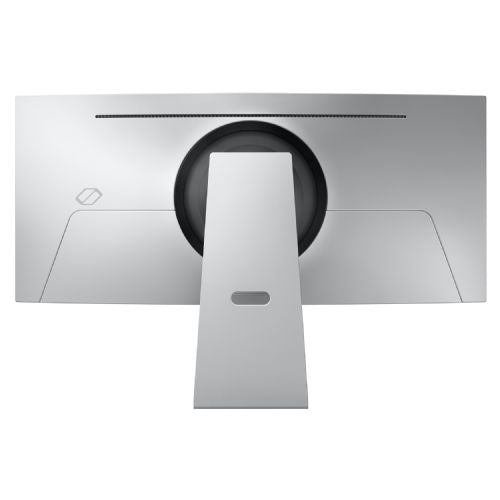


The Samsung G85SD 86.4 cm (34") monitor, 3440 x 1440 (WQHD), OLED, 250 cd/m2, 0.03ms, 175Hz, HDMI, DP brings users an exceptional visual experience where speed, accuracy and contrast are key. It is intended for business users, demanding gamers and consumers who expect superior image quality, reliability and advanced technology for productivity or gaming without compromise.
Evaluation of key product features
| Property | Value | Emoji rating |
|---|---|---|
| Field of application | Gaming monitor | 🟢 9.5 |
| Size | 86.36 cm (34.0") | 🟢 9.0 |
| Resolution | 3440 x 1440 (UWQHD) | 🟢 9.2 |
| Panel type | OLED | 🟢 10.0 |
| HDMI connector | Yes | 🟢 8.5 |
| USB-C connector | No | |
| Built-in docking station | No | |
| Aspect ratio | 21:9 | 🟢 8.8 |
| Touch screen | No | |
| Curved screen | Yes | 🟢 8.5 |
| Response time (ms) | 0.03 | 🟢 10.0 |
| Brightness (cd/m2) | 250 | 🟡 6.5 |
⚖️ Compare features with other products of your choice
This 34-inch curved OLED monitor with a wide 21:9 aspect ratio allows for complete immersion in games and multimedia content, and efficient work with multiple open programs or documents at the same time. The high UWQHD resolution provides a sharp image and more workspace, which is just as important in dynamic games as in demanding professional applications.
The key advantage of the monitor is OLED technology, which enables an exceptional contrast ratio, vivid colors and almost unlimited black depth. With a refresh rate of 175 Hz, movement is always smooth, which will convince even the most demanding gamers. The extremely short response time of 0.03 ms further reduces image smearing and ensures an immediate display of the action without blurring, which is crucial for competitive gaming.
The curvature of the screen provides a more natural field of view and reduces eye strain during prolonged use. Connectivity via HDMI and DisplayPort allows for easy connection to modern graphics cards, while the height and tilt adjustment options make it easy to adapt to the working environment. The monitor stands out with its modern design and technical features that meet the demands of advanced users, regardless of whether it is content creation, gaming or professional work.
Screen
Screen diagonal: 86.4 cm (34")
Screen resolution: 3440 x 1440 pixels
HD Type: UltraWide Quad HD
Native aspect ratio: 21:9
Display technology: OLED
Panel type: OLED
Brightness (typical): 250 cd/m²
Response time: 0.03ms
Response time measurement method: GTG (gray to gray)
Screen shape: Curved
Screen curvature degree: 1800R
Contrast ratio: 1,000,000:1
Maximum refresh rate: 175 Hz
Horizontal viewing angle: 178°
Horizontal viewing angle: 178°
Number of display colors: 1 billion colors
Visible area (horizontal): 80 cm
Viewable area (vertical): 33.7 cm
Features: High Dynamic Range (HDR) video support
High Dynamic Range (HDR) technology: High Dynamic Range 10 (HDR10), High Dynamic Range 10+ (HDR10 Plus)
Color space standard: DCI-P3
Color gamut: 99%
Feature: Quantum dot color technology
Capacity
Feature: AMD FreeSync
AMD FreeSync Type: FreeSync Premium Pro
Feature: Flicker-free technology
Smart features: Mobile to screen, Screen mirroring, Screen to mobile audio, Audio mirroring, Wireless on
Installed operating system: Tizen
Multimedia
RMS power: 10W
Feature: Built-in speakers
Feature: Adaptive Sound Pro
Shape
Market Positioning: Gaming
Product color: Silver
Base color: Silver
Ports and interfaces
Feature: Built-in USB hub
USB hub version: 3.2 Gen 1 (3.1 Gen 1)
Number of USB Type B input ports: 1
Number of USB Type A input ports: 2
Feature: HDMI
Number of HDMI ports: 2
HDMI version: 2.1
Number of DisplayPort ports: 1
DisplayPort version: 1.4
Network
Features: Wi-Fi
Wi-Fi standards: Wi-Fi 5 (802.11ac)
Features: Bluetooth
Bluetooth version: 5.2
Ergonomics
Features: VESA mount
Panel mounting interface: 100 x 100 mm
Functions: Height adjustment
Adjustable height (maximum): 12 cm
Functions: Rotation
Rotation angle: from -3° to 3°
Functions: Tilt adjustment
Tilt angle range: -2° to 20°
Energy
Energy efficiency class (EER): G
Energy efficiency class (HDR): G
Energy consumption (SDR) per 1000 hours: 42 kWh
Energy consumption (HDR) per 1000 hours: 48 kWh
Power consumption (standard operation): 42 Power consumption (standby): 0.5 W
Power consumption (max.): 180 W
AC input voltage: 100-240V
AC input frequency: 50/60 Hz
Power supply type: External
Energy efficiency scale: from A to G
Working conditions
Operating temperature: 10–40°C
Operating relative humidity: 10-80%
Weight and dimensions
Device width (including stand): 813.6 mm
Device depth (including stand): 192.8 mm
Device height (including stand): 522.3 mm
Weight (including stand): 7.5 kg
Width (without stand): 813.6 mm
Depth (without stand): 128.1 mm
Height (without stand): 363.5 mm
Weight (without stand): 5.5 kg
Packaging information
Stand type: Standing HAT
Packaging width: 948 mm
Packaging depth: 456 mm
Packaging height: 185 mm
Package weight: 11.8 kg
Scope of delivery
Cables included: AC, DisplayPort, USB Type A to USB Type B
Features: Remote control included
Power cable length: 1.5 m
Other functions
Brand-specific technologies: Eye Saver, Game Bar 2.0, Game Hub, Smart Calibration
Features: Sound mirroring
Features: Screen mirroring
Features: TV Plus
Features: Works with Samsung Bixby
Features: Touch to view
Virtual assistant: Amazon Alexa and Samsung Bixby
Features: Remote voice interaction
Functions: Universal guide
Features: Multi-view
Digital Signal System: Not supported
Features: Samsung Eye Saver Mode
Features: Anynet+ (HDMI-CEC)
Warranty period: 2 years
Features: Image size
Features: Wireless display
Features: Adaptive image
Functions: Sleep Timer Plus
Functions: Workspace
Functions: Factory Calibration Report
Feature: Virtual AIM Point
Feature: My Content
Immerse yourself in the vibrant worlds of OLED
OLED in Ultra WQHD
With OLED technology, you can enjoy a wide color gamut and vibrant images that captivate you and provide an immersive gaming experience. Content comes to life on the Ultra WQHD (3440 x 1440) display, drawing you into incredibly clear and detailed images.
Complete focus on your goal
Glare-free OLED
Advanced, glare-free OLED technology delivers high color accuracy and reduces reflections while maintaining image sharpness. This ensures an impressive viewing experience even in daylight. With an OLED-optimized, anti-reflective coating that reflects 54% less than our non-glare surfaces, you can see everything on screen and take down your opponents in no time.
Defeat opponents with incredible speed
175 Hz High refresh rate and 0.03 ms (GtG) response time
Every second counts: Experience stunning gameplay with OLED technology and a 0.03ms (GtG) response time. And... The 175Hz refresh rate reduces lag, so you're always one step ahead.
Your gaming center
Get ready for a captivating gaming experience. With a gaming hub, this monitor is incredibly versatile.
The Samsung G85SD monitor with an 86.4 cm (34") diagonal and ultra-wide aspect ratio and OLED screen is a thoughtful choice for users who value an extremely wide field of view, pronounced color depth and high refresh rate. Due to the combination of high UWQHD resolution, extremely fast response time and 175 Hz refresh rate, the monitor is particularly suitable for demanding gamers and those who work with multiple windows and extensive timelines (e.g. video editing, analytics, programming). When used for everyday office tasks or as a replacement for two smaller monitors, the need for an appropriate working distance and adequate desk space must be taken into account. OLED technology brings distinct advantages in visual experience and color accuracy, but care must be taken with prolonged static displays due to the possibility of image distortion.
Recommendation source: Enaa guides and team experiences.
This type of monitor is often chosen by users who either want a comprehensive gaming experience with deep blacks and extremely fast responsiveness, or need a wide and clear workspace for multitasking – as is often the case in programming, video editing or large-scale data analysis. The ultra-wide format allows for efficient placement of multiple applications at once, providing an alternative to two separate monitors and further simplifying workflow.
Our monitor size guide can help you decide on the right monitor size and viewing distance. Users who trust quality and tradition often choose Samsung products, as they value reliability and the availability of a rich ecosystem of accessories.
At Enaa, we provide you with detailed technical descriptions and expert guides that make it easier to choose a monitor based on your individual needs and usage. With us, you will find a wide selection of monitors with different parameters and detailed filters, making it easier to find a model that matches your requirements and work environment.
An ultrawide monitor like this model allows for a continuous wide work surface without distracting edges in between, which can make it easier to work with large timelines, spreadsheets, or increase the sense of immersion when gaming.
Due to its extremely wide display and high refresh rates, it is suitable for demanding multitasking, content editing and analytics, as well as for gaming.
For optimal comfort, we recommend using it on a table with sufficient depth to maintain a slightly longer viewing distance (ideally 70 to 90 cm) to ensure a full view of the screen.
We recommend that you change the content layout from time to time, use dark mode, and make sure that the screen switches to power saving mode or turns off automatically when inactive.
The monitor allows you to connect various devices via HDMI and DisplayPort inputs; for more information on connection options and practical setups, see our guide to dual monitors and ultrawide setups .
Description updated: April 2026


