Your shopping cart
😊 Product added to cart successfully
Product removed to cart successfully

Couldn't load pickup availability
Izdelek bomo predvidoma poslali čez: 2 dni
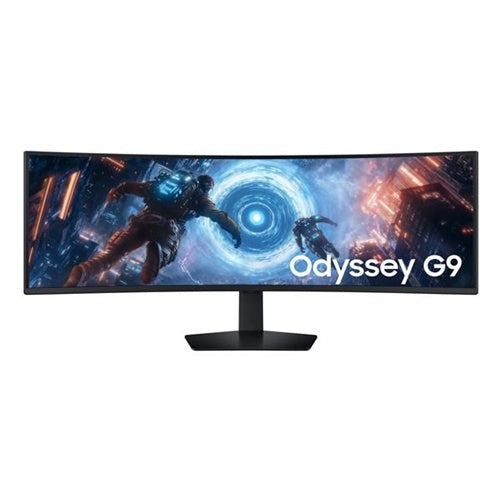
The Samsung 49 G91F Odyssey G9 curved monitor 124.46 cm (49.0"), VA, 5120x1440, 2x HDMI, DP, 144Hz LS49FG910EUXEN represents the latest technological achievement for users looking for an exceptionally wide visual experience when working or playing. The combination of an ultra-wide curved screen, high resolution and superb response times perfectly meets the needs of both business users and passionate gamers or more demanding consumers.
Evaluation of key product features| Property | Value | Emoji rating |
|---|---|---|
| Field of application | Gaming monitor | 🟢 10 |
| Size | 124.5cm (49") | 🟢 9.5 |
| Resolution | 5120 x 1440 (5K UHD) | 🟢 10 |
| Panel type | VA | 🟢 9 |
| HDMI connector | Yes | 🟢 9 |
| USB-C connector | No | |
| Built-in docking station | No | |
| Aspect ratio | 32:9 | 🟢 10 |
| Touch screen | No | |
| Curved screen | Yes | 🟢 9.5 |
| Response time (ms) | 1 | 🟢 10 |
| Brightness (cd/m2) | 350 | 🟢 8 |
This product is designed for users who want extreme productivity and a complete gaming experience. With an ultra-wide 49-inch curved display and 32:9 aspect ratio, it opens up completely new possibilities for multitasking, graphic work and full gaming immersion. The large work surface allows you to monitor multiple programs or documents at the same time without the need for additional monitors.
Advanced VA technology combined with a resolution of 5120 x 1440 delivers crystal-clear images and rich contrasts, ideal for color-sensitive tasks, multimedia viewing, or demanding gaming. A high refresh rate of 144Hz and an extremely fast response time of 1ms ensure smooth image display without blurring or tearing, even in the most dynamic scenes.
The monitor features HDMI and DisplayPort ports for easy connectivity to a variety of devices, though it doesn't come with USB-C or a built-in docking station. The curvature of the screen naturally spreads the image across your field of vision, reducing eye fatigue and increasing focus – whether you're working hard or playing long games.
It stands out for its true “super ultra-wide” experience, sophisticated gaming features, and ergonomics that improve your well-being and efficiency. The design allows you to take full advantage of advanced display technology and enjoy visual persuasion like you’ve never experienced before.
The Samsung Odyssey G9 monitor, thanks to its extremely large, curved diagonal (49") and high resolution (5120 x 1440), allows the user to simultaneously monitor multiple windows, applications or divided parts of the image, which is particularly suitable for advanced multitasking and areas where clarity and spaciousness are key. The high refresh rate of 144 Hz and VA panel make the monitor particularly interesting for gaming enthusiasts and anyone who values smooth image display. It is less suitable for users at very small workstations or for those who appreciate the most accurate color reproduction from professional IPS or OLED screens. The main advantages include the above-average display width, which practically replaces dual-monitor setups, and the experience of complete immersion in the image due to the curvature of the screen.
Recommendation source: Enaa guides and team experiences.
A monitor of this size and performance is most often chosen by demanding gamers, software developers, or business users who often work with large spreadsheets, multiple open windows, or graphics-intensive applications. In addition, the ultrawide format makes it extremely practical for creative work, video editing, or managing applications that take advantage of a larger work surface. You can read more about how monitor size affects the practical experience at home or in the office in our guide to choosing a monitor size .
Users often choose Samsung products also because of their long tradition, innovation in the design of large monitors, and confidence in the quality of the panel and the included functionalities.
At Enaa, you can be sure that you will choose from a carefully selected range of monitors that includes current trends and proven models for even the most demanding users, while we offer clear expert guides and technical support for the optimal decision.
Yes, due to its extremely wide diagonal and resolution (5120 x 1440), the Samsung Odyssey G9 can completely replace two classic monitors in many cases, especially when multitasking and working with multiple content at once.
The optimal distance is usually between 80 and 100 cm, depending on your layout and preferences, as the curvature allows for an even range of vision across the entire width of the screen.
The monitor uses a VA panel, which is good for contrast, but is not specifically designed for advanced work where the highest color accuracy and wide color gamut offered by some IPS or OLED monitors are necessary.
For the best image and high refresh rate, we recommend using a DisplayPort connector, and the monitor is also equipped with two HDMI inputs, which is practical for connecting multiple sources.
For more practical information on choosing a monitor tailored to your different usage scenarios, check out our comprehensive monitor buying guide .
Description updated: April 2026


