Your shopping cart
😊 Product added to cart successfully
Product removed to cart successfully

Couldn't load pickup availability
Izdelek bomo predvidoma poslali čez: 2 dni


The curved 32-inch Full HD monitor is primarily aimed at users who want a larger screen for gaming.
The Samsung 32 G35H G3 curved monitor, VA, 1920x1080, HDMI, DP LS32HG350EUXEN is a 32-inch curved monitor for gaming, work and everyday use. The VA screen displays images in Full HD resolution (1920 × 1080), and HDMI and DisplayPort connectors allow you to connect to a computer or other compatible devices.
A 144Hz refresh rate and 1ms response time (MPRT) are designed to deliver smooth, fast-moving images. AMD FreeSync synchronizes the display's refresh rate with a compatible graphics card, helping to reduce screen tearing and stuttering.
| Property | Value | Rating |
|---|---|---|
| Brightness | 250 cd/m² |
⚖️ Compare features with other products of your choice
The 32-inch curved display surface offers plenty of space for displaying content, making it suitable for gaming, document viewing and multitasking. Full HD resolution ensures content is displayed in a 16:9 aspect ratio. The VA panel is the basis for displaying a contrasting image, and the curvature brings the screen closer to the user's field of vision.
A 144Hz refresh rate allows for more frames per second than a typical 60Hz display, which is useful for fast-paced games and other content with a lot of motion. The 1ms response time (MPRT) is designed to reduce perceptible motion blur. Actual display smoothness also depends on the performance of your computer and the output signal.
AMD FreeSync technology allows the monitor's refresh rate to be synchronized with a compatible graphics card, helping to reduce screen tearing and stuttering when frame rates change.
Game mode allows you to adjust the display to make details in darker scenes easier to see. Eye Saver and Less Screen Flickering technologies are designed for more comfortable viewing by reducing blue light emissions and screen flickering.
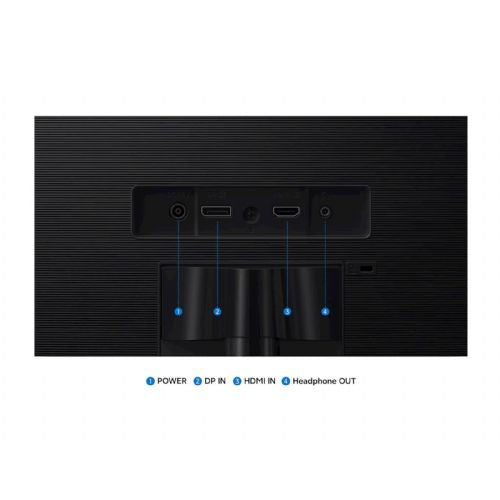
You can connect your monitor to a computer, game console, or other device with an HDMI or DisplayPort output. To achieve the desired refresh rate, make sure that the connected device, connector, and cable you are using support it.
At this screen size, the main trade-off is between the large display and the amount of detail that Full HD resolution offers. So before you buy, consider whether a larger image or a sharp, spacious workspace for text and multiple open windows is more important to you.
Source of editorial recommendations: ENAA guides and team experience.
🔴 Less suitable - on a 32-inch screen, Full HD resolution means a less detailed image, which can be a noticeable limitation when working with fine text and spreadsheets for long periods of time.
This cannot be reliably estimated from the available data, as it does not include refresh rate and responsiveness. For competitive gaming, check whether these features meet your expectations.
This depends on the available desk depth and your usual sitting distance. Before making your choice, check whether you will be able to use the screen from a distance that is comfortable for you.
Description updated: November 2026
If you are still deciding, the following content may also be helpful.
Best products
Products for various purposes


