Samsung 27 G31H G3
For playing games
A 27-inch monitor for everyday work and content viewing, with gaming features for smooth display of fast-paced action.
- The 144 Hz frequency ensures a smooth display of fast scenes.
- The IPS display maintains a consistent display even when viewed from different positions.
- FreeSync can reduce screen tearing with a compatible graphics card.
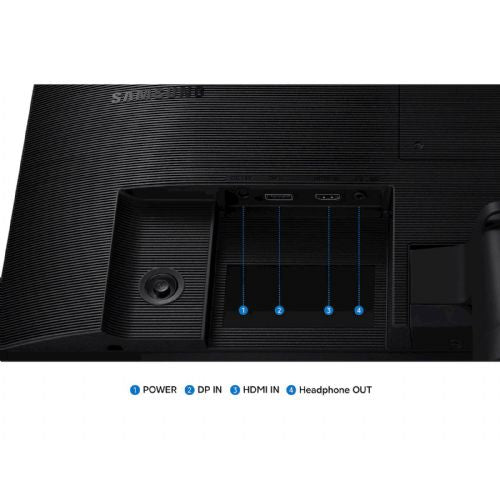
- HDMI and DisplayPort ports allow you to connect to compatible devices.
The Samsung 27 G31H G3 monitor (LS27HG310EUXEN) is a 27-inch monitor with an IPS display and a Full HD resolution of 1920 × 1080. It is suitable for everyday work, viewing content and playing games. The 144 Hz refresh rate and 1 ms response time (MPRT) support smooth motion display, and HDMI and DisplayPort connectors allow you to connect to a computer, game console or other compatible device.
The monitor supports AMD FreeSync technology to synchronize screen refresh rates with a compatible graphics card. There's also a game mode, Eye Saver, and Less Screen Flickering features. The screen can be tilted, and the black design blends in seamlessly with your work or gaming environment.
Key product features
| Property |
Value |
Rating |
| Size |
27 inches |
|
| Resolution |
1920 × 1080 (Full HD) |
|
| Panel type |
IPS |
|
| HDMI connector |
Yes |
|
| Response time |
1ms (MPRT) |
|
| Brightness |
250 cd/m² |
|
⚖️ Compare features with other products of your choice
Responsive image for work and play
A 144Hz refresh rate allows the image to be refreshed more frequently than a typical 60Hz display. This is useful for fast-paced scenes in games and other content with a lot of motion, as the display can appear smoother. 1ms response time (MPRT) is a measure of the reduction in perceived motion blur; actual experience will also vary depending on content, settings, and connected device.
AMD FreeSync synchronizes the refresh rate of your monitor with that of a compatible graphics card. This can reduce screen tearing and choppy display during gameplay. Game Mode allows you to adjust the display to make details in darker parts of the scene easier to see.
IPS display and comfort of use
The IPS panel offers wide viewing angles, so colors and display remain more consistent even when viewed from different positions. The 1920 x 1080 resolution on the 27-inch display provides room for everyday tasks, web content, and multimedia.
Eye Saver reduces blue light emission and Less Screen Flickering reduces screen flicker. These features may contribute to more comfortable viewing during extended use, but they do not guarantee the prevention of eye fatigue.
Connection and setup
HDMI and DisplayPort inputs allow you to connect to a variety of compatible devices. Before connecting, check which port and settings support your desired resolution and refresh rate. The monitor can be tilted, so you can adjust the screen position to suit your workstation.
It is important to know
When choosing, it's important to weigh up the difference between smooth motion and text sharpness for extended periods of time. Before buying, consider whether the monitor will be used primarily for gaming or long hours of document work, and whether you're comfortable with a position without height adjustment.
- When reading for long periods of time and working with spreadsheets, text may appear less sharp than you would like on a 27-inch Full HD display.
- The tilt allows for basic position adjustments, but the screen height cannot be adjusted. This is something to consider if you use the monitor for several hours a day.
- FreeSync support is only useful if the connected graphics card also supports it; the label on the monitor alone does not guarantee the same effect with every device.
Source of editorial recommendations: ENAA guides and team experience.
In practice
🎮 Playing fast games
🟢 Very suitable - support for higher refresh rates and FreeSync is useful for fast on-screen motion; for the FreeSync effect, the graphics card must also be compatible.
📄 Working for hours with documents and spreadsheets
🟡 Suitable with limitations - the large screen offers room to work, but text may be less sharp at this size and resolution combination, and the screen height cannot be adjusted.
Answers to frequently asked questions
Is it possible to adjust the screen height?
No. The screen can be tilted, but height adjustment is not available.
Will every connected device display the image at the highest refresh rate?
This depends on the device output, connector, and settings. Before use, please check that your device supports the desired resolution and frequency combination via the selected connection.
Does FreeSync work with every graphics card?
No. A compatible graphics card is required to use FreeSync.
Description updated: November 2026
Read also
If you are still deciding, the following content may also be helpful.
Best products
Best monitors 2026
Products for various purposes
Gaming monitors
Monitors for office work
Why buy from ENAA?
- The descriptions on ENAA are designed neutrally, with clear summaries of benefits and functionality, leaving the decision up to the buyer.
- There are over 100 shopping guides available for you to make an informed choice.