Your shopping cart
😊 Product added to cart successfully
Product removed to cart successfully

Couldn't load pickup availability
Izdelek bomo predvidoma poslali čez: 5 dni

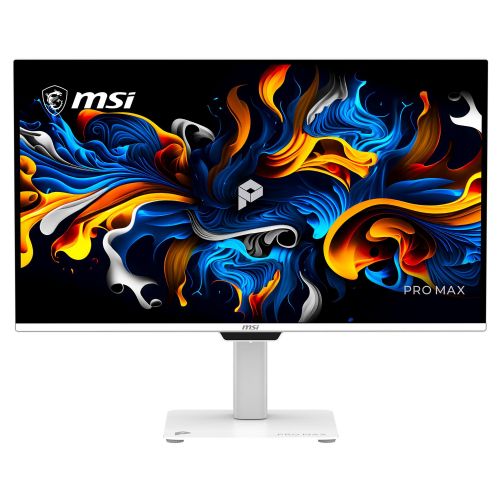
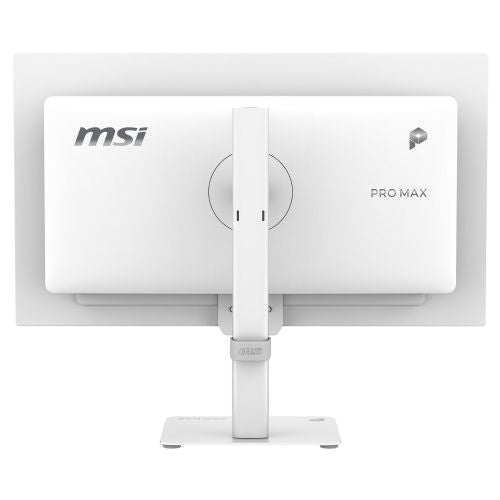


The 26.5-inch, high-resolution monitor is designed for users who want more space to work, comfortable multitasking, or a combination of work and gaming.
The MSI PRO MAX 271UPXW12G 26.5" monitor is a high-end business monitor that uses a QD-OLED panel to provide exceptional display quality in 4K UHD resolution (3840 x 2160). This model is designed for users who demand accuracy, a wide color gamut, and responsiveness from their monitor, making it particularly suitable for office work, image editing, multimedia, and even gaming, where a fast-response image is important.
The 67.3 cm (26.5") diagonal screen with a 16:9 aspect ratio allows for comfortable work and clarity even with multiple open windows or demanding programs. QD-OLED (Quantum Dot OLED) technology delivers deeper blacks, extremely vibrant colors, and wide viewing angles, making it easier to use for long periods of time and multitask without eye fatigue. In practical use, the accuracy of detail display will be particularly noticeable when working with graphics or watching content with high contrast.
In addition to the excellent display, the ultra-fast response time of 0.03 ms stands out, which ensures smooth transitions between images and prevents blurring during fast movements, which is crucial for video editing or dynamic games. The refresh rate of 120 Hz enables a smooth display of the image, which is especially noticeable in animations, mouse movements and gaming - here the speed and smoothness will be noticeable in everyday use.
Inputs such as HDMI and USB-C allow for easy connection of various devices, with USB-C often also allowing for image, data and power transfer of one device via a single cable (depending on the actual support of each device). The brightness of 250 cd/m² is sufficient for working in normal and slightly brighter rooms, while the lack of curvature and touchscreen means that the monitor is primarily intended for traditional use with high display accuracy on a flat surface.
Key product features
| Property | Value | Rating |
|---|---|---|
| Field of application | Business monitor | |
| Size | 67.3cm (26.5") | 🟡 7 |
| Resolution | 3840 x 2160 (4K UHD) | 🟢 9.5 |
| Panel type | OLED | 🟢 10 |
| HDMI connector | Yes | |
| USB-C connector | Yes | |
| Aspect ratio | 16:9 | |
| Touch screen | No | |
| Curved screen | No | |
| Response time (ms) | 0.03 | 🟢 10 |
| Brightness (cd/m²) | 250 | 🟡 6 |
⚖️ Compare features with other products of your choice
The combination of 4K UHD resolution and QD-OLED technology means that the monitor delivers a very sharp and realistic display, suitable for photo editing, design, multimedia content and for use on workstations where the accuracy of displaying fine details or colors is important. The display is stable even with fast movements thanks to the 120 Hz refresh rate and extremely fast response time, which is an additional advantage when editing videos or playing games - movement remains clear without blurring.
Connectivity to multiple devices, such as laptops and other multimedia devices, is enabled by HDMI and USB-C, simplifying workstation setup and reducing the number of cables needed. The screen size contributes to better productivity, allowing you to work in multiple programs simultaneously or use an extended office on a single monitor.
In everyday work, the user will notice the color accuracy and image sharpness across the entire monitor surface, which allows for clear and comfortable work even during prolonged use. The brightness of 250 cd/m² is suitable for most indoor working environments, while preventing excessive reflections and glare. The monitor is not curved and does not support touch, which preserves the natural display shape for classic work with a mouse and keyboard.
With its technical design, the MSI PRO MAX 271UPXW12G represents an advanced choice for demanding users who need high resolution, fast refresh rates and accurate colors on a single screen, regardless of whether it is for business use, creative work or relaxation with multimedia content.
| Screen diagonal | 67.3 cm (26.5 inches) | ||
| Screen resolution | 3840 x 2160 pixels | ||
| type | OLED monitor | ||
| Color | white | ||
| Manufacturer's no. | PROMAX271UPXW12G | ||
| Suitable for | Business, multimedia | ||
| Picture | Type of glare | Anti-reflective | |
| format | 16:9 | ||
| Technology | QD-OLED | ||
| Panel technology | OLED | ||
| functions | Ultra HD/4K, HDR Ready | ||
| brightness | 250 cd/m² | ||
| refresh rate | 120Hz | ||
| Viewing angle (10:1) | Horizontal | 178° | |
| Vertical | 178° | ||
| Pixel pitch | Horizontal | 0.153mm | |
| Vertical | 0.153mm | ||
| Colors | 1.070 million | ||
| reaction time | GtG | 0.03ms | |
| contrast | Dynamic | 1,500,000 : 1 | |
| Static | 1,000 : 1 | ||
| frequency | Vertical | 48-120Hz | |
| Horizontal | 30–270 kHz | ||
| Links | 2x HDMI input (HDMI version: 2.1), 1x DisplayPort input (DisplayPort version: 1.4a), 1x headphone output, 4x USB-A 3.2 Gen 1 (5 Gbit/s), 1x USB-B 3.2 (5 Gbit/s) | ||
| USB-C | USB-C Power Delivery: 98W, USB-C DP Alternate Mode | ||
| USB Note | The USB 3.2 Gen 1 designation corresponds to the previous USB 3.1 Gen 1 and USB 3.0 designations. | ||
| ergonomics | type | Swivel, swivel, tilt, height adjustable | |
| Rotating | 30° left, 30° right | ||
| Tilting | 5° forward, 20° backward | ||
| Adjustable height | 150mm | ||
| power supply | Eco-off | 0.3 watts | |
| Speakers | Number | 2 | |
| Total capacity | 5 watts | ||
| Standards | video | sRGB (138.2%), Adobe (118.4%), DCI-P3 (110) | |
| wall bracket | VESA compatible (100 x 100 mm) | ||
| Features | MSI M-Mate app, 5-layer tandem OLED panel with EL Gen-3 technology, DarkArmor film, uniform brightness, MSI OLED Care 3.0, crystal clear motion with VESA ClearMR 7000 certification | ||
| AMD FreeSync, Kensington lock, NVIDIA G-Sync compatible | |||
| VESA DisplayHDR standard | DisplayHDR True Black 400 | ||
| Additional information | Peak brightness up to 1000 nits | ||
| Accessories | Available | DP cable, HDMI cable, power cable, quick start guide | |
| Dimensions | Width: 61.11 cm x Height: 56.03 cm x Depth/Length: 20.06 cm | ||
Before choosing a monitor like the MSI PRO MAX 271UPXW12G, it's crucial to understand the relationship between the technical specifications and your work habits and space needs. With high-resolution monitors and innovative panels, the differences in experience can be greater than the specifications suggest - especially with extended use or multi-monitor setups. Pay special attention to connectivity, usage patterns, and any need to adjust settings or space.
Source of editorial recommendations: ENAA guides and team experience.
The effective combination of 4K resolution and diagonal size allows you to comfortably work with multiple applications at the same time without the need for an additional monitor.
The QD-OLED panel with high color accuracy and contrast is particularly suitable for visually demanding tasks such as image processing or video editing.
The monitor offers a variety of connectivity options for use with laptops, but to enable all advanced features (e.g. higher refresh rate or full USB-C functionality), it is recommended to first check the technical compatibility of your device and cables.
Due to the very high pixel density, you will be most comfortable reading texts for a long time with the appropriate scaling setting and an appropriate distance from the screen.
Refresh rates up to 120 Hz and an OLED panel mean a smooth, responsive and colorful picture, which is an advantage in fast-paced games and e-sports.
The monitor allows you to connect to various devices; before purchasing, check the compatibility of the connectors (e.g. USB-C with video transfer support) with your laptop.
The combination of 26.5" and 4K means a very sharp image, but you'll probably need to adjust the display scaling in your operating system for the optimal experience.
To achieve the full 120Hz refresh rate in 4K resolution, you need the appropriate cable (DisplayPort or the latest HDMI) and support from your graphics card.
High resolution ensures sharp text, but pay attention to ergonomics (stand height, distance to screen) and adjust the scaling to your needs.
Description updated: October 2026
If you are still deciding, the following content may also be helpful.
Best products
Products for various purposes
Monitors for working from home


