Your shopping cart
😊 Product added to cart successfully
Product removed to cart successfully

Couldn't load pickup availability
Izdelek bomo predvidoma poslali čez: 5 dni
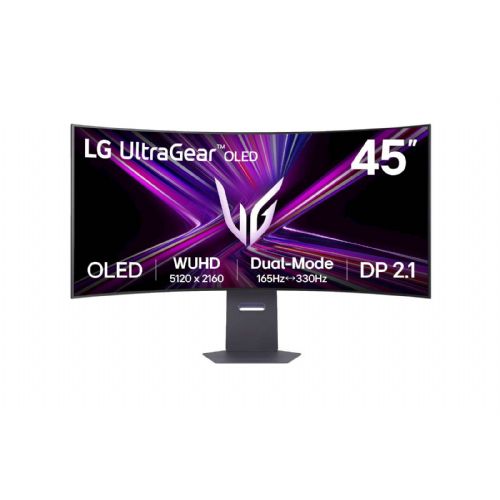
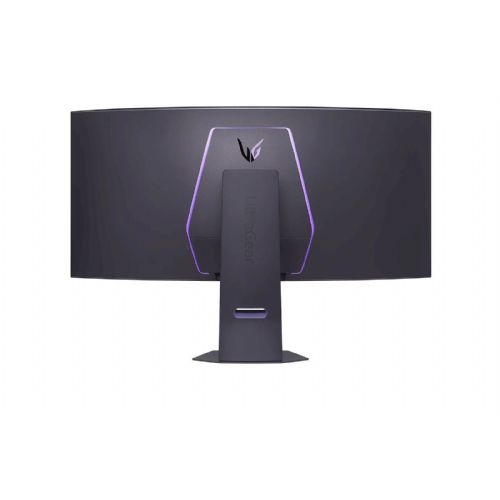
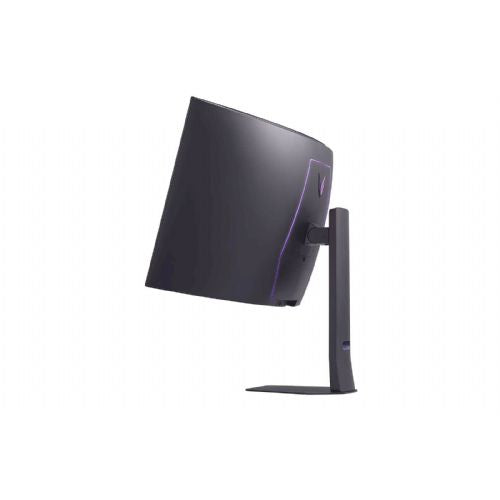
The 44.5-inch curved OLED monitor is designed for demanding users who want more space for multi-window work or an exceptional gaming and creative experience.
The LG UltraGear 45GX950A-B OLED monitor is a 44.5-inch (113 cm) curved computer monitor designed for demanding gamers, content creators and professional users looking for an exceptional visual experience and advanced connectivity. The monitor belongs to the class of gaming monitors of the highest quality level, with OLED technology enabling deep blacks and vivid colors, and the 21:9 aspect ratio offers additional width for a better view of the action.
Thanks to the WUHD 5120 × 2160 resolution and an extremely fast 0.03 ms response time, the monitor provides a smooth image and sharp display of details even in dynamic scenes. The 800R curvature of the screen creates a feeling of complete immersion in the content, which is especially noticeable when playing games or working with multiple program windows at the same time.
Key product features
| Property | Value | Rating |
|---|---|---|
| Field of application | Gaming monitor | |
| Size | 113.03cm (44.5") | 🟢 9.3 |
| Resolution | 5120 x 2160 (WUHD) | 🟢 9.7 |
| Panel type | OLED | 🟢 9.8 |
| HDMI connector | Yes | |
| USB-C connector | Yes | |
| Built-in docking station | Yes, 90W | 🟢 9.2 |
| Aspect ratio | 21:9 | 🟢 9.6 |
| Touch screen | No | |
| Curved screen | Yes | 🟢 9.5 |
| Response time (ms) | 0.03 | 🟢 10 |
| Brightness (cd/m2) | 275 | 🟡 6.5 |
⚖️ Compare features with other products of your choice
The use of an OLED panel allows for accurate display of both deep shadows and strong, vivid colors. This is especially important for photo editing, watching movies, playing games with stunning visual effects, or work where color accuracy and exceptional contrast are essential. The maximum refresh rate of up to 330 Hz (in Overclock mode) allows for extremely smooth display of fast motion without blurring or lag, which can significantly affect the gaming experience in fast-paced action games.
The built-in docking station (90W) allows you to connect your laptop and simultaneously power, transfer images and data via USB-C, simplifying work in modern home or business environments. The 800R curvature ensures more ergonomic viewing with less eye strain during prolonged use, especially on such a large screen area. The 21:9 aspect ratio provides additional width for multitasking, allowing you to display multiple different windows or applications at the same time.
The monitor supports DisplayHDR True Black 400, which means a greater variety of dark shades and better detail in dark scenes, especially when watching movies or creating content. Although the brightness of 275 cd/m² is not the highest in this category, thanks to OLED technology it is still enough for a rich and contrasting display in most indoor spaces.
| Screen diagonal | 113 cm (44.5 inches) | ||
| Screen resolution | 5120 x 2160 pixels | ||
| type | Gaming monitor | ||
| Color | dark gray | ||
| Suitable for | Games | ||
| Picture | Type of glare | Frozen | |
| format | 21:9 | ||
| Curved | Radius: 800R | ||
| Technology | WOLED | ||
| Panel technology | OLED | ||
| functions | HDR Ready, HDR10 | ||
| brightness | 275 cd/m² | ||
| refresh rate | Dual mode: 165 Hz (5120 x 2160 pixels) and 330 Hz (2560 x 1080 pixels) | ||
| Viewing angle (10:1) | Horizontal | 178° | |
| Vertical | 178° | ||
| Pixel defect class | type | 2 | |
| Pixel pitch | Horizontal | 0.203mm | |
| Vertical | 0.203mm | ||
| Colors | 1.070 million | ||
| reaction time | GtG | 0.03ms | |
| contrast | Static | 1,500,000 : 1 | |
| lighting | Yes, RGB | ||
| Links | 2x HDMI input (HDMI version: 2.1), 1x DisplayPort input (DisplayPort version: 2.1), 1x headphone output, 2x USB-A 3.2 Gen 1 (5 Gbit/s), 1x USB-C 3.2 Gen 1 (5 Gbit/s) | ||
| USB-C | USB-C Power Delivery: 90W, USB-C DP Alternate Mode | ||
| USB Note | The USB 3.2 Gen 1 designation corresponds to the previous USB 3.1 Gen 1 and USB 3.0 designations. | ||
| ergonomics | type | Rotatable, tiltable, height adjustable | |
| Rotating | 10° left, 10° right | ||
| Tilting | 10° forward, 15° backward | ||
| Adjustable height | 120mm | ||
| power supply | Eco-off | 0.3 watts | |
| Speakers | Number | 2 | |
| Total capacity | 20 watts | ||
| note | Rich bass | ||
| Standards | video | DCI-P3 98.5% | |
| Sound | DTS Headphone: X | ||
| wall bracket | VESA compatible (100 x 100 mm) | ||
| Features | USB-C 90W Power Delivery, Micro Lens Array+ (MLA+) technology, low blue light, RGWB subpixel layout, on-screen display, dynamic action sync, black stabilizer, crosshair, FPS counter, factory calibrated colors, dual controller, shortcut, PiP, PbP, hexagonal lighting | ||
| Adaptive Sync, AMD FreeSync, NVIDIA G-Sync compatible, dual mode | |||
| VESA DisplayHDR standard | DisplayHDR True Black 400 | ||
| Additional information | Dual mode: 165Hz refresh rate at WUHD (graphics intensive games) and 330Hz at WFHD (fast action) | ||
| Notice | HDR peak brightness up to 1300 cd/m²; total stand height in low position: 545.6 mm | ||
| Accessories | Available | Power cable, HDMI cable, DisplayPort cable, USB-C cable | |
| Dimensions | Width: 99.16 cm x Height: 66.56 cm x Depth/Length: 34.2 cm | ||
Choosing a curved OLED monitor with an extremely large diagonal and ultra-high resolution brings significant advantages and some specific challenges that are not obvious from the technical specifications alone. It is important to consider how the spatial layout, usage and connectivity affect your real needs, especially when working, gaming or creating.
Source of editorial recommendations: ENAA guides and team experience.
The extremely wide work surface and high resolution provide a very good starting point for working with multiple applications at the same time and advanced window organization without the need for an additional monitor.
The combination of OLED technology, a curved panel, and a high refresh rate delivers an excellent experience for demanding games and complete immersion in the image.
The large surface area, precise colors and contrast, and wide viewing angle make the monitor well-suited for creators who need precision and spaciousness.
The size and curvature of the monitor may limit placement in smaller spaces or on shallow desks; proper distance must be maintained for an optimal experience.
Advanced connection options require attention to choosing the right cable and checking the compatibility of the graphics card and connectors on the computer, especially if you want to take advantage of the highest resolutions and frequencies.
In most cases, a greater depth and width of the desk will be required for optimal monitor placement, otherwise several ergonomic compromises are possible.
For most scenarios, the ultrawide model provides a single wide work surface without a frame in the middle, but some users are still more satisfied with two separate monitors due to the possibility of individual settings.
You will need a suitably powerful graphics card and the right cable (most often DisplayPort or HDMI of the latest generations) to fully utilize the monitor's capabilities.
Displaying a static image on OLED panels for a long time can gradually leave traces, so it is recommended to use functions to prevent burn-in or regularly change the content on the screen.
Before purchasing, check whether your laptop supports the required resolution and refresh rate and whether it has an appropriate output (e.g. DisplayPort/Thunderbolt/HDMI) that allows connection to a monitor.
Description updated: August 2026
If you are still deciding, the following content may also be helpful.
Best products
Products for various purposes
Monitors for working from home


