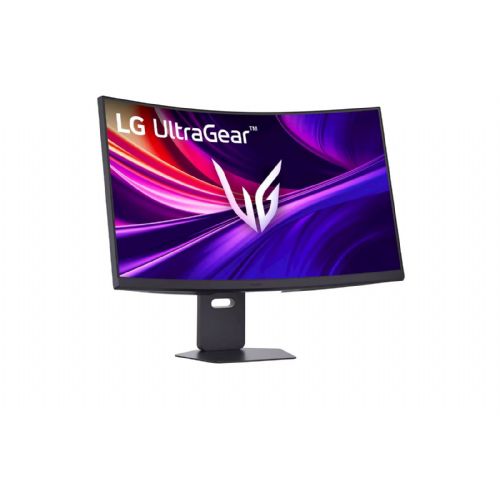
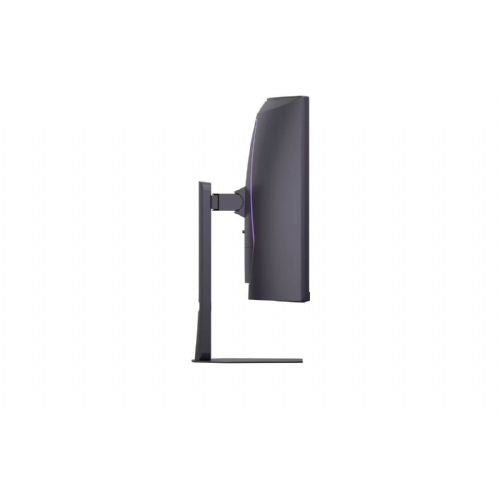
LG UltraGear 37G800A-B
Suitable for gaming and multitasking Curved ultrawide screen Optimal for ample desk space High resolution for demanding work
The LG UltraGear 37G800A-B curved 37-inch monitor is designed for demanding users looking for a spacious screen for gaming, advanced multitasking, or professional work.
- The large diagonal allows for easy management of multiple windows and a better overview of content.
- The curved design increases immersion when playing games and makes it easier to see the entire screen.
- 4K UHD resolution ensures an extremely sharp picture and precise display of details.
- A high refresh rate reduces eye fatigue and improves the experience when the image moves quickly.
The LG UltraGear 37G800A-B 37" Curved Monitor, 4K UHD, VA, 165Hz, FreeSync Premium Pro is an advanced curved monitor designed for demanding gamers, business users, and those who value a premium experience in everyday work or entertainment. Superior image quality and responsiveness ensure that you are always one step ahead of others - whether in fast-paced games or complex multitasking tasks.
Evaluation of key product features
| Property |
Value |
Rating |
| Field of application |
Gaming monitor |
🟢 9.5 |
| Size |
93.98cm (37) |
🟢 9.0 |
| Resolution |
3840 x 2160 (4K UHD) |
🟢 10 |
| Panel type |
VA |
🟢 8.5 |
| HDMI connector |
Yes |
🟢 9.0 |
| USB-C connector |
Yes |
🟢 8.5 |
| Built-in docking station |
Yes, 65W |
🟢 8.0 |
| Aspect ratio |
16:9 |
🟢 9.0 |
| Touch screen |
No |
|
| Curved screen |
Yes |
🟢 8.5 |
| Response time (ms) |
1 |
🟢 10 |
| Brightness (cd/ m2 ) |
400 |
🟢 8.5 |
⚖️ Compare features with other products of your choice
The advanced screen curvature and high resolution in 4K UHD format enable an extremely immersive visual experience, which is especially evident in games and larger multimedia projects. With a refresh rate of 165 Hz and a response time of only 1 ms, the monitor provides extremely smooth image display without tearing, which greatly improves responsiveness in fast-paced action, e-sports and dynamic content.
For business users, the integrated docking station with up to 65W of power via USB-C is a great solution, allowing fast device charging and image and data transfer via a single cable. It is the optimal choice for organized work environments where a clean and efficient work surface is important.
In addition to the wide viewing angle of the VA panel, the monitor also stands out for its FreeSync Premium Pro technology, which ensures image synchronization and eliminates unwanted blurring or display lag. High brightness and rich color reproduction mean that content will always be vivid, detailed and enjoyable to watch - regardless of whether you are a professional, a gaming enthusiast or looking for an advanced solution for everyday use.
This monitor's versatility makes it ideal for users who want to take advantage of maximum image quality, fast responsiveness, and an interactive work environment, while also needing a powerful docking station for modern connectivity needs.
| Screen diagonal
|
92.7 cm (37 inches) |
| Screen resolution
|
3840 x 2160 pixels |
| type
|
Gaming monitor |
| Color
|
black |
| Manufacturer's no.
|
37G800A-B.AEUQ |
| Suitable for
|
Games |
| Picture
|
format |
16:9 |
|
Curved |
Yes (radius: 1,000R) |
|
Technology |
LED light |
|
Panel technology |
VA |
|
functions |
Ultra HD/4K, HDR Ready |
|
brightness |
400 cd/m² |
|
refresh rate |
165Hz |
|
Viewing angle (10:1) |
Horizontal |
178° |
|
|
Vertical |
178° |
|
Pixel pitch |
Horizontal |
0.21mm |
|
|
Vertical |
0.21mm |
|
Colors |
1.070 million |
|
reaction time |
GtG |
1ms |
|
contrast |
Static |
4,000 : 1 |
| lighting
|
Yes, RGB |
| Links
|
2x HDMI input (HDMI version: 2.1), 1x DisplayPort input (DisplayPort version: 1.4), 1x headphone output, 2x USB-C |
| ergonomics
|
type |
Rotatable, tiltable, height adjustable |
|
Rotating |
30° left, 30° right |
|
Tilting |
9° forward, 13° backward |
|
Adjustable height |
110mm |
| power supply
|
Eco-off |
0.3 watts |
| Speakers
|
Number |
2 |
|
Total capacity |
10 watts |
| Standards
|
video |
DCI-P3 95% |
|
Sound |
DTS Headphone: X |
| wall mount
|
VESA compatible (100 x 100 mm) |
| Features
|
Dynamic Action Sync, Black Stabilizer, Crosshair, FPS Counter, Color Weakness, Reading Mode, USB-C PD 65W, Unity Hexagonal Lighting, Smart Power Saving |
|
Adaptive Sync, AMD FreeSync |
|
VESA DisplayHDR standard |
DisplayHDR 600 |
| Additional information
|
Total stand height in low position: 532.3 mm |
| Dimensions
|
Width: 81.56 cm x Height: 64.23 cm x Depth/Length: 28.63 cm |
It is important to know
Before purchasing that giant 37-inch curved monitor, it's crucial to understand whether you have the space and distance to get the best experience. It's also important to consider what that diagonal combined with the high 4K resolution and fast refresh rate means in practice, and what you can expect when working or playing. Be careful if you need a higher level of color accuracy or if you're mixing monitors of different types.
- You will benefit most if you can place the monitor on a sufficiently deep and wide desk, as the curved screen and large diagonal require a longer viewing distance for clarity and reduced eye fatigue.
- As an ultrawide model, it can often replace two standard monitors, but this means a different user experience, especially when it comes to multitasking and window arrangement; the decision between ultrawide and two monitors affects ergonomic layout and work habits.
- The VA panel delivers deeper contrast, but during intensive office work (a lot of text reading, programming) you may notice slightly worse display of fast movements or ghosting compared to IPS panels.
- To achieve the highest resolution and refresh rate, you need a sufficiently powerful graphics adapter and a quality DisplayPort or HDMI cable; an improper connection can limit the monitor's capabilities.
- Such a high resolution combined with a large surface area allows for extremely dispersed content - you need to adjust system scaling and get used to the appearance of smaller elements on the screen, which may initially affect the user experience.
Source of editorial recommendations: ENAA guides and team experience.
In practice
🟢 Ultrawidescreen gaming
Very suitable - the curved 4K UHD display with a 165 Hz refresh rate and FreeSync Premium Pro support provides an extremely smooth and immersive experience in games that take advantage of the wide screen ratio.
🟢 Multitasking and working with multiple windows
Very convenient – the large surface area and ultra-wide format make it easier to manage multiple open windows at the same time without the need for an additional monitor.
🟡 Long-term text reading and programming
Suitable with limitations - high resolution helps with sharpness, but the VA panel can cause slightly poor visibility of moving text or ghosting when scrolling quickly, which may be noticeable to a more demanding user.
🟢 Video and photo editing
Very convenient – the wide curved screen allows for a better overview of timelines and more space to work with tools and references.
🟢 Installation in a modern office or home workspace
Very convenient – if you have a deep enough desk, an ergonomic setup is possible; otherwise, the large diagonal may cause you to be too close to the screen.
Answers to frequently asked questions
How big a desk makes sense for such a monitor?
Due to the exceptional diagonal and curvature, we recommend a deep and wide table to ensure sufficient viewing distance and comfortable positioning.
Can this monitor effectively replace a setup with two regular monitors?
The monitor can replace two 27-inch monitors in most cases, but the user experience will be different, especially when arranging windows and sharing content.
What should I check regarding the connection to the computer?
To take full advantage of the resolution and refresh rate, ensure that your computer has the appropriate output (DisplayPort or HDMI with the appropriate version) and that you are using the appropriate cable.
Which users will notice the limitations of a VA panel?
More advanced users who do a lot of reading or programming may experience ghosting, or poorer sharpness of moving text, compared to IPS monitors.
Does the operating system need to be adjusted to work with 4K on this diagonal?
System scaling is usually necessary because elements and text on such a large surface can be very small without adjustment.
Description updated: August 2026
Read also
If you are still deciding, the following content may also be helpful.
Best products
Best monitors 2026
Products for various purposes
Gaming monitors
Monitors for office work
Monitors for working from home
Graphic design monitors
Why buy from ENAA?
- The leading choice for monitors in Slovenia - a proven offer and top guides for choosing the right model.
- No double pricing and hidden costs – you always clearly see the fair and best final price.