Your shopping cart
😊 Product added to cart successfully
Product removed to cart successfully

Couldn't load pickup availability
Izdelek bomo predvidoma poslali čez: 5 dni


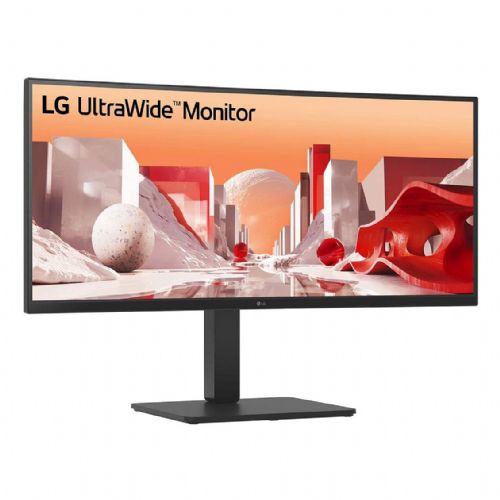


The curved 34-inch monitor is designed for business users and anyone who needs more space for clear work, video conferencing, and simultaneous use of multiple applications.
The LG 34BA85QE-B.AEU 34" UWQHD IPS Curved Monitor is a widescreen business monitor designed for advanced users who need clarity and multitasking at work. Its 34-inch diagonal and 21:9 aspect ratio allow you to display multiple applications at the same time, which is especially useful for complex work tasks such as data analysis, document processing, or multimedia editing.
The curved IPS display with a resolution of 3440 x 1440 provides wide viewing angles and accurate color reproduction, which is especially important for working with graphically demanding content or collaborating in a group environment. The curvature of the display helps reduce eye movement on the screen and makes it easier to use for long periods of time, as the image is visible evenly across the entire surface.
The built-in USB-C docking station with up to 90W of power allows you to transfer images, data, and power your laptop with a single cable. This simplifies the work environment and reduces the number of cables needed on the desk, which is especially appreciated by business users and those who frequently connect various devices. The integrated webcam and microphone make video conferencing easier, allowing for instant connectivity and a cleaner desk without additional devices.
The 300 cd/m² brightness ensures good readability even in brighter office environments, while the 5 ms response time enables fast display of moving content, which is useful for interactive presentations or occasional video content. The presence of HDMI and USB-C ports allows connectivity with various devices, increasing the monitor's adaptability in various office scenarios.
Key product features
| Property | Value | Rating |
|---|---|---|
| Field of application | Business monitor | |
| Size | 86.36 cm (34.0") | 🟢 9.0 |
| Resolution | 3440 x 1440 (UWQHD) | 🟢 9.2 |
| Panel type | IPS | 🟢 8.7 |
| HDMI connector | Yes | |
| USB-C connector | Yes | |
| Built-in docking station | Yes, 90W | 🟢 9.0 |
| Aspect ratio | 21:9 | 🟢 9.4 |
| Touch screen | No | |
| Curved screen | Yes | 🟢 8.8 |
| Response time (ms) | 5 | 🟡 6.8 |
| Brightness (cd/m2) | 300 | 🟡 7.2 |
⚖️ Compare features with other products of your choice
The extended image display allows users to have multiple programs, windows or data sources open on a single screen, which is especially convenient in modern business environments where multitasking is becoming the norm. IPS technology ensures consistent image quality even from different angles, which is useful for group work in meetings or presentations.
In addition to advanced connections, the monitor also includes a webcam and microphone, which are useful for remote meetings or quick communication with colleagues. This means that additional external equipment is not required for basic video conferencing, which simplifies use and allows for a tidy workspace.
The combination of a curved screen, high resolution and modern connectivity makes this monitor a versatile solution where clarity, content layout and easy connection to laptops are important. The average brightness and response time meet everyday business needs and also allow for occasional enjoyment of multimedia content or simple games in leisure time.
| Screen diagonal | 86.7 cm (34 inches) | ||
| Screen resolution | 3440 x 1440 pixels | ||
| type | LED monitor | ||
| Manufacturer's no. | 34BA85QE-B.AEU | ||
| Suitable for | Business | ||
| Picture | Type of glare | Anti-reflective | |
| format | 21:9 | ||
| Curved | Yes (radius: 3,800R) | ||
| Technology | LED light | ||
| Panel technology | IPS | ||
| functions | QHD/WQHD, HDR Ready, HDR10 | ||
| brightness | 300 cd/m² | ||
| refresh rate | 60Hz | ||
| Viewing angle (10:1) | Horizontal | 178° | |
| Vertical | 178° | ||
| Pixel defect class | type | 2 | |
| Pixel pitch | Horizontal | 0.233mm | |
| Vertical | 0.233mm | ||
| Colors | 1.070 million | ||
| reaction time | GtG | 5ms | |
| contrast | Static | 1,000 : 1 | |
| Links | 2x HDMI input (HDMI version: 2.0), 1x DisplayPort input (DisplayPort version: 1.4), 1x headphone output, 2x USB-A 2.0, 2x USB-A 3.2 Gen 1 (5 Gbit/s), 1x USB-B, 1x USB-C, 1x RJ45 | ||
| USB-C | USB-C Power Delivery: 90 watts | ||
| ergonomics | type | Rotatable, tiltable, height adjustable | |
| Rotating | 45° left, 45° right | ||
| Tilting | 5° forward, 21° backward | ||
| Adjustable height | 150mm | ||
| power supply | Eco-off | 0.3 watts | |
| power supply | Integrated | ||
| Speakers | Number | 2 | |
| Total capacity | 10 watts | ||
| wall bracket | VESA compatible (100 x 100 mm) | ||
| Features | Built-in Full HD webcam (2MP, Windows Hello compatible) and microphone, KVM switch, on-screen control, PBP (Picture by Picture) mode, smart power saving, anti-flicker, dual controller, MAXXAUDIO sound system, super resolution+, black stabilizer, dynamic sync performance, USB-C (alternative DP mode and 90W maximum charging power) | ||
| Microphone, webcam | |||
| Accessories | Available | Power cable, HDMI cable, DisplayPort cable, USB cable | |
| Dimensions | Width: 81.67 cm x Height: 39.35 cm x Depth/Length: 26.75 cm | ||
| Weight | 11.1 kg | ||
When choosing a curved 34-inch UWQHD monitor like the LG 34BA85QE-B.AEU, it's crucial to understand how the balance between size, resolution, and features impacts actual usability in different scenarios. Beyond the obvious technical features, it's worth carefully considering the connectivity, usability, and ergonomics that will determine your long-term satisfaction with your everyday use.
Source of editorial recommendations: ENAA guides and team experience.
The ultra-wide format and UWQHD resolution allow you to open multiple applications and work documents simultaneously without the need for two separate monitors.
Convenient USB-C laptop connectivity and an integrated webcam/microphone make it easy to transition between working from home, meetings, and basic multimedia needs.
The large IPS curved display with a wide work surface allows you to manage complex tables, edit images or timelines, while increasing the transparency of information.
For casual gaming, the large curved screen is impressive, but if you expect the highest refresh rates or advanced gaming features, this model is less suitable.
The monitor offers multiple interfaces, but if you plan to use it with multiple computers at the same time (e.g. work and personal), check whether it functionally fits your scenarios and can be switched quickly.
Yes, if your laptop supports USB-C with video output (DisplayPort Alt Mode) and power delivery, you can enable video, audio, and charging with a single cable.
The curved screen helps to keep the eyes at a uniform distance from the edges, increasing clarity and reducing the need to move your gaze when viewing wide spreadsheets and multiple windows.
The monitor has an IPS panel for good overall color reproduction, but it is not specifically calibrated for the most demanding professional graphics tasks or advanced HDR projects.
Yes, the built-in webcam and microphone make the monitor particularly suitable for regular video conferencing without additional equipment.
Due to the 34-inch diagonal and curvature, the table needs to be wide and deep enough to allow for a comfortable distance without feeling cramped.
Description updated: October 2026
If you are still deciding, the following content may also be helpful.
Best products
Products for various purposes
Monitors for working from home


