Your shopping cart
😊 Product added to cart successfully
Product removed to cart successfully

Couldn't load pickup availability
Izdelek bomo predvidoma poslali čez: 1 dni
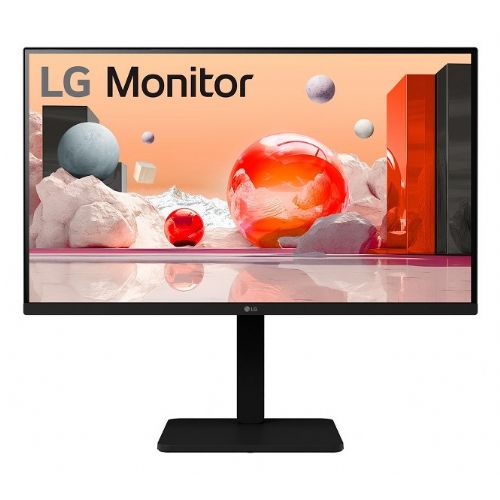

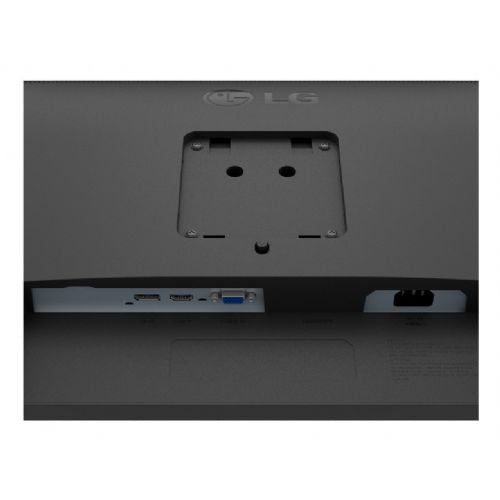

Experience exceptional picture quality with the LG 24BA550-B monitor, which delivers stunning FullHD 1920x1080 resolution on a 60.45 cm (23.8") screen. This monitor is ideal for anyone looking for the perfect combination of clarity, color accuracy, and elegant design.
With FullHD resolution, you'll enjoy sharp, clear images that bring every detail to life. Whether you're working, gaming, or watching movies, this monitor will give you an exceptional visual experience.
With a brightness of 250 cd/m², the LG 24BA550-B provides sufficient illumination for use in a variety of lighting conditions, allowing for comfortable viewing and reducing eye fatigue.
The LG 24BA550-B monitor not only offers top-notch performance, but also a sleek design that will fit seamlessly into any workspace. Its slim form and minimalistic edges provide a modern look that complements your work environment.
It is equipped with a variety of ports that allow you to easily connect to your devices, allowing you to quickly and easily switch between work and entertainment.
Designed with user comfort in mind, the monitor features tilt and height adjustment for optimal viewing angles, so you can ensure your workspace is always ergonomically set up to your liking.
Choose the LG 24BA550-B monitor and enhance your daily user experience with LG's cutting-edge technology and design. An ideal choice for home or office.
Features:
size: 60.45 cm (23.8")
resolution: 1920 x 1080 (FullHD)
screen type: IPS
Connection: VGA, HDMI, Display Port, USB Hub, headphone output
response time: 5 ms
Brightness: 250 cd/m2
viewing angle: 178/178
refresh rate: 100 Hz
speakers: 2 x 2W
stand: height adjustable, swivel, foldable, Pivot
power supply: built-in
standards: TCO, TUV-GS, EPA, TUV-Ergo, CG, UL(cUL), FCC-B, ErP
The LG 24BA550-B monitor with a 23.8-inch diagonal and Full HD resolution is a balanced choice for everyday office work, study or home use, where clarity and eye comfort are paramount. It offers a practical combination of size, resolution and basic features for users looking for a monitor for multitasking, browsing, using web applications and occasionally watching videos or holding meetings. It is also suitable as an additional screen in multi-monitor setups, especially where desk space is limited. More advanced users or demanding gamers who expect very high refresh rates or professional color accuracy may miss out on more advanced features in this model.
Recommendation source: Enaa guides and team experiences.
Typical users of this monitor are business users, students and families who need a reliable tool for working with documents, email, video calls or distance learning. In everyday practice, the monitor works well as a primary or secondary display on a home or office desk, where a compromise between size, good text readability and versatility is important. If you are interested in a more detailed review, our guide to choosing a monitor size may be helpful.
Users increasingly appreciate the quality and reliability of LG monitors, as they offer a wide selection of models that are tailored to diverse needs and modern work environments.
Enaa allows you to clearly compare multiple monitors from a wide range, making it easier to make an honest and thoughtful decision based on your space, purpose of use, and your needs. Clear information and expertly supported monitor selection guides are available, which further contributes to confidence when purchasing.
This model is particularly suitable for office work, home use, online learning and video calls, where good readability, eye comfort and a practical screen size are important.
Yes, a 23.8-inch monitor is often used as an additional display because it is easy to fit on most desks and improves visibility when multitasking.
When choosing a monitor size, it's a good idea to consider your available desk space, desired viewing distance, and the type of tasks you'll be doing. For more advice, check out our monitor size guide .
The monitor is designed for general everyday use and is not aimed at professional designers or demanding gamers who need a higher refresh rate or accurate color reproduction.
Before purchasing, check whether the monitor you choose allows for height adjustment or VESA mounting if you need more flexibility in your workspace.
Description updated: April 2026


