Your shopping cart
😊 Product added to cart successfully
Product removed to cart successfully

Couldn't load pickup availability
Izdelek bomo predvidoma poslali čez: 5 dni


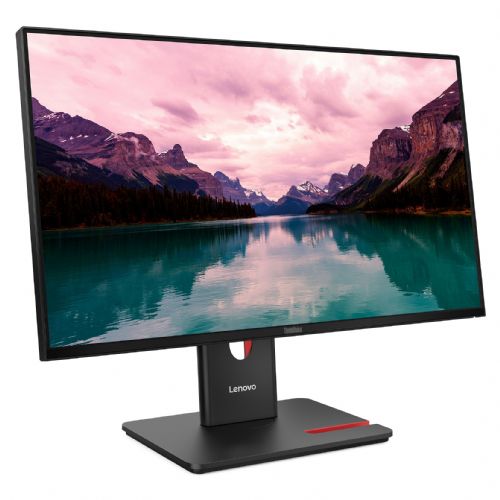


The Lenovo ThinkVision T24-40 60.45 cm (23.8") monitor is designed for professional users and demanding consumers who need high-quality image display and advanced connectivity options for work or entertainment. It brings users a combination of excellent images, flexibility and expanded connections, improving productivity and the visual experience in everyday use.
Evaluation of key product features
| Property | Value | Rating |
|---|---|---|
| Field of application | Business monitor | 🟢 9.0 |
| Size | 60.45 cm (23.8") | 🟢 8.5 |
| Resolution | 1920 x 1080 (FHD) | 🟢 8.2 |
| Panel type | IPS | 🟢 9.0 |
| HDMI connector | Yes | 🟢 9.0 |
| USB-C connector | Yes | 🟢 9.4 |
| Built-in docking station | No | |
| Aspect ratio | 16:9 | 🟢 8.0 |
| Touch screen | No | |
| Curved screen | No | |
| Response time (ms) | 4 | 🟢 8.1 |
| Brightness (cd/m2) | 250 | 🟡 6.5 |
⚖️ Compare features with other products of your choice
This monitor is a great choice for business users looking for a reliable and color-accurate work environment, as well as for amateur gamers and home users who require a wide range of connections. The 23.8" screen size allows for optimal visibility and efficient multitasking, while IPS technology ensures true colors and wide viewing angles - important for teamwork or presentations.
The brightness of 250 cd/m² ensures pleasant work in standard lighting rooms, and the FHD resolution delivers a sharp and clear image for reading, designing and editing documents. With a refresh rate of 120 Hz and a response time of 4 ms, it is also suitable for smoother image scrolling and less smearing in fast animations, which is an advantage for both office work and occasional gaming.
With a wide range of ports (HDMI, DisplayPort, VGA, USB-C and USB HUB), it allows you to connect various modern and older equipment without additional adapters. In addition to image transfer, the USB-C port also provides for connecting modern devices and charging the laptop, which reduces the number of cables on the desk and greatly simplifies use in modern offices or home workspaces.
The monitor stands out for its thoughtful balance between business functionality, color performance (99% sRGB coverage) and versatile connectivity. Thanks to a wide range of settings, it will cope with demanding multi-user environments and diverse needs, while being suitable for anyone who values quality images, practicality and professional aesthetics.
Screen
Screen diagonal: 60.5 cm (23.8")
Screen resolution: 1920 x 1080 pixels
HD type: Full HD
Native aspect ratio: 16:9
Display technology: LCD
Panel type: IPS
Feature: LED backlight
Backlight type: W-LED
Brightness (typical): 250 cd/m²
Response time: 6 ms
Feature: Anti-glare screen
Screen shape: Flat
Contrast ratio: 1500:1
Contrast ratio (dynamic): 3000000:1
Maximum refresh rate: 120 Hz
Viewing angle, horizontal: 178°
Viewing angle, vertical: 178°
Number of colors on the screen: 16.7 million colors
Response time (fast): 4 ms
Pixel pitch: 0.2745 x 0.2745 mm
Pixel density: 95 ppi
Visible size (horizontal): 52.7 cm
Visible size (vertical): 29.6 cm
Color depth: 8 bits
Color space standard: Rec. 709
Color gamut: 99%
sRGB coverage (classic): 99%
Services
Feature: Flicker-free technology
Feature: Low Blue Light Technology
Supports Windows operating systems: Windows 10, Windows 11
design
Product color: Black
Color name: Raven Black
Foot color: black
Connections and interfaces
Feature: Built-in USB hub
USB Hub Version: 3.2 Gen 1 (3.1 Gen 1)
USB input port type: USB Type B
Number of upstream data transfer slots: 1
Number of USB Type B input ports: 1
Number of USB-A downstream slots: 3
Number of USB-C input ports: 1
Function: USB powered
USB power supply up to: 15 W
Number of VGA (D-Sub) connectors: 1
Feature: HDMI
Number of HDMI inputs: 1
HDMI version: 1.4
Number of DisplayPort connectors: 1
DisplayPort version: 1.2
ergonomics
Feature: VESA mount
Panel mounting interface: 100 x 100 mm
Feature: Cable lock slot
Cable lock slot type: Kensington
Feature: Height adjustment
Adjustable height (max.): 15.5 cm
Feature: Pivot
Rotation angle: -90 - 90°
Feature: Rotatable
Rotation range: -45 - 45°
Feature: Tilt adjustment
Tilt angle range: -5 - 23°
energy
Energy efficiency class (EER): C
Energy efficiency class (HDR): Not available
Energy consumption (SDR) per 1000 hours: 12 kWh
Power consumption (standard operation): 12 W
Power consumption (standby): 0.5 W
Power consumption (max): 66 W
Power consumption (off): 0.3 W
AC input voltage: 100-240V
AC input frequency: 50/60 Hz
Power supply type: Internal
Energy efficiency scale: from A to G
Weight and dimensions
Device width (including stand): 539.8 mm
Device depth (including stand): 190 mm
Weight (including stand): 5.1 kg
Width (without stand): 539.8 mm
Depth (without stand): 45.3 mm
Height (without stand): 314.8 mm
Weight (without stand): 3 kg
Frame width (side): 2 mm
Frame width (top): 2 mm
Frame width (bottom): 1.05 cm
Packaging information
Packaging width: 734 mm
Packaging depth: 112 mm
Packaging height: 422 mm
Package weight: 7.3 kg
Scope of delivery
Feature: Stand included
Cables included: AC, DisplayPort, USB Type A to USB Type B
Feature: Quick Start Overview
DisplayPort cable length: 1.8 m
Power cable length: 1.8 m
The text is machine translated.
The Lenovo ThinkVision T24-40 monitor with a 23.8" diagonal and Full HD resolution is a balanced choice for office users and anyone who spends most of their time working on documents, online applications, or working from home. The IPS panel offers good viewing angles and pleasant color reproduction for everyday use, while the 120 Hz refresh rate ensures smoother scrolling and comfortable use during extended work and casual gaming. USB-C connectivity and a built-in USB hub bring users greater flexibility and easier connection to newer laptops, which is practical in modern work environments. However, due to the Full HD resolution on the 24" screen, it is not intended for demanding graphic designers or professional photo editing, where exceptional sharpness or color accuracy is important.
Recommendation source: Enaa guides and team experiences.
Typical users of this monitor are business users who value a balanced combination of size, ergonomics and flexibility in connections. It is also suitable for students and home users who need better visibility and comfort with larger screens next to their laptop, especially if they value connectivity via USB-C. In practice, it is very useful for multitasking, browsing the web, reading documents and smoothly participating in video calls. If you are considering dual monitors or want more information on the optimal setup, we recommend taking a look at our dual monitor selection guide .
Users often choose Lenovo monitors for their reliability and extensive support for accessories and settings that make it easy to integrate into various work environments.
Enaa offers extensive professional support, making it easier to choose between different monitors and compare relevant data for your needs. In addition, users appreciate the transparency of information and the ability to find relevant guides to help them make decisions regarding the specific requirements of the modern work environment.
Yes, the monitor offers the right combination of size and resolution for comfortable office work, mainly due to the IPS panel and 120 Hz refresh rate, which reduces eye fatigue during prolonged use.
The monitor features USB-C connectivity and an integrated USB hub, making it easy to connect to newer laptops and use additional USB devices without the need for an additional hub.
Due to the 120 Hz refresh rate, it is suitable for casual gaming and games where the highest responsiveness is not necessarily required; however, there are specialized models for competitive e-sports games with an emphasis on the shortest response time.
For a 24" screen, Full HD resolution is usually sufficient for everyday work and normal use, but if you're doing detailed graphics work or photo editing, a higher resolution (e.g. QHD) can provide greater sharpness. You can read more about this in our guide to choosing a monitor size .
Yes, this model is suitable for use as part of a dual screen setup in terms of connectivity and size, especially when combined with another device of the same size or similar configuration.
Description updated: April 2026


