Your shopping cart
😊 Product added to cart successfully
Product removed to cart successfully

Couldn't load pickup availability
Izdelek bomo predvidoma poslali čez: 5 dni


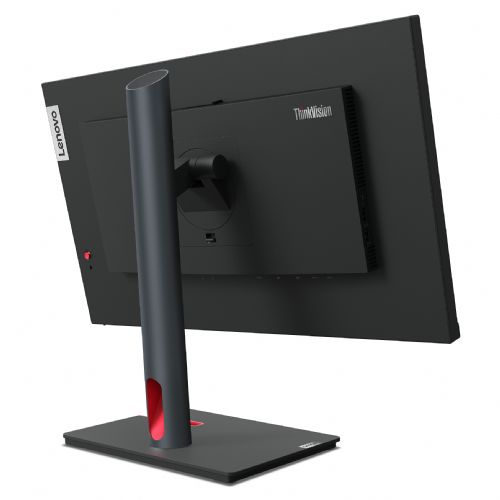


The 24" QHD monitor is designed for users who need a clear image and more space to work with documents, spreadsheets or multiple open windows. It is suitable for business, home and creative use.
The Lenovo ThinkVision P24q-30 60.45 cm (23.8") monitor is an excellent choice for professional users who need reliable, high-quality image display and efficiency in everyday tasks. It is intended for business users, gamers and home consumers who value color accuracy, ergonomic design and versatile connectivity.
Evaluation of key product features| Property | Value | Rating |
|---|---|---|
| Field of application | Business monitor | 🟢 9 |
| Size | 60.45 cm (23.8") | 🟢 8.5 |
| Resolution | 2560 x 1440 (QHD) | 🟢 9.5 |
| Panel type | IPS | 🟢 9 |
| HDMI connector | Yes | 🟢 8.5 |
| USB-C connector | No | |
| Built-in docking station | No | |
| Aspect ratio | 16:9 | 🟢 8 |
| Touch screen | No | |
| Curved screen | No | |
| Response time (ms) | 4 | 🟢 8 |
| Brightness (cd/m2) | 300 | 🟡 6 |
The monitor with a QHD resolution of 2560 x 1440 pixels provides an extremely sharp and detailed image, which is especially important for graphic-intensive tasks such as designing, photo editing or analyzing data tables. The IPS panel provides excellent color reproduction and ensures consistent image quality from different angles, making it also suitable for collaborative work or presentations.
Professional users will appreciate the features specifically tailored for business use: a wide range of inputs such as HDMI and DisplayPort, allowing for multiple device connections, and an ergonomic design that reduces strain during prolonged use. Flexible installation is also ensured with the supported VESA mount.
The 23.8" screen offers an optimal surface for multitasking, while the 4 ms response time ensures smooth image display even with faster transitions, which is useful for both work and gaming. With a brightness of 300 cd/m2, the monitor is well usable in various lighting conditions, although additional shading is recommended in strong sunlight.
Advanced technical features such as high resolution, stable color display of IPS technology and convenient connectivity make this monitor one of the best choices in its class. With balanced features and reliable performance, it enables efficient work without compromise for various user profiles in business and home environments.
The Lenovo ThinkVision P24q-30 monitor with a 23.8-inch diagonal and QHD resolution is a balanced solution for office users looking for more work space and better display sharpness than basic models. It is also suitable as a second display for multitasking or for use with a laptop, where clarity and text clarity are important. Thanks to IPS technology and a matte screen, it is comfortable for long hours of work, but due to its 60 Hz refresh rate, it is not particularly suited to demanding or competitive gaming. Users who want advanced color display for professional graphics work or a higher refresh rate for fast-paced gaming may be better suited to specialized models.
Recommendation source: Enaa guides and team experiences.
This monitor is often chosen by business users who need a clear, comfortable display of documents, spreadsheets and web applications, as well as individuals who work with multiple windows open or are looking to supplement their laptop for a more transparent work from home. With a higher QHD resolution, it allows for more content on the screen and less scrolling, making everyday tasks in the office or at home easier. Anyone considering the optimal layout of multiple monitors or wanting to choose the right size can also check out our monitor size guide for additional advice.
Users often choose Lenovo products because of their recognition, good ecosystem, and reliability in a business environment.
We offer you the ability to easily browse and filter monitors based on your actual usage, and support from a team of experts to help you choose the right size and resolution ratio for your office or home use. We also provide up-to-date guides to support you in making an informed decision when purchasing a monitor for work or a larger workspace.
Yes, thanks to IPS technology and a matte screen, it is suitable for prolonged use, as it provides a good viewing angle and less tiring viewing of text and tables.
The monitor supports HDMI and DisplayPort connectors, so it's important to check which connectors your laptop has to ensure proper connectivity.
Yes, the display is ideal as an additional monitor next to your laptop or desktop, especially when you need more work space to work more efficiently. You can read more about this in our dual monitor guide .
The monitor allows for casual gaming of less demanding games, but due to the 60 Hz refresh rate, it is not intended for fast or competitive gaming scenarios.
For such a diagonal and resolution, a viewing distance of approximately 60–80 cm is usually recommended, which allows for comfortable viewing of content without eye strain.
Description updated: April 2026


