Skip to content

Search
Skip to product information
1 of 7

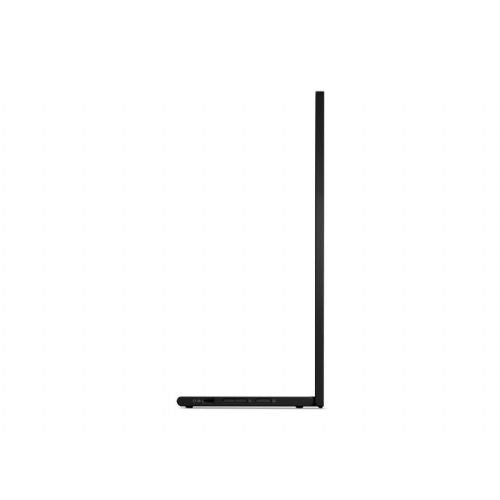
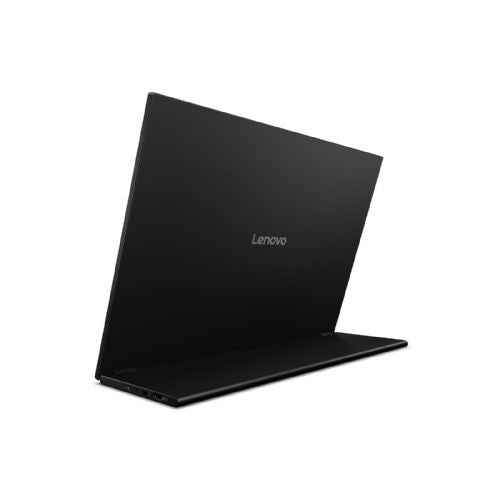
Monitor Lenovo ThinkVision M16 16-inch WUXGA 16:10 300 cd/m2 60Hz

Regular price
€289,20
Sale price
€289,20
Regular price
Lenovo ThinkVision M16 For mobile work setups Good choice for laptops The 16-inch portable monitor is designed for users who need an additional screen for...
Vendor: Lenovo
Availability: In stock , 2 dni Out of stock

Čas dostave

Svg Vector Icons : http://www.onlinewebfonts.com/icon

Izdelek bomo predvidoma poslali čez: 2 dni

Monitor Lenovo ThinkVision M16 16-inch WUXGA 16:10 300 cd/m2 60HzMonitor Lenovo ThinkVision M16 16-inch WUXGA 16:10 300 cd/m2 60HzMonitor Lenovo ThinkVision M16 16-inch WUXGA 16:10 300 cd/m2 60HzMonitor Lenovo ThinkVision M16 16-inch WUXGA 16:10 300 cd/m2 60HzMonitor Lenovo ThinkVision M16 16-inch WUXGA 16:10 300 cd/m2 60HzMonitor Lenovo ThinkVision M16 16-inch WUXGA 16:10 300 cd/m2 60Hz

Lenovo ThinkVision M16

For mobile work setups Good choice for laptops

The 16-inch portable monitor is designed for users who need an additional screen for working on the go, in the home office, or with a laptop.

  • Makes multitasking easier with multiple open windows or applications.
  • Compact dimensions allow for easy transportation and quick setup.
  • Taller 16:10 aspect ratio for more space for documents and spreadsheets.
  • Suitable for connecting to various devices with modern connections.


Sharp, colorful Lenovo ThinkVision monitors increase productivity, encourage creativity, and reduce eye strain—all with a sleek design and some of the simplest, cleanest cable and connectivity options in the industry.

It is important to know

Before choosing a monitor like the Lenovo ThinkVision M16, it’s crucial to understand how its size, resolution, and connectivity options will impact your everyday use. The specific benefits and potential limitations will be felt most by customers who frequently use the monitor in combination with a laptop or in dynamic work environments. It’s recommended to pay extra attention to port compatibility and the way you work that will most benefit your productivity.

  • The 16-inch diagonal and 16:10 aspect ratio provide more vertical space, which is often more useful for multitasking than the classic 16:9, but less suitable for those who expect a wide work surface.
  • Portable monitors with WUXGA resolution are optimal for working with text and spreadsheets, but professional users of graphics-intensive programs may notice limited sharpness compared to larger, higher-resolution models.
  • For all-day comfortable work, the balance between pixel density and viewing distance is important – at this diagonal, WUXGA is often very well balanced for typical office tasks.
  • When connecting via USB-C or other connectors, it is a good idea to check before purchasing whether your laptop supports the appropriate output (e.g. DisplayPort Alt Mode), otherwise the video signal or power may not work as expected.

Source of editorial recommendations: ENAA guides and team experience.

In practice

🟢 Basic and advanced office work

Very convenient – The compact size, 16:10 aspect ratio and WUXGA resolution allow you to comfortably display documents, spreadsheets and multiple applications at the same time.

🟡 Work on the go and hybrid setup with a laptop

Suitable with limitations – The monitor is reasonably portable due to its dimensions, but will sometimes require additional placement adjustments on smaller desks or limited space.

🟡 Creative work (photography, graphic design, video)

Suitable with limitations – The monitor allows for basic viewing and editing, but due to the screen size and resolution, it is not optimal for advanced graphics work or precise color correction.

🟡 Gaming (games with moderate speed requirements)

Suitable with limitations - 60 Hz refresh rate is acceptable for quieter games or occasional gaming, but more demanding gamers will miss the higher frequency and faster response.

🟢 Additional/external screen in a "laptop + monitor" setup

Very convenient – The monitor is easy to integrate into a laptop work environment, allowing for rapid increase in visibility and multitasking with minimal space requirements.

Answers to frequently asked questions

Can I use this monitor as a second display with a laptop via USB-C?

Use is possible if your laptop has USB-C with appropriate DisplayPort Alt Mode support; we recommend checking your laptop's specifications.

What can I expect when multitasking on a 16-inch monitor with a 16:10 aspect ratio?

More vertical space allows for comfortable work with documents, spreadsheets, and web applications; two windows are usually usefully clear, but for demanding parallel work, a larger monitor is an advantage.

Is the screen suitable for all-day text work?

The pixel density and WUXGA resolution on the 16” diagonal ensure text readability, making the screen suitable for long-term office tasks.

What limitations will I experience when editing photos or videos?

The screen allows for basic creative work, but the limited dimensions and resolution aren't ideal for checking details or colors closely.

Description updated: October 2026

Read also

If you are still deciding, the following content may also be helpful.

Best products

Best Monitors 2026

Products for various purposes

Monitors for office work

Monitors for working from home

Hybrid Work Monitors

Monitors for home use

Gaming monitors

Graphic design monitors

Why buy from ENAA?

  • More than 100 shopping guides for a better and informed choice - ENAA provides support with relevant expert content.
  • Descriptions and recommendations are based on verified data and user experiences, and the decision is completely in your hands.