Your shopping cart
😊 Product added to cart successfully
Product removed to cart successfully

Couldn't load pickup availability
Izdelek bomo predvidoma poslali čez: 5 dni


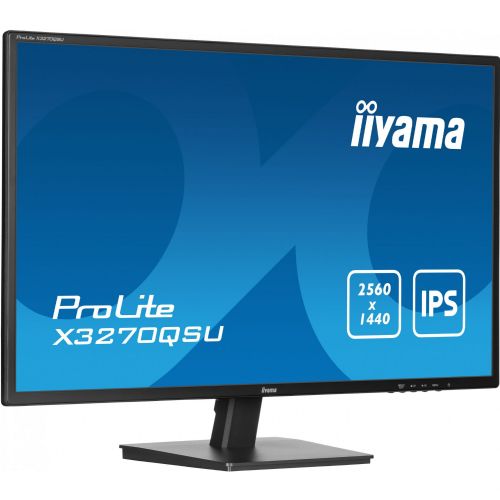

The Iiyama X3270QSU-B1 monitor, 80cm (31.5") 2560 x 1440, 16:9, IPS, 250 cd/m2, 100 Hz, 3ms, black is an advanced display designed for users who require high image resolution, exceptional color accuracy, and fast response time in professional or entertainment environments. It provides an optimal visual experience for demanding business users as well as gamers and general consumers who are looking for more than just an average monitor.
Evaluation of key product features
| Property | Value | Rating |
|---|---|---|
| Field of application | Business monitor | 🟢 9.1 |
| Size | 81.28 cm (32") | 🟢 9.0 |
| Resolution | 2560 x 1440 (WQHD) | 🟢 9.2 |
| Panel type | IPS | 🟢 9.5 |
| HDMI connector | Yes | 🟢 8.8 |
| USB-C connector | No | |
| Built-in docking station | No | |
| Aspect ratio | 16:9 | 🟢 9.0 |
| Touch screen | No | |
| Curved screen | No | |
| Response time (ms) | 3 | 🟢 8.7 |
| Brightness (cd/m2) | 250 | 🟡 6.5 |
This 31.5-inch monitor offers a large work surface with crystal-clear WQHD resolution, enabling efficient multitasking and increased productivity. The high-quality IPS panel delivers exceptionally wide viewing angles and accurate color reproduction, making it suitable for graphic design, spreadsheets, business analytics, and gaming, where color fidelity and overall sharpness are key.
A 100Hz refresh rate and 3ms response time ensure smooth motion without lag or blur. This is especially important when playing fast-paced games, watching videos, or working with demanding interactive content. The standard 16:9 aspect ratio and HDMI connectivity support provide the flexibility to connect a variety of devices, from laptops to gaming consoles.
The ergonomic design and thin bezels provide an optimal experience for multi-screen use or in limited office spaces. The device performs stably and reliably in all use cases, while ensuring low power consumption with 250 cd/m² brightness, which is satisfactory for a typical office environment.
The combination of performance, large diagonal and advanced features places this monitor at the top of reliable solutions for professionals and advanced home users who want to upgrade their visual experience.
| Screen diagonal | 80 cm (31.5 inches) | ||
| Screen resolution | 2,560 x 1,440 pixels | ||
| type | LED monitor | ||
| Color | black (matte) | ||
| EAN | 4948570123643 | ||
| Manufacturer's no. | X3270QSU-B1 | ||
| series | ProLite | ||
| Suitable for | Business | ||
| Picture | Type of glare | Frozen | |
| format | 16:9 | ||
| Technology | LED light | ||
| Panel technology | IPS | ||
| functions | QHD/WQHD | ||
| brightness | 250 cd/m² | ||
| refresh rate | 100Hz | ||
| Viewing angle (10:1) | Horizontal | 178° | |
| Vertical | 178° | ||
| Pixel pitch | Horizontal | 0.272mm | |
| Vertical | 0.272mm | ||
| reaction time | GtG | 3ms | |
| contrast | Dynamic | 80,000,000 : 1 | |
| Static | 1,200 : 1 | ||
| frequency | Horizontal | 30–90 kHz | |
| Links | 2x HDMI input (HDMI version: 2.0), 1x DisplayPort input (DisplayPort version: 1.4), 1x headphone output, 3x USB-A 3.2 Gen 1 (5 Gbit/s), 1x USB-B | ||
| USB Note | The USB 3.2 Gen 1 designation corresponds to the previous USB 3.1 Gen 1 and USB 3.0 designations. | ||
| ergonomics | type | Tilting | |
| Tilting | 4° forward, 20° backward | ||
| power supply | Eco-off | 0.3 watts | |
| power supply | Integrated | ||
| Speakers | Number | 2 | |
| Total capacity | 4 watts | ||
| wall bracket | VESA compatible (100 x 100 mm) | ||
| Features | Flicker-free LED, Low Blue Light, ACR, i-Style Color, Cable Management, X-Res Technology | ||
| Adaptive sync, Kensington lock | |||
| Accessories | Available | Power cable, USB cable, HDMI cable, installation instructions, safety instructions | |
| Dimensions | Width: 72.6 cm x Height: 50.35 cm x Depth/Length: 22.15 cm | ||
The Iiyama X3270QSU-B1 monitor with a 32-inch screen and a resolution of 2560 x 1440 offers users a very large work surface, which is practical for multitasking in a business environment or with complex spreadsheets. Such a size and resolution ratio are also well suited for home use, such as watching movies and less demanding gaming, although more demanding e-sports players may miss the higher refresh rate. For professional graphics work, where superb color accuracy and natural reproduction are required, this monitor may not be the best choice. However, its transparency and IPS technology stand out especially where comfortable reading and wide viewing angles are important, e.g. when working with documents frequently or in meetings.
Taken from: Enaa guides and team experiences.
Typical users of this monitor are business or home users who appreciate a spacious and clear work environment, where multiple open windows are an advantage. A large screen with good resolution is especially suitable for analytics, document editing, extended Excel spreadsheets or software development, as well as for home environments where the monitor is often used for series, movies or educational work. For more detailed orientation on choosing the right monitor size, you can see our guide on choosing a monitor size .
Users often trust the Iiyama brand for its focus on reliability, consistent range of professional monitors, and easy integration into various work environments.
When buying a monitor on Enaa, you have access to professional support and clear descriptions, which makes it easier for you to choose based on the purpose and size of your room. The platform allows you to quickly compare different models from a wide range, which increases your confidence in making a decision. You can also find more information in the Why Choose Enaa section on our website.
A monitor of this size and resolution is particularly suitable for multitasking, spreadsheet editing, word processing, and digital administration, where it is important to have multiple content on the screen at the same time without frequently switching between windows.
The monitor is suitable for simultaneous connection to multiple devices, as long as your devices support the appropriate connection standards, such as HDMI or DisplayPort. It is recommended to check in advance what connections you have available.
When setting up such a large monitor, it makes sense to provide a desk that is deep enough for a comfortable viewing distance. Either an adjustable stand or VESA mount compatibility can help. For even more practical advice, check out our monitor size guide .
The monitor will satisfy the needs of casual gamers, but those who prioritize extremely high refresh rates or responsiveness may prefer a model with 120 Hz or more and a faster response time.
The IPS panel offers wide viewing angles and more realistic colors, which is very convenient when working with several people at a table or using it in a room where viewing positions change frequently.
Description updated: March 2026


