Your shopping cart
😊 Product added to cart successfully
Product removed to cart successfully

Couldn't load pickup availability
Izdelek bomo predvidoma poslali čez: 5 dni
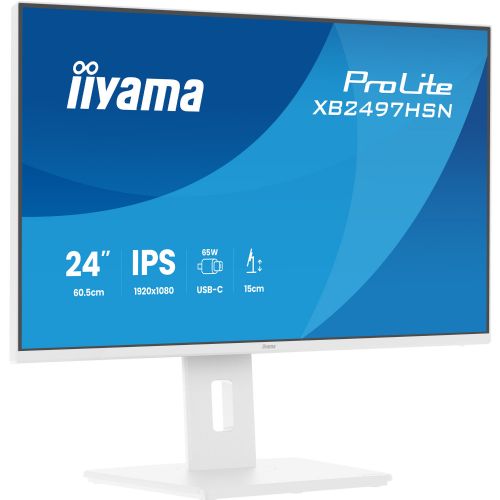


The monitor is suitable for business users, working from home, and everyday use where connections, a good picture, and a simple workspace layout are important.
The Iiyama ProLite XB2497HSN-W1 monitor is a 23.8-inch business monitor equipped with an IPS display and Full HD resolution, designed for precise and comfortable work in an office environment or home office. With its universal design and modern connectivity, it allows easy connection to various devices, which is especially useful for users looking for a flexible work display with advanced connectivity options.
The monitor is designed to make everyday work easier with a built-in USB-C port and 65W docking station. This functionality allows you to transfer video, audio, data, and power to your laptop through a single cable, reducing cable clutter and helping to create a cleaner workspace. With the integrated docking station, switching between working in the office and from home becomes extremely simple and efficient, especially for users who frequently use laptops or multiple devices.
IPS display technology provides wide viewing angles and realistic colors, which is essential when working with graphics, spreadsheets or collaborative projects. The brightness of 350 cd/m² means good visibility even in brighter rooms, which helps reduce eye fatigue during long work intervals. With a refresh rate of 100 Hz and a response time of 1 ms, the display responds quickly to events - this helps to display content smoothly and reduce motion blur, which can be important for both consumers and business users who use multiple demanding applications simultaneously.
The flat-panel monitor with a standard 16:9 aspect ratio provides good visibility for multitasking and easy desktop organization. Connectivity options via HDMI, DisplayPort and USB-C ensure broad compatibility with a variety of computers and laptops, so the monitor can easily integrate into your existing IT infrastructure. With a robust combination of practical connectivity options and advanced functionality, this monitor is ideal for applications where flexibility and convenience are paramount.
Key product features
| Property | Value | Rating |
|---|---|---|
| Field of application | Business monitor | |
| Size | 60.45 cm (23.8") | 🟢 8.5 |
| Resolution | 1920 x 1080 (FHD) | 🟡 6.5 |
| Panel type | IPS | 🟢 9.5 |
| HDMI connector | Yes | |
| USB-C connector | Yes | |
| Built-in docking station | Yes, 65W | 🟢 9.0 |
| Aspect ratio | 16:9 | |
| Touch screen | No | |
| Curved screen | No | |
| Response time (ms) | 1 | 🟢 9.5 |
| Brightness (cd/m2) | 350 | 🟢 8.5 |
⚖️ Compare features with other products of your choice
| Screen diagonal | 60.5 cm (23.8 inches) | ||
| Screen resolution | 1920 x 1080 pixels | ||
| type | LED monitor | ||
| Color | white | ||
| EAN | 4948570125906 | ||
| Manufacturer's no. | XB2497HSN-W1 | ||
| Suitable for | Business, multimedia | ||
| Picture | Type of glare | Frozen | |
| format | 16:9 | ||
| Technology | LED light | ||
| Panel technology | IPS | ||
| functions | Full high definition | ||
| brightness | 350 cd/m² | ||
| refresh rate | 100Hz | ||
| Position (5:1) | Horizontal | 89° | |
| Vertical | 89° | ||
| Viewing angle (10:1) | Horizontal | 178° | |
| Vertical | 178° | ||
| Pixel defect class | type | 2 | |
| Pixel pitch | Horizontal | 0.275mm | |
| Vertical | 0.275mm | ||
| Colors | 16.7 million | ||
| reaction time | MPRT | 1ms | |
| contrast | Dynamic | 80,000,000 : 1 | |
| Static | 1,500 : 1 | ||
| frequency | Horizontal | 30–115 kHz | |
| Links | 1x HDMI input (HDMI version: 1.4), 1x DisplayPort input, 1x DisplayPort output (DisplayPort version: 1.4), 1x headphone output, 2x USB-A 3.2 Gen 1 (5 Gbit/s), 3x USB-C 3.2 Gen 1 (5 Gbit/s), 1x RJ45 | ||
| USB-C | USB-C DP Alternative Mode | ||
| USB Note | The USB 3.2 Gen 1 designation corresponds to the previous USB 3.1 Gen 1 and USB 3.0 designations. | ||
| ergonomics | type | Swivel, swivel, tilt, height adjustable | |
| Rotating | 60° left, 60° right | ||
| Tilting | 5° forward, 23° backward | ||
| Adjustable height | 150mm | ||
| power supply | Eco-off | 0.3 watts | |
| power supply | Integrated | ||
| Speakers | Number | 2 | |
| Total capacity | 4 watts | ||
| wall bracket | VESA compatible (100 x 100 mm) | ||
| Features | Eye Comfort Certified, USB-C PD 65W, Daisy Chain, Flicker-Free, Blue Light Reduction, i-Style Color, Cable Management | ||
| Adaptive sync, Kensington lock | |||
| Additional information | Total stand height in low position: 373.5 mm | ||
| Accessories | Available | Power cable, HDMI cable, USB-C cable, installation guide, safety instructions | |
| Dimensions | Width: 53.85 cm x Height: 49.65 cm x Depth/Length: 20.95 cm | ||
Choosing the Iiyama ProLite XB2497HSN-W1 monitor is associated with some practical advantages, but it also requires attention to the intended use and working environment. Before purchasing, it is worth clearly defining for which tasks the monitor will be used most and whether it allows for a layout that supports comfortable and productive work over long periods of time.
Source of editorial recommendations: ENAA guides and team experience.
Very suitable – Full HD resolution and IPS panel are sufficient for clear document editing, email and web browsing; the ergonomic stand allows for height adjustment.
Very convenient - the USB-C port allows for easy connection of a modern laptop or switching between multiple devices, especially in combination with an additional monitor.
Suitable with limitations – Setting up two identical 24-inch monitors allows for efficient multi-window work, but more demanding tasks such as video editing or processing large spreadsheets would benefit from a higher resolution or larger diagonal.
Suitable with limitations – 100 Hz refresh rate brings a smoother image when playing games or working quickly with windows, but Full HD resolution and general features remain within the framework of the basic segment.
Less suitable – Full HD resolution at this size limits the accuracy of graphics display; for demanding graphic design or photo editing, a higher resolution or larger diagonal is more suitable.
Yes, the monitor has a USB-C connector, but to transfer the image, your device must support DisplayPort Alt Mode over USB-C.
For basic multitasking, the monitor is adequate; however, for working with larger spreadsheets or multiple programs, a larger diagonal or an additional monitor may prove to make the job easier.
Height adjustment allows for a more ergonomic position and reduces fatigue during prolonged use, which is recommended for everyday use.
100 Hz provides smoother image movement, which is noticeable when quickly scrolling through documents, working with multiple windows, or basic gaming.
Description updated: September 2026
If you are still deciding, the following content may also be helpful.
Best products
Products for various purposes
Monitors for working from home


