Your shopping cart
😊 Product added to cart successfully
Product removed to cart successfully

Couldn't load pickup availability
Izdelek bomo predvidoma poslali čez: 5 dni


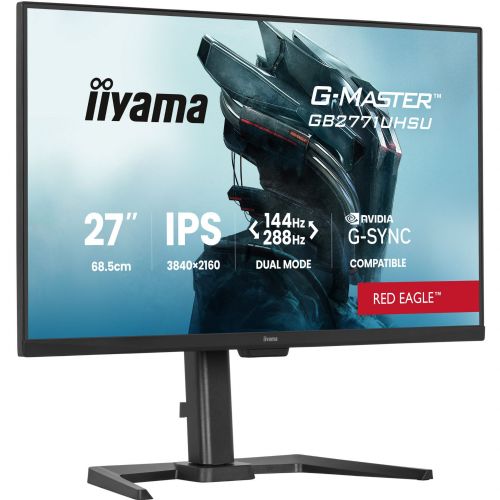

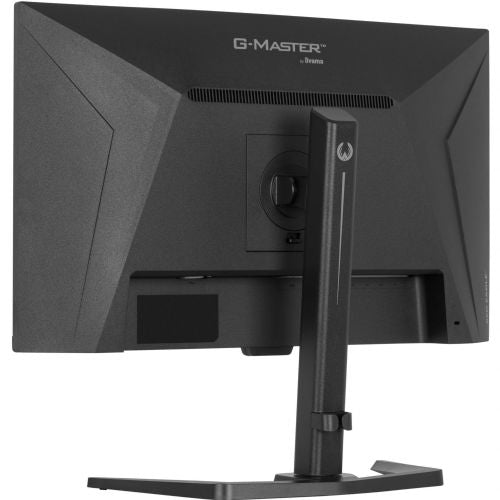

The Iiyama GB2771UHSU-B1 27" IPS, UltraHD/4K, 144 Hz, HDR400, FreeSync monitor is an advanced monitor specifically designed for demanding users who want exceptional image quality, fast refresh rates, and a superior experience when working or gaming. With its impressive 4K UHD resolution and fast response time, this monitor delivers both color accuracy and exceptionally smooth image display that business users, gamers, and all tech-savvy consumers will appreciate.
Evaluation of key product features
| Property | Value | Rating |
|---|---|---|
| Field of application | Gaming monitor | 🟢 9.5 |
| Size | 68.58 cm (27") | 🟢 9.0 |
| Resolution | 3840 x 2160 (4K UHD) | 🟢 10.0 |
| Panel type | IPS | 🟢 9.0 |
| HDMI connector | Yes | 🟢 9.0 |
| USB-C connector | Yes | 🟢 8.5 |
| Built-in docking station | No | |
| Aspect ratio | 16:9 | 🟢 8.5 |
| Touch screen | No | |
| Curved screen | No | |
| Response time (ms) | 0.8 | 🟢 9.5 |
| Brightness (cd/m2) | 450 | 🟢 8.5 |
This model with a modern IPS panel provides high color accuracy and wide viewing angles, which is especially important for graphic design, photo editing or teamwork. Thanks to the high resolution of 4K UHD, details are crystal clear, text is clearly legible, and images and video content are displayed extremely realistically.
A 144Hz refresh rate and an ultra-fast 0.8ms response time ensure smooth gameplay without blurring or lag, making this monitor a top choice for passionate gamers. FreeSync technology enables synchronization with compatible graphics cards and reduces screen tearing, further enhancing the gaming experience.
Built-in HDR400 support means that darker and brighter areas of the image are displayed more realistically, which is especially noticeable when watching movies and playing modern games. Connectors such as HDMI and USB-C offer flexibility in connecting various devices, which is useful for both business environments and home use.
The ergonomic design combined with high screen brightness allows for comfortable use in various lighting conditions. With comprehensive features and advanced technology, this monitor stands out as a reliable solution for those who expect the most from their workstation or gaming corner.
| Screen diagonal | 68.6 cm (27 inches) | ||
| Screen resolution | 3840 x 2160 pixels | ||
| type | Gaming monitor | ||
| Color | black (matte) | ||
| EAN | 4948570127139 | ||
| Manufacturer's no. | GB2771UHSU-B1 | ||
| Suitable for | Games | ||
| Picture | format | 16:9 | |
| Technology | LED light | ||
| Panel technology | IPS | ||
| functions | Ultra HD/4K, HDR Ready | ||
| brightness | 450 cd/m² | ||
| refresh rate | 144Hz | ||
| Position (5:1) | Horizontal | 89° | |
| Vertical | 89° | ||
| Viewing angle (10:1) | Horizontal | 178° | |
| Vertical | 178° | ||
| Pixel defect class | type | 2 | |
| Pixel pitch | Horizontal | 0.155mm | |
| Vertical | 0.155mm | ||
| Colors | 1.070 million | ||
| reaction time | MPRT | 0.8ms | |
| contrast | Dynamic | 100,000,000 : 1 | |
| Static | 1,500 : 1 | ||
| frequency | Horizontal | 30–360 kHz | |
| Links | 2x HDMI input (HDMI version: 2.1), 1x DisplayPort input (DisplayPort version: 1.4), 1x headphone output, 2x USB-A 3.2 Gen 1 (5 Gbit/s), 2x USB-C 3.2 Gen 1 (5 Gbit/s) | ||
| USB Note | The USB 3.2 Gen 1 designation corresponds to the previous USB 3.1 Gen 1 and USB 3.0 designations. | ||
| ergonomics | type | Swivel, swivel, tilt, height adjustable | |
| Rotating | 45° left, 45° right | ||
| Tilting | 5° forward, 23° backward | ||
| Adjustable height | 150mm | ||
| power supply | Eco-off | 0.3 watts | |
| power supply | Integrated | ||
| Speakers | Number | 2 | |
| Total capacity | 4 watts | ||
| wall bracket | VESA compatible (100 x 100 mm) | ||
| Features | Blue light reduction, Flicker-free LED, i-Style Colour, Cable management, USB hub | ||
| AMD FreeSync, Kensington lock, NVIDIA G-Sync compatible | |||
| VESA DisplayHDR standard | DisplayHDR 400 | ||
| Additional information | Total stand height in low position: 417 mm | ||
Before purchasing a 27-inch 4K monitor like the Iiyama GB2771UHSU-B1, it's crucial to understand the trade-off between exceptional display sharpness and the need to accommodate system scaling and physical desk space. It's also important to check connectivity options and whether your computer supports the desired resolutions and frequencies. The right decision often depends on how well the monitor fits with the rest of your equipment and the specific needs of your work or home environment.
Source of editorial recommendations: ENAA guides and team experience.
The monitor is particularly suitable for use in a dual setup, as the 27-inch diagonal and 4K resolution provide high sharpness and display consistency, which is ideal for users who need clarity of multiple windows and data.
The high resolution and IPS panel provide excellent text readability and enough space for spreadsheets, multiple documents or analytical work – ideal for business use and longer concentration.
The monitor is a suitable starting point for gaming in 4K resolution at 144 Hz, but a suitably powerful graphics card will be necessary to take advantage of these capabilities.
4K resolution, IPS matrix and HDR support are especially useful when processing photos and video content, where details and display quality are key.
A set with a second monitor of different dimensions or resolution (e.g. 24-inch FHD) can lead to display inconsistency and uneven sharpness and scaling, so it is not an optimal choice for advanced users.
For the highest resolution and refresh rate, modern connectors are essential; older standards do not allow you to utilize the monitor's full potential.
To display 4K at 144 Hz, you typically need a DisplayPort 1.4 or appropriate HDMI connector and a powerful graphics card that supports such output.
A monitor with 4K resolution, IPS panel, and HDR support enables high-quality display of colors and details, which is an advantage for creative tasks.
The image is extremely sharp, but a magnification setting in the operating system is recommended for a comfortable font and icon size.
For an optimal experience, we recommend using two identical monitors, as combining with a monitor of different resolution or size may cause differences in display and sharpness.
It is best to use DisplayPort or modern HDMI, as they allow image transmission at the highest resolution and refresh rate.
Description updated: October 2026
If you are still deciding, the following content may also be helpful.
Best products
Products for various purposes
Monitors for working from home


