Your shopping cart
😊 Product added to cart successfully
Product removed to cart successfully

Couldn't load pickup availability
Izdelek bomo predvidoma poslali čez: 3 dni


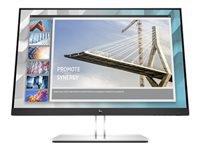
The 24-inch monitor is designed for office users who are looking for comfort when working with documents and multiple open programs for extended periods of time.
HP E24i G4 24-inch IPS WUXGA
 |
||
| Manufacturer | HP INC. | |
| Manufacturer's part no. | 9VJ40AA#ABB | |
| Marketing description | |
| Work comfortably and stay focused with the optimized ergonomics and WUXGA resolution of the HP E24i G4 WUXGA Monitor with HP Eye Ease, designed around you. Simplify IT's life with remote management. | |
| Product features | |
| |
| Product features | |
| Product description | HP E24i G4 - E-Series - LED monitor - 24" |
| Device type | LCD screen with LED backlight - 24" |
| energy class | Class D |
| Energy consumption per year | 24 kWh |
| Power consumption (on mode) | 15.3W |
| Features | USB 3.2 Gen 1 hub |
| Panel type | IPS |
| Relationship | 16:10 |
| Native resolution | WUXGA 1920 x 1200 @ 60Hz |
| Pixel Pitch | 0.2745mm |
| Brightness | 250 cd/m² |
| Contrast ratio | 1000:1 / 5000000:1 (dynamic) |
| Response time | 5 ms (gray to gray with overdrive) |
| Color support | 16.7 million colors (8-bit) |
| Color scale | 72% (CIE 1931), 83% (CIE 1976) |
| Input connectors | HDMI, VGA, DisplayPort |
| Screen position adjustments | Height, rotation (pivot), rotation, pitch |
| Screen coating | Haze 25%, anti-glare hardness 3H |
| Voltage | AC 120/230V (50/60Hz) |
| Color | Black |
| Dimensions (WxDxH) - with stand | 53.2cm x 20.69cm x 50.96cm |
| Weight | 6.06 kg |
| Localization | English / Europe |
| Environmental standards | TCO Certified 8 displays, TCO Certified edge displays, ENERGY STAR qualified |
| Compliant standards | Plug and Play, TUV GS, VCCI, BSMI, NOM, TUV S, CB, CCC, PSB, FCC, ISO 9241-307, KCC, WEEE, cTUVus, E-Standby, CEC, KC, CECP, CEL, EAC, CEL Class 1, ISC, BIS, Low Halogen, DisplayPort 1.2, HP GSE, Australia-New Zealand MEPS, Vietnam MEPS |
| Manufacturer's warranty | 3-year warranty |
The text is machine translated.
Before choosing the HP E24i G4 monitor, it's helpful to focus on the practical implications of the screen ratio, connectivity, and ergonomics, as these factors can be more important in the long run than just the basic specs. This model is geared primarily for business and multitasking use, but there are aspects that are easy to overlook before making a purchase.
Source of editorial recommendations: ENAA guides and team experience.
Very suitable – the 16:10 format with WUXGA resolution and IPS technology is especially useful for working with documents, spreadsheets and e‑mail, where image clarity and stability count.
Very convenient - using two identical monitors ensures a uniform image and uninterrupted workspace, but it is recommended to first check the same height and adjustability of the stand for ergonomic reasons.
Suitable with limitations - a wide range of connectors allows connection to most computers, but the absence of USB-C prevents a simple single-cable solution for modern laptops without other outputs.
Suitable with limitations – the monitor allows for basic gaming and multimedia use, but due to the standard refresh rate, it is not optimal for quick reactions or particularly smooth display of fast motion.
Very convenient – the extra screen height and good color consistency make it easier to work with code, tables, or display multiple content on one screen at the same time.
The monitor has several types of inputs (DisplayPort, HDMI, VGA), allowing you to connect various devices, but it does not have a built-in KVM switch for quickly switching between them.
Yes, the monitor offers several classic USB ports for connecting devices, but there is no USB-C connection for image transfer and powering modern laptops.
The 16:10 aspect ratio allows for more vertical space on the screen, which is useful when writing, reading documents, or working with longer tables.
Yes, the size and resolution allow for the coordinated use of two identical displays, especially for multitasking or an extended workspace.
Description updated: August 2026
If you are still deciding, the following content may also be helpful.
Best products
Products for various purposes
Monitors for working from home


