Your shopping cart
😊 Product added to cart successfully
Product removed to cart successfully

Couldn't load pickup availability
Izdelek bomo predvidoma poslali čez: 5 dni
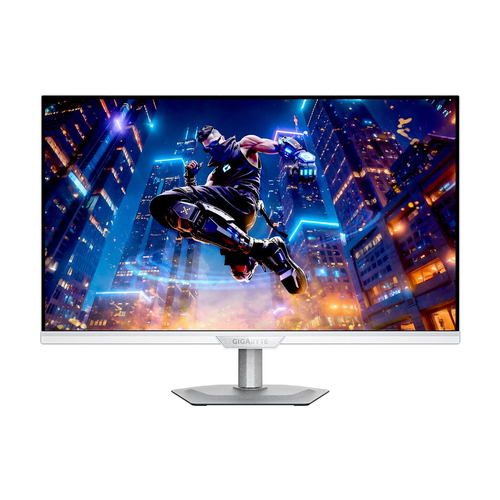
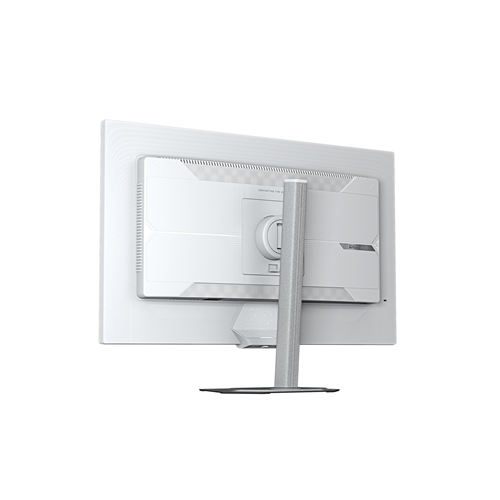

The Gigabyte M27UP ICE 27" white SS-IPS 4K 160 Hz/320 Hz HDR FreeSync Pivot monitor is designed for anyone who needs a superior visual experience in a professional environment, advanced gaming, or everyday use. With an advanced combination of 4K resolution, fast refresh rate, and a high-quality IPS panel, it brings the user exceptional image clarity, high performance, and flexibility for a variety of needs.
This monitor is a great choice for business users looking for display accuracy and an expanded workspace, for gamers who want flawless speed and smooth images even in the most demanding games, and it is also suitable for all consumers who appreciate image quality and modern connectivity.
Evaluation of key product features
| Property | Value | Rating |
|---|---|---|
| Field of application | Business, gaming, home use | 🟢 9.5 |
| Size | 27" | 🟢 9 |
| Resolution | 3840 x 2160 (4K UHD) | 🟢 10 |
| Panel type | SS-IPS (Super Speed IPS) | 🟢 9.5 |
| HDMI connector | Yes | 🟢 10 |
| USB-C connector | Yes | 🟢 9 |
| Built-in docking station | Yes | 🟢 9 |
| Aspect ratio | 16:9 | 🟢 9.5 |
| Touch screen | No | |
| Curved screen | No | |
| Response time (ms) | 1ms (MPRT) | 🟢 9 |
| Brightness (cd/m2) | 400 | 🟢 8.5 |
The advanced SS-IPS panel technology enables a significantly wider color gamut, fast response times and wide viewing angles without distortion, meaning you enjoy sharp and vivid images every time. 4K UHD resolution delivers exceptional detail – from demanding graphics processing, professional design, to watching movies and playing games with flawless picture quality.
The monitor offers an extremely high refresh rate of up to 160 Hz in 4K mode and even up to 320 Hz in FHD resolution, which will impress even the most demanding gamers. With support for FreeSync technology, a smooth image without tearing and blurring is ensured, and unparalleled smoothness even in very dynamic scenes. The built-in docking station allows modern connection of multiple devices via USB-C and HDMI connectors, which is especially useful for modern work setups and quick transitions between devices.
The Pivot feature allows the monitor to be easily rotated into a portrait orientation, which will benefit developers, designers, and anyone who works with long documents or spreadsheets. The white color and minimalist design allow it to fit seamlessly into any modern work or living environment.
Thanks to the fast 1ms response time, the product is optimal for games and content where every second counts, while HDR support improves contrast and details in both dark and bright parts of the image. The monitor stands out for its versatility, top-notch parameters and adaptability to different user needs.
| Screen diagonal | 68.5 cm (27 inches) | ||
| Screen resolution | 3840 x 2160 pixels | ||
| type | Gaming monitor | ||
| Manufacturer's no. | M27UP ICE EK | ||
| Suitable for | Games | ||
| Picture | Type of glare | Anti-reflective | |
| Technology | LED light | ||
| Panel technology | SS-IPS | ||
| Backlight | Edge LED | ||
| functions | Ultra HD/4K, HDR Ready | ||
| brightness | 350 cd/m² | ||
| refresh rate | 160Hz | ||
| Viewing angle (10:1) | Horizontal | 178° | |
| Vertical | 178° | ||
| Pixel pitch | Horizontal | 0.155mm | |
| Vertical | 0.155mm | ||
| Colors | 1.070 million | ||
| reaction time | GtG | 1ms | |
| contrast | Static | 1,000 : 1 | |
| Links | 2x HDMI input (HDMI version: 2.1), 1x DisplayPort input (DisplayPort version: 1.4), 1x headphone output, 3x USB-A 3.2 Gen 1 (5 Gbit/s), 1x USB-B 3.2 (5 Gbit/s), 1x USB-C | ||
| USB Note | The USB 3.2 Gen 1 designation corresponds to the previous USB 3.1 Gen 1 and USB 3.0 designations. | ||
| ergonomics | type | Swivel, swivel, tilt, height adjustable | |
| Rotating | 15° left, 15° right | ||
| Tilting | 5° forward, 21° backward | ||
| Adjustable height | 130mm | ||
| power supply | Eco-off | 0.3 watts | |
| power supply | Integrated | ||
| Speakers | Number | 2 | |
| Total capacity | 10 watts | ||
| Standards | video | 95% DCI-P3, 125% sRGB | |
| wall mount | VESA compatible (100 x 100 mm) | ||
| Features | Dual Mode, Flicker Free, HBR3, USB-C PD 18W, Tactical Switch 2.0, KVM, Smart Offset Meter, Aim Stabilizer Sync, Night Vision, Game Assist, Timer, Crosshair Meters, PiP, PbP, Low Blue Light, Clear Audio, Metal Stand with Ultra-Slim 2mm Base, USB Hub | ||
| AMD FreeSync, Kensington lock, NVIDIA G-Sync compatible | |||
| VESA DisplayHDR standard | DisplayHDR 400 | ||
| Additional information | Refresh rate: Full HD: 320 Hz; Ultra HD/4K: 160 Hz | ||
The Gigabyte M27UP ICE monitor with a 27-inch diagonal, 4K resolution and an advanced SS-IPS panel is a suitable tool for users who need a very sharp image, wide viewing angles and reliable, fast refresh rates. Due to the high frequency (up to 320 Hz in FHD mode and 160 Hz in 4K) and FreeSync support, it is particularly interesting for more demanding gamers, and also performs well in environments where productivity, multitasking and display accuracy are important.
The Pivot feature allows for flexible use in an office or creative environment, but due to its high-end and exposed gaming features, it is not optimal for users looking for an affordable basic display for everyday tasks. In addition, a more powerful computer and appropriate connectivity are recommended to optimally utilize all the features.
Recommendation source: Enaa guides and team experiences.
This monitor is most often chosen by users who value a combination of exceptional resolution, large work area and refresh rate. Professional users and students who want clear text and comfort during long hours of work can take advantage of 4K and ergonomic options, while more demanding gamers appreciate responsiveness and support for higher frequencies. The monitor is also suitable for working in pairs with a second display, especially where the balance of size and sharpness is key for clarity and efficiency.
Our guide to choosing the right monitor size also makes the decision easier, describing practical aspects such as viewing distance and desk placement. Users highlight their trust in the Gigabyte brand, as it offers a diverse ecosystem of monitors and computer equipment that enables the harmonious development of a work or gaming environment.
When you buy monitors at Enaa, you have access to verified expert descriptions based on our team's experience, as well as clearly marked filters for quick comparison by size, usage type, and display technology. This way, you can easily choose the monitor that suits your needs, whether you're furnishing a home office, building a gaming setup, or renovating your work environment.
The Gigabyte M27UP ICE monitor, with a refresh rate of up to 320 Hz in FHD mode and a responsive SS-IPS panel, provides very smooth image display, which is crucial for fast-paced genres and e-sports. It works best with a powerful computer that can provide high enough efficiency at such a high refresh rate.
The pivot feature allows you to rotate your screen vertically, making it easier to work with documents, programming, or spreadsheets. Those who frequently use advanced text tools or edit long columns of data will benefit the most.
When using two monitors, it's important to keep the size and resolution as consistent as possible to ensure consistent sharpness and easy movement of programs between the two screens. You can also read more about this in our guide to using two monitors effectively .
Fast refresh rates (up to 320 Hz) mean smoother motion, which is most noticeable when playing games and moving content. In everyday office work, the difference is less pronounced, but it can still make work more enjoyable and less tiring on the eyes.
Use with a regular laptop is possible, but to optimally utilize 4K resolution and high refresh rates, it is recommended that the laptop has appropriate connectors (e.g. HDMI 2.1 or DisplayPort) and a sufficiently powerful graphics card.
Description updated: April 2026


