Your shopping cart
😊 Product added to cart successfully
Product removed to cart successfully

Couldn't load pickup availability
Izdelek bomo predvidoma poslali čez: 5 dni


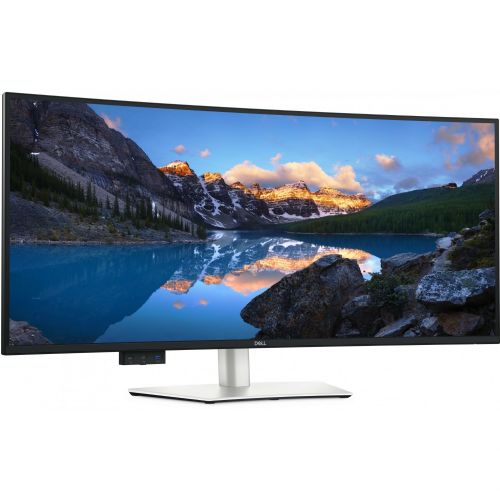


The DELL U4025QW 100.85 cm (39.7") IPS, 600 cd/m 2 , 5 ms, 120 Hz, 21:9, HDMI, DP, USB-C 90W, gray monitor is an extremely powerful curved monitor designed for business users, demanding gamers, and anyone who wants an expanded work or gaming experience without compromise. Its ultra-wide diagonal, advanced IPS panel, and superior brightness provide a panoramic view and superior image quality, which is beneficial for both work and entertainment.
Evaluation of key product features
| Property | Value | Emoji rating |
|---|---|---|
| Field of application | Business monitor | 🟢 9.5 |
| Size | 101.6cm (40) | 🟢 10 |
| Resolution | 5120 x 2160 (WUHD) | 🟢 9.7 |
| Panel type | IPS | 🟢 9 |
| HDMI connector | Yes | 🟢 9 |
| USB-C connector | Yes | 🟢 10 |
| Built-in docking station | Yes, 140W | 🟢 10 |
| Aspect ratio | 21:9 | 🟢 9.5 |
| Touch screen | No | |
| Curved screen | Yes | 🟢 9 |
| Response time (ms) | 8 | 🟡 6.5 |
| Brightness (cd/ m2 ) | 600 | 🟢 9.5 |
The monitor is ideal for those who need a large work surface, easy switching between devices and exceptional image quality – whether for complex multi-programming, financial analysis, creative work or immersive gaming. With a built-in 140W docking station, USB-C connectivity and an ultra-wide 21:9 aspect ratio, it is particularly suitable for modern work environments where efficiency and ergonomics matter.
WUHD (5120 x 2160) resolution on a nearly 40-inch curved IPS display delivers superior image sharpness and simultaneous display of multiple sources without the need for multiple monitors. The curvature of the display combined with high brightness (600 cd/ m2 ) creates an exceptional spatial experience, reducing eye movement and improving productivity, while maintaining natural colors and wide viewing angles thanks to IPS technology.
The monitor boasts advanced connectors: HDMI, DisplayPort and an advanced USB-C connection with a power delivery capacity of up to 90 W, allowing simultaneous transmission of image, audio, data and power. The built-in docking station makes it much easier to connect laptops and additional devices without unnecessary cables.
In addition to its high technical performance, this model offers an exceptional 120Hz refresh rate for smooth images in fast-paced action and reliable response times. With a spacious, curved surface and advanced connectivity, it stands out as the partner of choice in professional environments and impresses demanding users who expect more - from work to entertainment.
| Screen diagonal | 101 cm (39.7 inches) | ||
| Screen resolution | 5120 x 2160 pixels | ||
| type | LED monitor | ||
| Color | black/silver | ||
| EAN | 5397184821510 | ||
| Manufacturer's no. | DELL-U4025QW | ||
| series | UltraSharp | ||
| Suitable for | Business | ||
| Picture | Type of glare | Anti-reflective | |
| format | 21:9 | ||
| Curved | Yes (radius: 2,500R) | ||
| Technology | LED light | ||
| Panel technology | IPS black | ||
| Backlight | Edge LED | ||
| functions | HDR ready | ||
| brightness | 600 cd/m² | ||
| refresh rate | 120Hz | ||
| Viewing angle (10:1) | Horizontal | 178° | |
| Vertical | 178° | ||
| Pixel pitch | Horizontal | 0.181mm | |
| Vertical | 0.181mm | ||
| Colors | 1.070 million | ||
| contrast | Static | 2,000 : 1 | |
| Links | 1x HDMI input (HDMI version: 2.1), 1x DisplayPort input (DisplayPort version: 1.4), 2x Thunderbolt, 1x 3.5 mm audio output, 5x USB-A 3.2 Gen 2 (10 Gbit/s), 3x USB-C 3.2 Gen 2 (10 Gbit/s), 1x RJ45 | ||
| ergonomics | type | Rotatable, tiltable, height adjustable | |
| Rotating | 30° left, 30° right | ||
| Tilting | 5° forward, 21° backward | ||
| Adjustable height | 150mm | ||
| Energy Star | Yes | ||
| power supply | Eco-off | 0.3 watts | |
| Speakers | Number | 2 | |
| Total capacity | 18 watts | ||
| Standards | video | DCI-P3 99% display P3 99% sRGB 100% BT.709 100% DCI-P3 display P3 sRGB and BT.709: Delta E < 2 (average) | |
| wall mount | VESA compatible (100 x 100 mm) | ||
| Features | Ambient light sensor, PbP/PiP, KVM, USB hub, 140W Thunderbolt Power Delivery, 15W USB-C Power Delivery, Low Blue Light, Internal Multi-Streaming, Dell Display Manager compatible, Dell Color Management Software, Daisy Chain capability, | ||
| Kensington Castle | |||
| VESA DisplayHDR standard | DisplayHDR 600 | ||
| Notice | Total height in the lower position: 472.3 mm | ||
| Accessories | Available | Power cord, DisplayPort 1.4 cable (1.8 m), USB Type-A to USB Type-C Gen 2 cable (1.0 m), Active Thunderbolt 4 cable (1.5 m), HDMI 2.1 cable (1.8 m), Quick Start Guide, Safety, Environmental and Regulatory Information, Factory Calibration Report | |
| sustainability | Environmentally friendly production (TCO) Efficient energy consumption (TCO) |
||
The DELL U4025QW monitor is intended primarily for demanding business users and advanced consumers who often work with multiple open windows or complex applications. Its large ultra-wide diagonal and high resolution enable excellent visibility and multitasking on a single screen, which is especially useful for data analysis, document editing and creative projects. Due to the curved screen, it is recommended for work environments with a suitably deep desk and where the user benefits most from a wide display - e.g. when programming, designing or editing timelines. The model is not an optimal choice for work surface constraints, so it may become less practical in very small spaces or in typical home use, where a compact layout is a priority. Another advantage is rich connectivity with modern connectors and a single cable ecosystem for power and image transfer, but for some older laptops, check the compatibility of the USB-C or Thunderbolt connector.
Taken from: Enaa guides and team experiences.
Typical users of this monitor are business professionals, analysts, developers, as well as more demanding creators who want to follow multiple content at once on one screen or efficiently manage programs with wide toolbars. Due to the 21:9 ratio and large work area, it is often chosen by those who manage large spreadsheets, lead meetings while taking notes in parallel, or are involved in multimedia projects where spatial width is above the standard. You can read more about the advantages of choosing large or ultrawide monitors in the guide How to choose a monitor size and which one to buy .
Users also repeatedly choose Dell products due to their reliability, panel quality, and broad support in the business environment.
At Enaa, you can help yourself before you buy with extensive expert guides and comparisons that make it easier for you to decide on the most suitable monitor for your needs. We are equipped with extensive experience in advising companies and individuals on choosing optimal computing solutions, which enables a more informed purchasing experience.
Yes, thanks to the ultra-wide screen and high resolution, you can view multiple programs, documents, or data sources simultaneously on this monitor without the need for an additional display.
To use a 40-inch curved monitor, we recommend a desk that is deep and wide enough to provide the appropriate distance for comfortable viewing and an optimal experience.
The monitor offers a high refresh rate and fast response time, so it may be suitable for casual gaming, especially games that take advantage of wide viewing angles. For competitive eSports, even higher frequencies or faster response times may be a priority.
Before connecting, make sure your laptop supports video output via USB-C (DisplayPort Alt Mode or Thunderbolt) to take full advantage of power and video transfer over a single cable. For more information, see our guide to effective monitor placement .
The ultra-wide 21:9 aspect ratio allows for greater visibility of content, easier window arrangement, and a better multitasking experience, which is especially useful in analytical, administrative, or creative environments.
Description updated: March 2026


