Your shopping cart
😊 Product added to cart successfully
Product removed to cart successfully

Couldn't load pickup availability
Izdelek bomo predvidoma poslali čez: 5 dni
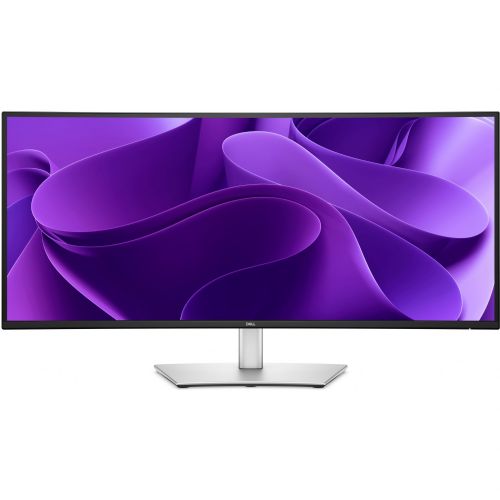


Discover seamless productivity with the industry-leading Dell Pro Monitor P3425WE, which sets new standards in business environments and for content creators with its 34-inch UWQHD resolution (3440 x 1440) and 21:9 aspect ratio.
The Dell Pro P3425WE Monitor represents the perfect combination of superior images, advanced connectivity, and ergonomics, making it an ideal choice for professionals, IT departments, designers, analysts, developers, or anyone who swears by working comfortably and efficiently with multiple windows open at the same time.
Thanks to advanced IPS (In-Plane Switching) technology, you can enjoy vivid colors and wide viewing angles, allowing the same display quality from any position. The brightness of 350 cd/m² and the refresh rate of 100 Hz ensure a sharp, smooth and comfortable image without unpleasant eye fatigue, even during long hours of work or entertainment.
This monitor is perfect for anyone who wants to maximize their workspace, display multiple content at once, and provide a superior user experience when processing graphics, analyzing data, or working with multiple documents.
It's extremely easy to use: just connect the monitor to your computer or laptop via the appropriate connector, and in the case of USB-C, you can power your laptop directly through the monitor. With the built-in USB ports, you can quickly connect additional devices, and the RJ-45 enables a fast and reliable network connection.
The Dell Pro P3425WE Monitor impresses with both its technical capabilities and its elegant black and silver design that complements any modern office or home workstation. Treat yourself to a monitor that reaches new heights of productivity and visual comfort!
Specifications
| Suitable for | Business | ||
| Picture | Type of glare | Anti-reflective | |
| format | 21:9 | ||
| Curved | Yes (radius: 3,800R) | ||
| Technology | LED light | ||
| Panel technology | IPS | ||
| Backlight | Edge LED | ||
| brightness | 350 cd/m² | ||
| refresh rate | 100Hz | ||
| Viewing angle (10:1) | Horizontal | 178° | |
| Vertical | 178° | ||
| Pixel defect class | type | 2 | |
| Pixel pitch | Horizontal | 0.233mm | |
| Vertical | 0.233mm | ||
| Colors | 1,070 million | ||
| Reaction time | GtG | 5ms | |
| contrast | Static | 1,500:1 | |
| frequency | Vertical | 30–100 Hz | |
| Links | 1x HDMI input, 1x DisplayPort input (DisplayPort version: 1.4), 3x USB-A 3.2 Gen 1 (5 Gbps), 1x USB-B 3.2 (5 Gbps), 2x USB-C 3.2 Gen 1 (5 Gbps) | ||
| ergonomics | type | Swivel, tilt, height adjustable | |
| Rotating | 30° left, 30° right | ||
| Tilting | 5° forward, 21° backward | ||
| Adjustable height | 150mm | ||
| Energy Star | 8.0 | ||
| Power supply | Eco-off | 0.3 watts | |
| Energy consumption | Maximum 200 watts | ||
| power supply | Integrated | ||
| Standards | video | 99% sRGB | |
| Wall bracket | VESA compatible (100 x 100 mm) | ||
| Features | Eye Comfort Technology, ComfortView Plus, PiP, PbP, USB-C Power Delivery 15/90W, DDPM, PiP, PbP, KVM, USB Power Delivery, Dell Display Manager, Peripheral Manager | ||
| Picture in Picture, Kensington Castle | |||
| Additional information | Total stand height in low position: 391.3 mm | ||
| Accessories | Available | Power cord, DisplayPort cable, USB-A to USB-B cable, USB-C cable, Safety, Environmental, and Regulatory Information, Cable ties | |
| sustainability | Environmentally friendly production (TCO) Efficient energy consumption (TCO) |
||
| Dimensions | Width: 81.6 cm x Height: 54.13 cm x Depth/Length: 22.94 cm | ||
The Dell Pro P3425WE monitor with an ultra-wide (34'') diagonal and UWQHD resolution is well suited for demanding business users and anyone who often works with multiple open windows or spreadsheets. The 21:9 ratio and curved screen facilitate multitasking and make it easier to replace two monitors, while the IPS panel ensures reliable image quality and pleasant colors. Thanks to the USB-C port with 90 W charging and RJ-45 network, the screen is particularly practical for modern laptop setups in the office, at home or for remote work.
The model does stand out in terms of clarity and working comfort, but its size and curvature make it not the best fit for space-constrained desks or users looking for a classic monitor for basic home use. With a slightly lower refresh rate (100 Hz) than competing gaming models and due to its emphasis on productivity, it is less optimal for users whose main priority is a fast-responsive screen for e-sports.
Taken from: Enaa guides and team experiences.
This ultrawide monitor is most often chosen by business users who daily move between numerous work windows, analyze data, program or conduct meetings on one half of the screen, and monitor e-mail or documentation on the other. The wide working surface allows you to arrange multiple applications simultaneously without constant switching, which is especially useful for home work or hybrid setups. Because of these features, the P3425WE is also suitable for digital content creators, analysts, as well as casual users who enjoy a wider picture when watching movies.
If you're interested in the details on choosing the right monitor based on your multitasking needs or screen size, our guide to choosing a monitor size can also be helpful. Users also often appreciate the reliability and ecosystem of Dell devices, which makes it easy to integrate the monitor into an existing business environment.
At Enaa, you receive expert support with detailed monitor selection guides and always have access to a wide range of different models to compare. The choice is even easier because you can filter by more detailed criteria (size, resolution, connectivity) and, with the help of the team's experience, you can more easily decide on the solution that best suits your work or home environment.
Yes, 21:9 ultrawide monitors like this Dell Pro model often replace two regular monitors, providing a continuous workspace without distracting edges or image interruptions. For recommendations for such setups, check out our dual monitor productivity guide .
The USB-C connector allows you to transfer images, audio, data and charge your laptop with a single cable, which significantly simplifies connectivity and reduces the number of cables on your desk. This is especially useful in modern work settings and mobile offices.
For casual gaming or games that don't require the highest refresh rates, this monitor is suitable, offering 100 Hz and good responsiveness. For the most demanding gamers (e.g. e-sports titles) who need extreme speeds, there are models with higher refresh rates.
The curvature helps improve visibility and reduces head movement, which is especially noticeable on ultrawide monitors. This makes long-term tasks or reading text more pleasant and less tiring on the eyes, especially on larger diagonals.
It's important to have enough space on your desk, as a 34-inch diagonal may be too large for smaller or shallow work surfaces. It's also a good idea to follow the recommendations for optimal distance and setup in our monitor size guide .
Description updated: March 2026


