Your shopping cart
😊 Product added to cart successfully
Product removed to cart successfully

Couldn't load pickup availability
Izdelek bomo predvidoma poslali čez: 5 dni


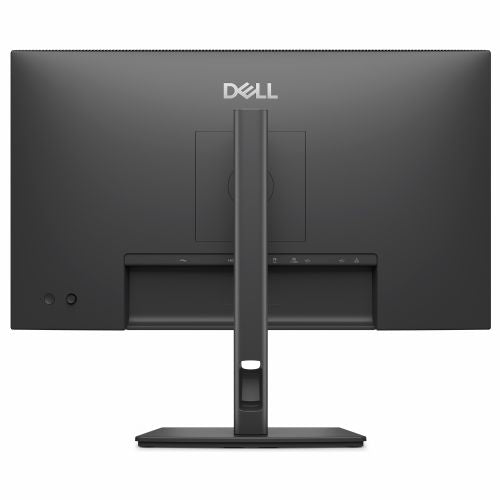


A 23.8-inch FHD monitor with an IPS display, designed for business users and those who need clarity when working with multiple windows or devices.
The DELL Pro P 24 USB-C Hub P2426HE Monitor, 23.8-inch IPS Display, 1920 x 1080, 120 Hz, offers users an upgrade to their work or gaming environment with its exceptional connectivity and image clarity. This monitor is designed for modern needs where productivity and visual quality are key.
Evaluation of key product features
| Property | Value | Emoji rating |
|---|---|---|
| Field of application | Business monitor | 🟢 9.5 |
| Size | 60.45 cm (23.8") | 🟢 9.0 |
| Resolution | 1920 x 1080 (FHD) | 🟡 7.5 |
| Panel type | IPS | 🟢 9.5 |
| HDMI connector | Yes | 🟢 9.0 |
| USB-C connector | Yes | 🟢 10.0 |
| Built-in docking station | Yes, 96W | 🟢 10.0 |
| Aspect ratio | 16:9 | 🟡 7.5 |
| Touch screen | No | |
| Curved screen | No | |
| Response time (ms) | 8 | 🟡 6.5 |
| Brightness (cd/m2) | 300 | 🟡 7.0 |
⚖️ Compare features with other products of your choice
This monitor is primarily suitable for business users looking for a reliable working environment, but thanks to the high refresh rate of 120 Hz it is also suitable for gamers and more demanding consumers. The integrated USB-C hub ensures fast and efficient connection of laptops, accessories and power supply up to 96 W, allowing for a tidy workspace without unnecessary cables.
The built-in IPS panel delivers wide viewing angles and color accuracy, making the display ideal for working with graphics, data, or presentations. Full HD resolution ensures clear display of content, and 300 cd/m² brightness provides good visibility even in very bright rooms. Connections such as HDMI, DisplayPort, USB, and RJ45 allow for connectivity to a wide range of devices and networks, making the monitor a versatile choice for the modern office or home environment.
The ergonomic design allows for height, tilt, and swivel adjustments, reducing eye and neck strain during extended work. Thanks to the 8ms response time and 120Hz refresh rate, even with fast movements, there is no blurring on the screen, further enhancing the user experience when playing games or video conferencing.
This model stands out for its built-in USB-C docking station, which reduces the need for additional adapters, as well as its intuitive use and high level of flexibility. The monitor is a great choice for anyone looking to increase productivity, efficiency and comfort in their work environment.
Screen
Screen diagonal: 60.5 cm (23.8")
Screen resolution: 1920 x 1080 pixels
HD type: Full HD
Native aspect ratio: 16:9
Display technology: LCD
Panel type: IPS
Feature: LED backlight
Backlight type: Side LED
Brightness (maximum): 300 cd/m²
Response time: 8 ms
Reaction time measurement method: GTG (gray to gray)
Feature: Anti-glare screen
Screen shape: Flat
Supported graphics resolutions: 640 x 480 (VGA), 720 x 400, 800 x 600 (SVGA), 1024 x 768 (XGA), 1152 x 864 (XGA+), 1280 x 1024 (SXGA), 1600 x 900, 1920 x 1080 (HD 1080)
Supported video modes: 1080p, 720p, 576p, 480p
Contrast ratio: 1500:1
Maximum refresh rate: 120 Hz
Horizontal viewing angle: 178°
Vertical viewing angle: 178°
Number of colors on the screen: 16.7 million colors
Response time (fast): 5 ms
Pixel pitch: 0.2745 x 0.2745 mm
Pixel density: 93 ppi
Visible size (horizontal): 52.7 cm
Visible size (vertical): 29.6 cm
Visible size (diagonal): 60.5 cm
Digital horizontal frequency: 30 - 135 kHz
Digital vertical frequency: 48 - 120 Hz
Surface hardness: 3H
sRGB coverage (classic): 99%
Services
Feature: Flicker-free technology
Feature: Low Blue Light Technology
design
Market positioning: Consumer
Product color: Gray
Connections and interfaces
Feature: Built-in USB hub
USB input connector type: USB Type-C
Number of USB Type-C input ports: 1
Number of USB-A input ports: 2
Number of USB-C input ports: 1
Function: USB Type-C DisplayPort Switch Mode
Function: USB powered
USB power adapter up to: 96 W
Feature: HDMI
Number of HDMI inputs: 11
HDMI version: 1.4
Number of DisplayPort connectors: 1
Number of DisplayPort outputs: 1
DisplayPort output version: 1.4
Function: HDCP
HDCP version: 1.4
network
Function: Ethernet/LAN
ergonomics
Feature: VESA mount
Panel mounting interface: 100 x 100 mm
Feature: Improved cable management
Feature: Cable lock slot
Cable lock slot type: Kensington
Feature: Height adjustment
Adjustable height (max.): 15 cm
Function: Pivot
Rotation angle: -90 - 90°
Feature: Rotatable
Rotation range: -45° - 45°
Feature: Tilt adjustment
Tilt angle range: -5 - 21°
energy
Energy efficiency class (EER): D
Energy efficiency class (HDR): Not available
Energy consumption (SDR) per 1000 hours: 14 kWh
Power consumption (standard operation): 13.8 W
Power consumption (standby): 0.3 W
Power consumption (max): 215 W
Power consumption (off): 0.3 W
AC input voltage: 100-240 V
AC input frequency: 50/60 Hz
Input current: 2.25 A
Power supply type: Internal
Energy efficiency scale: from A to G
Working conditions
Operating temperature: 0 - 40 °C
Storage temperature range: -20 - 60 °C
Operating relative humidity: 10-80%
Storage humidity: 5 - 90%
Operating altitude: 0 - 5000 m
Storage altitude: 5000 - 12192 m
Weight and dimensions
Device width (including stand): 538.6 mm
Device depth (including stand): 181.8 mm
Device height (including stand): 496.5 mm
Weight (including stand): 4.95 kg
Width (without stand): 538.6 mm
Depth (without stand): 50 mm
Height (without stand): 314.2 mm
Weight (without stand): 3.45 kg
Bezel width (side): 5.8 mm
Bezel width (top): 5.8 mm
Frame width (bottom): 1.2 cm
Packaging information
Package weight: 6.96 kg
Scope of delivery
Feature: Stand included
Included cables: power cable, USB Type-C to USB Type-C
sustainability
Sustainability certifications: ENERGY STAR, TCO, TCO10, EPEAT, EPEAT Gold, EPEAT Climate+
Does not contain: PVC/BFR, arsenic, mercury
Other functions
Certificates of conformity: RoHS
This 60.45 cm (23.8") FHD hub monitor offers everything for seamless productivity: comprehensive connectivity, up to 100W power, and 4-star TÜV-certified eye comfort.
The text is machine translated.
The DELL Pro P2426HE monitor, with its balanced 23.8-inch size and Full HD resolution, is primarily intended for office work, study tasks, and versatile home use. Thanks to its IPS panel and USB-C connectivity with additional ports, it represents a practical solution for use with laptops in modern work environments. It is also suitable as a second monitor in multi-screen setups or for users who value more work space without a particular desire for higher resolutions. If you expect maximum text sharpness in everyday use or need a monitor for professional graphics work, this model may be less suitable.
Recommendation source: Enaa guides and team experiences.
Users who frequently work with documents, spreadsheets, or participate in video conferences will appreciate the monitor's comfortable viewing angles, easy USB-C connectivity, and optional power strip. It's also a popular choice as a central display for working from home or in smaller offices, where a combination of ergonomics, fast refresh rates, and a compact layout are important.
When choosing a monitor of a similar format, it is recommended to also read the advice on choosing the right monitor size , where you can learn more about the difference between individual formats and how to adapt to your workspace. Users trust Dell brand monitors for their stable quality and the ability to integrate into the existing ecosystem of devices from the same manufacturer.
At Enaa, you can expect a clear selection of monitors of various sizes and types, with expert content and guides to make your purchasing decision easier. In addition, there is the added advantage of expert technical support tailored to the specific needs of business and home users, as well as up-to-date information on monitor compatibility and use in different environments.
The monitor allows for optimal use as part of a dual setup, with thin bezels, a practical size, and good connectivity options, including USB-C for easier cable management.
The IPS panel offers improved viewing angles and color uniformity compared to older TN or basic VA panels, making it suitable for longer work, collaboration, and multiple users in front of the screen.
Yes, the monitor supports USB-C connectivity, but it is recommended to check if your laptop supports USB-C video output and power delivery; see our monitor selection guide for more details.
For a 24-inch monitor, Full HD is a standard and suitable choice, offering a sharp enough image for most office and home tasks and efficient use of desk space.
The monitor allows for casual gaming with refresh rates up to 120 Hz, but is not intended for more demanding or competitive gamers looking for extremely fast response or higher resolution.
Description updated: May 2026


