Your shopping cart
😊 Product added to cart successfully
Product removed to cart successfully

Couldn't load pickup availability
Izdelek bomo predvidoma poslali čez: 0 dni


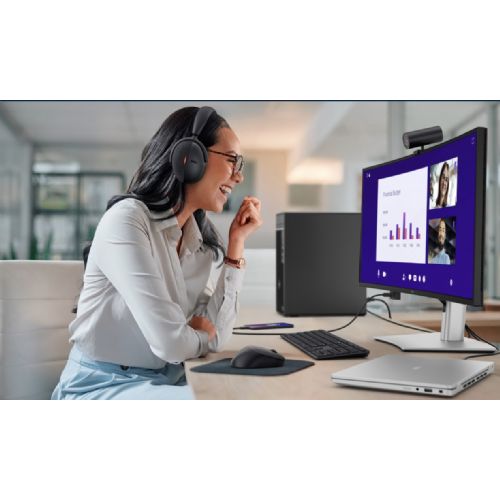
The Dell Pro 34 Plus Monitor P3425WE with a 34-inch curved display and UWQHD resolution delivers an incredibly immersive experience that brings more space, efficiency and visual quality to business users, gamers and power users. With advanced USB-C connectivity, a robust built-in docking station and a high-quality IPS matrix, this monitor is designed for those who expect more from a modern workstation or gaming station.
Evaluation of key product features
| Property | Value | Rating |
|---|---|---|
| Field of application | Business monitor | 🟢 9.5 |
| Size | 34" | 🟢 9.0 |
| Resolution | 3440 x 1440 (UWQHD) | 🟢 9.3 |
| Panel type | IPS | 🟢 9.0 |
| HDMI connector | Yes | 🟢 8.8 |
| USB-C connector | Yes | 🟢 9.3 |
| Built-in docking station | Yes, 90W | 🟢 9.5 |
| Aspect ratio | 21:9 | 🟢 9.2 |
| Touch screen | No | |
| Curved screen | Yes | 🟢 8.7 |
| Response time (ms) | 5 | 🟡 6.5 |
| Brightness (cd/m2) | 350 | 🟢 8.5 |
The monitor is optimal for users who frequently use multiple applications at once, need a large work surface and value an ergonomic design. Its 86.36 cm (34") diagonal with a 21:9 curved screen creates greater visibility and reduces eye movement, bringing greater comfort to users in dynamic work environments.
With a resolution of 3440 x 1440 and an advanced IPS matrix, it displays images clearly, with vivid colors and without distortion even from different viewing angles. The 100 Hz refresh rate ensures smooth image movement - also suitable for demanding gamers or users who switch between professional and entertainment content while working. The built-in docking station allows you to easily connect your laptop via USB-C with up to 90 W of power, which reduces the number of cables and increases the order on the desk.
The presence of ports such as HDMI, DisplayPort, USB-C and RJ-45 allows direct connectivity to a variety of hardware and network access without external interfaces. The curvature of the screen provides a uniform distance to the eyes, reducing fatigue and improving the all-day user experience, whether it is data analysis, multitasking or multimedia.
The monitor features an intuitive design that allows for quick switching between devices, an exceptional brightness of 350 cd/m² and an ergonomic shape for easy height and tilt adjustment. With high resolution, refresh rate and advanced connectivity options, it is a great partner for modern work, play or home entertainment.
The Dell Pro 34 Plus Monitor P3425WE with an ultra-wide 34-inch diagonal and a resolution of 3440 x 1440 (UWQHD) offers an exceptionally wide working surface, which is suitable for office users who need to keep an eye on multiple windows or applications at the same time. Thanks to the high resolution and IPS panel, the monitor allows you to comfortably work with texts, spreadsheets or analytical tools for hours, while at the same time being powerful enough for occasional multimedia content or light gaming. With interfaces such as USB-C, HDMI, DisplayPort and a network connection, it is particularly adaptable for modern business environments and connecting laptops. However, for very demanding games or those that require extremely fast refresh rates, this model is not primarily intended for competitive gamers.
Recommendation source: Enaa guides and team experience.
This monitor is most commonly used by business users and those who often split their work into multiple simultaneous tasks - it's ideal for editing spreadsheets, accessing multiple programs, and keeping track of data on one large, continuous screen. It's also often chosen by those who want to replace a combination of two classic displays with a single ultrawide monitor. For those interested in optimal monitor placement or choosing the right size for their needs, you can find more details in our monitor size guide .
Users trust the Dell brand primarily because of its established quality, product stability, and broad support in the business environment.
At Enaa, you can choose from a wide selection of monitors, where you can quickly compare different sizes and technical options based on your actual needs, and the information in the product description is designed to facilitate a professionally oriented decision.
The monitor supports a variety of ports, including HDMI, DisplayPort, and USB-C, allowing for easy switching between devices. Some users with USB-C and DisplayPort functionality can connect both a laptop and a desktop computer at the same time.
The ultrawide display makes it easy to arrange multiple applications or documents on a single monitor, making it especially suitable for multitasking, analytics, and working with large spreadsheets.
The monitor provides up to 90W of power via USB-C, which is sufficient for most business laptops and also allows image transfer over the same cable. Before use, please check if your laptop supports video output via USB-C (DisplayPort Alt Mode).
For an optimal experience, it is recommended that the distance to the screen is between 70 and 100 cm, as this ensures eye comfort and a good view of the entire work surface. You can read more about proper placement and ergonomics in our monitor size guide .
Although the 100 Hz refresh rate and responsiveness of the IPS panel provide a smooth image for most content, for serious competitive gaming, we recommend models with a higher refresh rate (144 Hz or higher) and specially tailored gaming features.
Description updated: April 2026


