Your shopping cart
😊 Product added to cart successfully
Product removed to cart successfully

Couldn't load pickup availability
Izdelek bomo predvidoma poslali čez: 2 dni

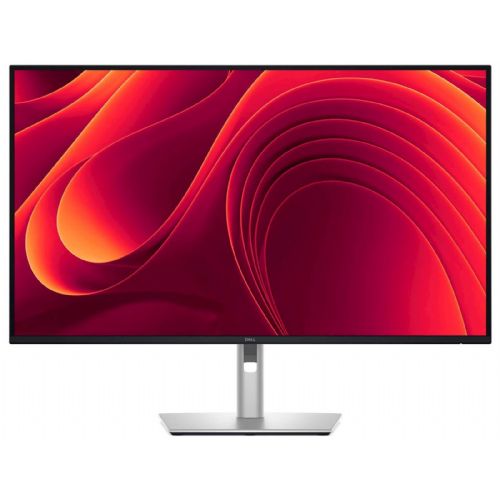


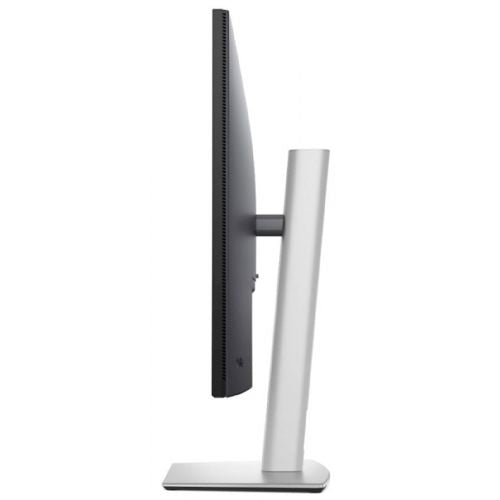
Good for office work Suitable for multitasking Large diagonal 31.5"
The Dell Pro 32 Plus P3225DE 80.01 cm (31.5'') monitor is a modern choice for demanding business users, game-hungry gamers and consumers who expect advanced image display, exceptional connectivity and reliable ergonomics during long-term use. With its exceptional resolution and image quality, it greatly improves productivity and visual experience in any work or home environment.
Designed for those who need more screen space, sharp images and advanced connectivity, the monitor is suitable for demanding environments, fast application switching or working with large amounts of data. It is ideal for analyzing complex spreadsheets and graphs, as well as watching movies and playing modern games without interruption.
Evaluation of key product features| Property | Value | Emoji rating |
|---|---|---|
| Field of application | Business monitor | 🟢 9.5 |
| Size | 80.1 cm (31.5'') | 🟢 9 |
| Resolution | 2560 x 1440 (WQHD) | 🟢 9 |
| Panel type | IPS | 🟢 9 |
| HDMI connector | Yes | 🟢 10 |
| USB-C connector | Yes | 🟢 10 |
| Built-in docking station | Yes, 90W | 🟢 9.5 |
| Aspect ratio | 16:9 | 🟢 9 |
| Touch screen | No | |
| Curved screen | No | |
| Response time (ms) | 4, 5 | 🟢 8.5 |
| Brightness (cd/m2) | 350 | 🟢 8 |
The combination of a 31.5-inch IPS panel and WQHD resolution provides a clear, sharp display with wide viewing angles and accurate color reproduction, which is essential for professional work with graphics, data and video. The high brightness of 350 cd/m2 allows for good visibility even in brighter rooms, while the response time of 4-5 ms ensures a smooth experience even with fast animations and games.
Advanced connectivity options, including HDMI, DisplayPort and USB-C, allow for easy integration with various devices and quick source switching. The built-in dock with up to 90W of power delivery via USB-C cable significantly improves desk organization – allowing you to power your laptop and transfer data at the same time, which is a distinct advantage in offices or home workspaces.
The monitor stands out for its balanced 16:9 aspect ratio, which is optimal for both multitasking and enjoying content on a large screen. The technical perfection of the Dell platform is reflected in reliability, quality construction and an eye-strain-free experience, making it suitable for users who spend a lot of time in front of the screen and want an advanced and flexible work environment.
The Dell Pro 32 Plus P3225DE monitor is designed for users who need a larger work surface and good image sharpness for everyday productivity or more demanding multitasking. Due to its 31.5-inch size and WQHD resolution, it is best suited for an office environment, for analyzing spreadsheets, editing documents or working with multiple windows at the same time. Compared to smaller monitors, it is suitable for longer sessions in front of the screen, but it is recommended that the user has enough desk space and an appropriate viewing distance. For graphic design or advanced content editing, where special color accuracy or higher resolution is required, there are also more suitable alternatives.
Taken from: Enaa guides and team experiences.
Typical users of this monitor include business professionals, analysts, programmers, and anyone looking for more space to work with multiple open applications, spreadsheets, or to read text more easily. The large diagonal makes multitasking easier, and the WQHD resolution provides good sharpness even with smaller fonts. Users who edit a lot of documents or manage projects on multiple screens will especially notice greater clarity and less window switching. If you're wondering which monitor size best suits your space, we recommend taking a look at our guide to choosing a monitor size .
The Dell brand is trusted by users as a reliable choice in the field of business monitors, which is often reflected in stable operation and a wide range of support solutions.
At Enaa, you can expect technical information about monitors to be presented clearly and professionally, with a focus on real user needs. The platform allows for easy comparison between models, making the decision easier even for more demanding users.
Yes, the large diagonal and WQHD resolution allow for a clear arrangement of multiple applications or documents, which is why this model is often used for multitasking in an office or home environment.
WQHD (2560 x 1440) delivers a higher pixel density and resulting sharper image compared to Full HD, which is especially important at 31.5 inches for comfortable reading and clear display of details. You can read more about this in our monitor size guide .
A monitor with a 100Hz refresh rate and IPS technology is suitable for casual gaming, although those for whom speed is a top priority may prefer models with a higher refresh rate.
At this size, a sufficiently deep desk is recommended to ensure optimal viewing distance and comfortable readability, and it is also useful to ensure proper screen height adjustment for better ergonomics.
Thanks to its support for HDMI and DisplayPort connectors, the monitor is compatible with most modern computers and laptops. Before connecting, it is worth checking which type of connection is most suitable for your computer.
Description updated: March 2026


