Your shopping cart
😊 Product added to cart successfully
Product removed to cart successfully

Couldn't load pickup availability
Izdelek bomo predvidoma poslali čez: 5 dni


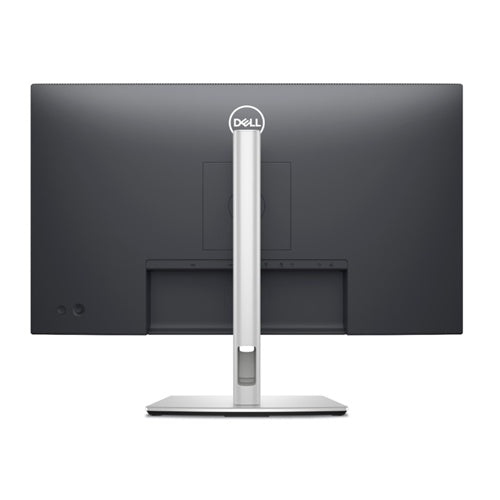

The Dell P2725HE monitor has a USB-C connector . which allows you to charge your laptop and other devices (up to 90 W ). This makes for a more tidy desktop. The 27-inch screen can be turned upright ( pivot ) if necessary. Height adjustment is also supported (up to 15 cm ) .
The Dell P2725HE Monitor, 68.58 cm (27.0"), 1920 x 1080 (FHD), IPS, 300 cd/m2, 5 ms, 100 Hz, 16:9, HDMI, USB-C (90 W), Gray (210-BMJC) is designed for users looking for a reliable and quality experience in a business environment or home workspace. Advanced connectivity and extensive functionality ensure greater productivity, comfortable visualization, and efficient management of multiple devices.
This product is ideal for business users, gamers, and consumers who need a spacious display with docking station and fast, accurate images, while seeking reliability, multitasking, and ergonomic flexibility from a monitor. It is great for multi-window work, graphic design, virtual meetings, or gaming entertainment.
Evaluation of key product features
| Property | Value | Emoji rating |
|---|---|---|
| Field of application | Business monitor | 🟢 9.5 |
| Size | 68.58 cm (27") | 🟢 9.0 |
| Resolution | 1920 x 1080 (FHD) | 🟡 7.5 |
| Panel type | IPS | 🟢 9.0 |
| HDMI connector | Yes | 🟢 9.0 |
| USB-C connector | Yes | 🟢 10.0 |
| Built-in docking station | Yes, 90W | 🟢 9.5 |
| Aspect ratio | 16:9 | 🟢 9.0 |
| Touch screen | No | |
| Curved screen | No | |
| Response time (ms) | 5 | 🟡 7.0 |
| Brightness (cd/m2) | 300 | 🟢 8.5 |
The IPS technology screen provides wide viewing angles and extremely accurate color reproduction, which is crucial for professional work with graphics, photos and tables. The brightness of 300 cd/m2 ensures good readability even in brighter rooms, making the monitor suitable for modern offices and home work environments without darkened rooms.
Connectivity is one of the biggest advantages of this model: a modern USB-C port with up to 90W of power allows you to charge your laptop, transfer images and data at the same time, and you can also use the monitor as a docking station for other devices. Thanks to additional ports such as HDMI and a built-in docking station, you get full control of your entire workstation with fewer cables and a more organized desk.
The 100Hz refresh rate and 5ms response time also ensure a smooth experience when watching fast-moving action, watching videos, or playing games in your free time. The 16:9 aspect ratio allows for optimal arrangement of multiple windows on a single screen, simplifying multitasking for demanding business and personal projects.
The monitor stands out for its comprehensive versatility – seamlessly combining modern design aesthetics, technical advancement and user comfort. It is an excellent choice for anyone who demands image quality, connectivity flexibility and a seamless user experience in a single product.
screen
Screen diagonal: 68.6 cm (27")
Screen resolution: 1920 x 1080 pixels
HD Type: Full HD
Native aspect ratio: 16:9
Display technology: LCD
Panel type: IPS
Function: LED backlight
Backlight type: LED
Brightness (typical): 300 cd/m²
Response time: 8 ms
Feature: Anti-glare screen
Screen shape: flat
Supported video modes: 480p, 576p, 720p, 1080p
Contrast ratio: 1500:1
Maximum refresh rate: 100 Hz
Viewing angle, horizontal: 178°
Viewing angle, vertical: 178°
Number of display colors: 16.7 million colors
Response time (fast): 5 ms
Pixel pitch: 0.3114 x 0.3114 mm
Pixel density: 81.57 ppi
Horizontal scan range: 30 - 110 kHz
Vertical scan range: 48 - 100 Hz
Visible size (horizontal): 59.8 cm
Visible size (vertical): 33.6 cm
Visible size (diagonal): 68.6 cm
Surface hardness: 3H
sRGB coverage (classic): 99%
Feature: Dell ComfortView Technology
Services
Feature: Flicker-free technology
Feature: Low Blue Light Technology
Supports Windows operating systems: Windows 10, yes
Supported Mac operating systems: MacOS
design
Product color: Black
Front bezel: black
Foot color: gray
Connections and interfaces
Feature: Integrated USB hub
USB hub version: 3.2 Gen 1 (3.1 Gen 1)
Number of USB Type-C input ports: 1
Number of bottom USB-A slots: 3
Number of USB-C downstream ports: 1
Function: USB Type-C DisplayPort switch mode
Function: USB Power Delivery
USB power supply up to: 90 W
Function: HDMI
Number of HDMI ports: 1
HDMI version: 1.4
Number of DisplayPort connectors: 2
DisplayPort version: 1.4
Function: HDCP
HDCP version: 1.4
Function: Input power
ergonomics
Function: VESA mount
Panel mounting interface: 100 x 100 mm
Feature: Improved cable management
Feature: Cable lock slot
Cable lock slot type: Kensington
Function: height adjustment
Height adjustment: 15 cm
Function: Pivot
Rotation angle: -90 - 90°
Feature: Rotating
Rotation angle range: -45 - 45°
Function: tilt adjustment
Tilt angle range: -5 - 21°
Function: On-Screen Display (OSD)
Function: Plug & Play
Function: LED indicators
energy
Power consumption (standard operation): 16.2 W
Power consumption (standby): 0.4 W
Power consumption (max.): 180 W
Power consumption (off): 0.3 W
AC input voltage: 100 - 240 V
AC input frequency: 50/60Hz
Input current: 2A
Operating conditions
Operating temperature: 0 - 40°C
Storage temperature range: -20 - 60 °C
Relative humidity during operation: 10 - 80%
Storage humidity: 5 - 90%
Operating altitude: 0 - 5000 m
Storage altitude: 0 - 12192 m
scope of delivery
Feature: stand included
Weight and dimensions
Device width (including foot): 610.7 mm
Device depth (including foot): 192.3 mm
Device height (including stand): 384.6 mm
Weight (with stand): 6.01 kg
Width (without stand): 610.7 mm
Depth (without stand): 50 mm
Height (without stand): 354.7 mm
Weight (without stand): 4.36 kg
Frame width (side): 6.4 mm
Bezel width (top): 6.4 mm
Frame width (bottom): 1.2 cm
Packaging information
Package weight: 8.67 kg
sustainability
Feature: Sustainability compliance
Sustainability certifications: ENERGY STAR, RoHS, TCO, TÜV mark
Does not contain: arsenic, mercury, PVC/BFR
Brand characteristics
Feature: Compatible with Dell Display Manager (DDM).
Other functions
Number of RJ-45 connectors: 1
Connectivity for greater productivity. This 68.58 cm (27") FHD hub monitor, certified with a 4-star TÜV Eye Comfort certificate, is easy on your eyes and offers up to 90 W of power.
The text is machine translated.
The Dell P2725HE monitor with a 27-inch diagonal in a 16:9 ratio and an IPS panel primarily meets the needs of office and home users looking for more screen space and wide viewing angles. Full HD resolution at this size allows reliable use for administrative tasks, online meetings or for monitoring multiple programs at the same time, but when working with text for long periods of time or where sharpness of letters is key, it brings a certain limitation in terms of display clarity. The model with a 100 Hz refresh rate and connectors such as USB-C and HDMI allows for flexibility and easy connectivity with modern laptops, which further emphasizes its practicality in hybrid or multi-purpose environments.
Taken from: Enaa guides and team experiences.
This monitor will most likely appeal to users who spend most of their working time in document editors, browsers or on video calls, especially in business and home environments. Thanks to the larger screen area, it also proves useful for multitasking or as a secondary display in combination with a laptop — especially thanks to the modern USB-C connection. If you want to further understand how size and resolution affect working comfort, we recommend taking a look at our guide to choosing a monitor size .
Users who swear by reliability and extensive ecosystem support often choose Dell products for their integration and stability in business environments.
We offer professional pre-purchase advice, a transparent presentation of product specifications, and the experience of our team to help you make the choice of a monitor easier based on your actual needs.
We recommend the monitor for business users who frequently work with spreadsheets, documents, or conduct video conferences, but it also works well for homework or as an extended screen for a laptop.
For everyday office tasks, casual browsing or multimedia use, the combination of 27 inches and Full HD is sufficient. However, for long-term word processing or if a very sharp image is required, it is recommended to consider a higher resolution. For more explanations, see our guide to choosing a monitor size .
With a refresh rate of up to 100 Hz, the monitor is suitable for casual gaming and less demanding games, but for competitive or e-sports use, we recommend models with a higher resolution or faster response time.
Yes, the built-in USB-C provides easy connection and power to most new laptops, but you should first check if your laptop supports displaying images via this port.
The IPS panel allows for better color tones and wider viewing angles, ensuring a more consistent image even when viewed from the side or in shared open spaces.
Description updated: March 2026


