Your shopping cart
😊 Product added to cart successfully
Product removed to cart successfully

Couldn't load pickup availability
Izdelek bomo predvidoma poslali čez: 5 dni


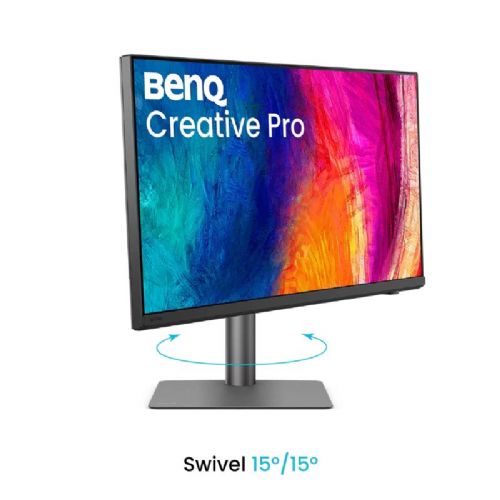
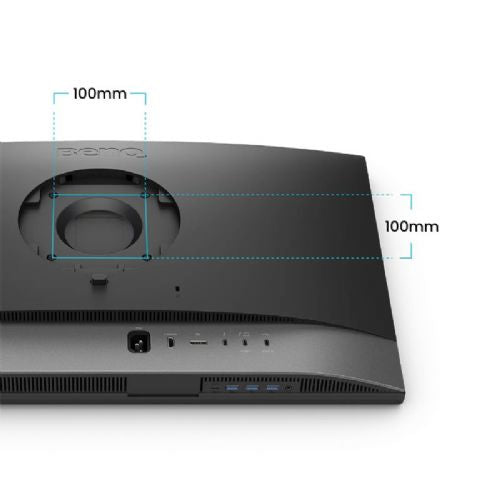
The 27-inch 4K UHD monitor is designed for demanding business users and creatives who need precise display and flexibility in multitasking.
The Benq PD2732U 27" IPS 4K UHD monitor is a business computer monitor designed for demanding users who need accurate image display and advanced connectivity in their daily work. It falls into the category of advanced monitors intended for professional creative tasks such as graphic design, photo editing, video editing and demanding multitasking.
The monitor displays images in a resolution of 3840 × 2160 (4K UHD), which in practice means exceptional sharpness, the ability to display fine details and enough space for multiple open windows at the same time. IPS technology provides stable colors and a wide viewing angle, which is key for accurate color work and collaboration in groups or with multiple monitors. High brightness, marked with 400 cd/m², allows for good readability even in brighter environments.
Key product features
| Property | Value | Rating |
|---|---|---|
| Field of application | Business monitor | |
| Size | 68.58 cm (27") | 🟢 9.0 |
| Resolution | 3840 x 2160 (4K UHD) | 🟢 9.5 |
| Panel type | IPS | 🟢 9.0 |
| HDMI connector | Yes | |
| USB-C connector | Yes | |
| Built-in docking station | Yes, 90W | |
| Aspect ratio | 16:9 | |
| Touch screen | No | |
| Curved screen | No | |
| Response time (ms) | 5 | 🟢 8.5 |
| Brightness (cd/m2) | 400 | 🟢 8.5 |
⚖️ Compare features with other products of your choice
The IPS panel provides consistent color accuracy across the entire screen, which is essential for accurate color work in creative and professional environments. With high 4K UHD resolution, details are sharper, text is more legible, and images and video are displayed with a greater range of detail than on standard monitors. The 27-inch diagonal offers a wide workspace, allowing for comfortable multitasking and less frequent switching between open windows.
The integrated 90W USB-C docking station allows you to easily connect your laptop for power, image transfer, and data transfer over a single connection, simplifying your work environment and reducing the number of cables on your desk. The daisy chain function supports connecting multiple monitors in series, which is especially useful in tidy office spaces or multi-display workstations.
HDR support means the monitor is capable of displaying a wider dynamic range of light and dark shades, which is especially noticeable when editing graphics or watching movies with HDR content. The 5ms response time ensures smooth image display even with faster movements in videos or games, without noticeable blurring.
Brightness of up to 400 cd/m² ensures a readable and vibrant image even in brighter rooms, while the matte surface reduces glare - making use more pleasant in different lighting conditions. Psychological comfort during prolonged use is further supported by the monitor's high-quality ergonomic design, which allows for height, tilt and swivel adjustment of the screen.
| Screen diagonal | 68.5 cm (27 inches) | ||
| Screen resolution | 3840 x 2160 pixels | ||
| type | LED monitor | ||
| Color | black/silver | ||
| EAN | 4718755098215 | ||
| Manufacturer's no. | 9H.Y0MLA.TBE | ||
| Suitable for | Business | ||
| Picture | Type of glare | Anti-reflective | |
| format | 16:9 | ||
| Technology | LED light | ||
| Panel technology | IPS | ||
| functions | Ultra HD/4K, HDR Ready, HDR10, HLG, Picture in Picture (PiB), Picture by Picture (PbP) | ||
| brightness | 400 cd/m² | ||
| refresh rate | 60Hz | ||
| Colors | 1.070 million | ||
| reaction time | GtG | 5ms | |
| contrast | Static | 1,000 : 1 | |
| Links | 1x HDMI input (HDMI version: 2.0), 1x DisplayPort input (DisplayPort version: 1.4), 2x Thunderbolt, 1x headphone output, 3x USB-A 3.2 Gen 1 (5 Gbit/s), 2x USB-C 3.2 Gen 1 (5 Gbit/s) | ||
| USB-C | USB-C Power Delivery: 90W, USB-C DP Alternate Mode | ||
| USB Note | The USB 3.2 Gen 1 designation corresponds to the previous USB 3.1 Gen 1 and USB 3.0 designations. | ||
| ergonomics | type | Swivel, swivel, tilt, height adjustable | |
| Rotating | 15° left, 15° right | ||
| Tilting | 5° forward, 20° backward | ||
| Adjustable height | 115mm | ||
| power supply | Eco-off | 0.3 watts | |
| electricity consumption | Maximum 200 watts | ||
| power supply | Integrated | ||
| Standards | video | Adobe RGB: 99%, DCI-P3: 99%, sRGB: 100%, Rec. 709: 100%, Delta E < 2 | |
| wall bracket | VESA compatible (100 x 100 mm) | ||
| Features | Software Calibration, Daisy Chain, M-book Mode, iDevice Color Sync, iKeyboard Management, AQCOLOR Technology, Color Management, Uniformity Technology, Pantone and Pantone SkinTone Validation, Calman Check, AQCOLOR Pilot Software, Display Pilot 2, Display QuickKit, Nano Matte Black Panel, Hotkey Puck, KVM, AMA, Flicker-Free, Dual View, CAD/CAM Mode, ICCsync | ||
| Picture in picture | |||
| Additional information | Total height of the stand in the low position: 545 mm | ||
| Notice | Color matching and previewing Mac devices | ||
| Accessories | Available | Quick Start Guide, Factory Calibration Report, Safety Instructions, Hotkey Puck G3, Thunderbolt 4 Cable, USB Cable | |
| Dimensions | Width: 43 cm x Height: 61.4 cm x Depth/Length: 24.2 cm | ||
Before choosing a 27-inch 4K monitor like the Benq PD2732U, it's crucial to consider the balance between image sharpness, physical space on your desk, and connection methods to your computer or laptop. While the monitor offers many advanced features for professional and multitasking use, some features may require additional attention in terms of compatibility and placement.
Source of editorial recommendations: ENAA guides and team experience.
The 4K resolution and 27-inch diagonal offer a large working area and a sharp image, which is extremely suitable for users who often use multiple applications open at the same time.
The combination of a KVM interface and daisy chaining options makes it easy to switch between two computers and enables advanced work scenarios, simplifies peripheral management, and ensures a tidy desk.
The 4K IPS panel with accurate color display and HDR capability is well suited for demanding graphics tasks, viewing high-resolution content, and accurate color reproduction.
Connection is possible via HDMI or DisplayPort, but taking advantage of all advanced features (e.g. KVM, power over USB-C) requires more modern hardware with appropriate outputs and support for DisplayPort Alt Mode/Thunderbolt.
The monitor can be useful for gaming, but 4K resolution requires a powerful graphics card. The refresh rate and response time are not primarily optimized for eSports or fast-paced action.
For everyday office work, the HDR function does not bring significant added value, as only a few office applications actually take advantage of high dynamic range.
To daisy chain, you must use a DisplayPort cable and verify that both the monitor and the computer are compatible with the MST (Multi-Stream Transport) function.
A KVM switch allows you to switch peripherals (keyboard and mouse) between two computers connected via appropriate ports — typically USB-C and/or USB-B and DisplayPort or HDMI.
The monitor supports USB-C power delivery, but the power output depends on the specific technical specifications and compatibility of the laptop. We recommend checking the laptop's website for USB-C power delivery and DisplayPort Alt Mode support.
The monitor is usually compatible with VESA standard mounts, but before purchasing a mount, we recommend checking the VESA spacing on the back of the monitor and the maximum load capacity of the mount.
When using two monitors with different resolutions and pixel densities (PPI), there can be a noticeable difference in text sharpness and element size, so consistency is important for comfortable working.
Description updated: October 2026
If you are still deciding, the following content may also be helpful.
Best products
Products for various purposes
Monitors for working from home


