Your shopping cart
😊 Product added to cart successfully
Product removed to cart successfully

Couldn't load pickup availability
Izdelek bomo predvidoma poslali čez: 5 dni


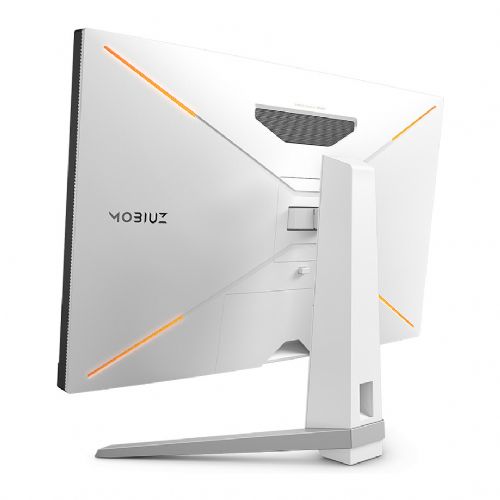
The 32-inch monitor is designed for business users as well as gamers, and for those who need a large and sharp work surface for multiple open windows or content editing.
The BenQ MOBIUZ EX3210U 80.1 cm (32") monitor, 3840 x 2160 4K, 16:9, IPS, 300cd/m 2 , 2ms, white/red is a premium 32-inch monitor designed for the most demanding games and business use, where exceptional images and lightning-fast response improve productivity and gaming experience. With its advanced IPS panel technology and 4K UHD resolution, it offers exceptional sharpness, color accuracy, and wide viewing angles for a truly immersive visual experience.
Evaluation of key product features
| Property | Value | Rating |
|---|---|---|
| Field of application | Gaming monitor | 🟢 9.5 |
| Size | 81.28 cm (32") | 🟢 9.3 |
| Resolution | 3840 x 2160 (4K UHD) | 🟢 10 |
| Panel type | IPS | 🟢 9.2 |
| HDMI connector | Yes | 🟢 9.5 |
| USB-C connector | No | |
| Built-in docking station | No | |
| Aspect ratio | 16:9 | 🟢 9.0 |
| Touch screen | No | |
| Curved screen | No | |
| Response time (ms) | 2 | 🟢 9.6 |
| Brightness (cd/ m2 ) | 300 | 🟡 6.5 |
⚖️ Compare features with other products of your choice
This monitor is designed for demanding users such as business professionals, graphic designers and advanced gamers who are looking for the perfect balance between image quality, fast response time and versatile use. As a gaming monitor, it offers extremely smooth images in fast-paced action, thanks to a 2ms response time and high refresh rate, which is essential for competitive gaming or working with video and graphics.
The main advantage of the product is the impressive 4K UHD resolution, which provides incredible sharpness and exceptional display detail, while the IPS panel provides excellent colors and wide viewing angles, allowing comfortable work and gaming for long periods of time. Users will appreciate the realism of the display and the ability to work more efficiently with multiple windows open at the same time.
BenQ's exclusive design with an elegant combination of white and red stands out in any room. The monitor boasts quality ergonomics of the setup and a wide range of connections, including HDMI, allowing easy connection to a variety of devices - from computers to game consoles. Although it does not have USB-C or a docking station, the speed and reliability of image display are at the highest level.
With its advanced technology, responsiveness, and visual performance, it stands out as an excellent solution for anyone who wants a multifunctional, modern, and visually stunning monitor in a demanding environment.
Screen
Screen diagonal: 81.3 cm (32")
Screen resolution: 3840 x 2160 pixels
HD type: 4K Ultra HD
Native aspect ratio: 16:9
Display technology: LED
Panel type: IPS
Brightness (typical): 300 cd/m²
Response time: 2 ms
Feature: Anti-glare screen
Screen shape: Flat
Aspect ratio: 16:9
Contrast ratio: 1000:1
Maximum refresh rate: 144 Hz
Viewing angle, horizontal: 178°
Viewing angle, vertical: 178°
Number of colors on the screen: 1.07 billion colors
Response time (fast): 1 ms
Pixel density: 138 ppi
Feature: High Dynamic Range (HDR) video support
High Dynamic Range (HDR) technology: DisplayHDR 400, High Dynamic Range 10 (HDR10)
Color space standard: DCI-P3
Color gamut: 98%
Services
Feature: AMD FreeSync
AMD FreeSync Type: FreeSync Premium Pro
Feature: Flicker-free technology
Feature: Low Blue Light Technology
Smart Modes: Cinema, Custom, Game, M-Book, RPG, E-Paper
multimedia
Number of speakers: 2
RMS power: 9W
Feature: Built-in speakers
Feature: Built-in microphone
design
Market Positioning: Games
Product color: Black
Foot color: black, red
Connections and interfaces
Feature: Built-in USB hub
USB Hub Version: 3.2 Gen 1 (3.1 Gen 1)
USB input port type: USB Type B
Number of upstream data slots: 1
Number of USB Type B input ports: 1
Number of USB-A downstream slots: 4
Feature: HDMI
Number of HDMI inputs: 2
HDMI version: 2.1
Number of DisplayPort connectors: 1
DisplayPort version: 1.4
Feature: Headphone output
Headphone outputs: 1
Function: HDCP
HDCP version: 2.2
ergonomics
Feature: VESA mount
Panel mounting interface: 100 x 100 mm
Feature: Height adjustment
Adjustable height (max.): 10 cm
Feature: Rotatable
Rotation angle range: -15 - 15°
Feature: Tilt adjustment
Tilt angle range: -5 - 15°
Feature: Picture in Picture
Function: On-Screen Display (OSD)
Number of OSD languages: 18
energy
Energy efficiency class (EER): G
Energy efficiency class (HDR): G
Energy consumption (SDR) per 1000 hours: 42 kWh
Energy consumption (HDR) per 1000 hours: 41 kWh
Power consumption (standard operation): 48 W
Power consumption (standby): 0.5 W
Power consumption (max.): 160 W
AC input voltage: 100-240 V
AC input frequency: 50 - 60 Hz
Energy efficiency scale: from A to G
European Product Energy Labelling Register (EPREL) code: 1008267
Weight and dimensions
Device width (including stand): 726.7 mm
Device depth (including stand): 269.9 mm
Device height (including stand): 487.4 mm
Weight (including stand): 9.5 kg
Width (without stand): 726.7 mm
Depth (without stand): 65.6 mm
Height (without stand): 442.4 mm
Weight (without stand): 6.6 kg
Packaging information
Packaging width: 543 mm
Packaging depth: 960 mm
Packaging height: 208 mm
Package weight: 14 kg
Scope of delivery
Included cables: AC, DisplayPort, HDMI, USB
Feature: Remote control included
Feature: Quick Start Overview
Other functions
Brand-specific technologies: Black Equalizer
Function: FPS counter
Function: Motion blur reduction
Logistical data
Tariff code (HS): 85285210
Playing at the highest level
The EX3210U offers you a whole new gaming experience.
Discover endless possibilities
Explore new worlds and get ready to experience gaming like never before. See, hear, and control your gaming worlds with the highest detail and best performance. Get ready for all-new adventures.
Extreme immersion
Plan your next steps with the best overview. With the EX3210U, you can see every detail and find every hidden treasure. Beautiful landscapes and clear, sharp images allow you to immerse yourself even deeper in your games.
Perfect sound
With the EX3210U's enhanced speakers, you'll hear every opponent and be ready for anything. Feel every hit of your weapon and experience the full sound of the built-in speakers with treVolo True Sound. 5 settings give you an action-packed experience in every game.
Boniovi DPS takes your sound to a new level with improved depth, greater clarity, and defined bass.
Noise-cancelling microphone
A microphone that adapts to your needs: In private mode, it only detects the person directly in front of the monitor, filtering out external noise. In surround mode, the microphone captures the entire group on your couch, giving you a full sense of entertainment.
*Compatible with PC/Mac/PS5™/PS4™
Elegant design
The EX3210U is not only stylish, but also offers you the best ergonomics. Enjoy gaming in 4K resolution and 144 Hz. With HDMI 2.1, connect your devices quickly and easily and find the perfect setup with numerous configuration options. With MOBIUZ displays, you enjoy maximum comfort with a stylish design.
Light tuner
The light tuner lets you see into the darkest corners and prevents glare. So you can find the optimal settings for every genre and experience stunning in-game worlds!
Scenario mapping
Link your settings to different monitor inputs. This means you always have the right settings for the connected device at hand.
Eye-Care™ for EXTRA play
Ready for the next round? With BenQ Eye-Care™ technology, even long gaming sessions are not a problem for your eyes.
The text is machine translated.
Before you decide on the BenQ MOBIUZ EX3210U monitor, it is crucial that you are aware of the practical implications of choosing such a large, high-resolution display and the chosen connection interface. Consider, in particular, the adaptation to your work desk and the compatibility with your computer equipment, as some specifics can affect the user experience.
Source of editorial recommendations: ENAA guides and team experience.
Very convenient – The large diagonal and 4K resolution allow you to work with multiple open windows, spreadsheets, and documents at the same time without losing clarity.
Very suitable - IPS technology provides good colors and wide viewing angles, and high resolution allows for precise work with graphics.
Suitable with limitations – The fast response time and resolution are suitable for gaming, but the refresh rate may not be optimal for the most demanding gamers, depending on the complexity and compromises made.
Suitable with limitations – A large screen allows for comfortable work and multitasking, but for an optimal experience, it is necessary to check the compatibility of the connectors between the monitor and the laptop.
Very suitable – The combination of diagonal and resolution offers excellent visibility in a layout with two identical monitors, which increases efficiency in analytical or programming work.
Suitable with limitations – The monitor can prove to be too large in smaller spaces, especially if the desk is not deep enough, which can affect comfort during long-term use.
Yes, the combination of 4K resolution and IPS panel provides a sharp image and comfortable reading of text at the appropriate distance from the screen.
The monitor supports HDMI and DisplayPort connectivity; please check which ports and cables are available on your computer before purchasing.
Yes, thanks to IPS technology, a large diagonal and 4K resolution, it is suitable for precise work with graphic content.
It is suitable for the main display when there is enough desk space and an appropriate viewing distance.
The monitor supports multiple inputs, making it easy to switch between different devices, but this model does not mention a built-in KVM switch.
Description updated: October 2026
If you are still deciding, the following content may also be helpful.
Best products
Products for various purposes
Monitors for working from home


