Your shopping cart
😊 Product added to cart successfully
Product removed to cart successfully

Couldn't load pickup availability
Izdelek bomo predvidoma poslali čez: 5 dni
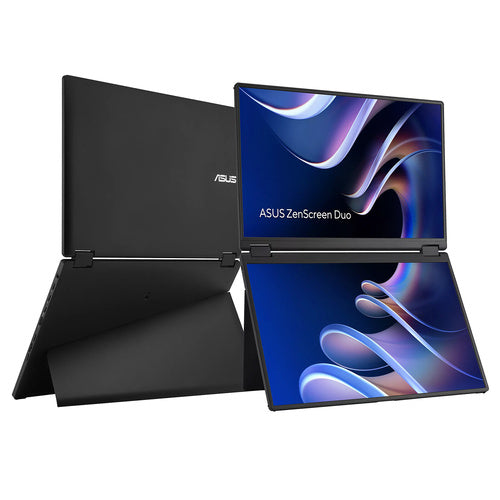
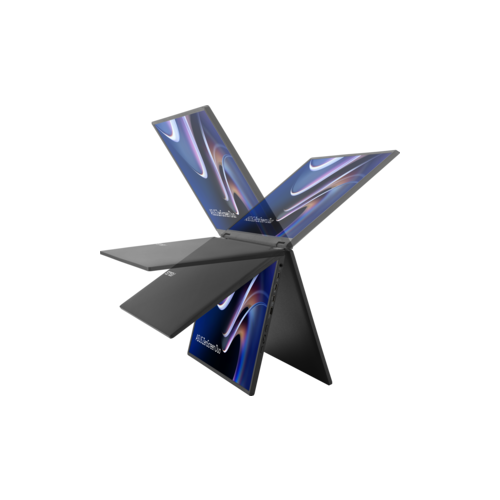
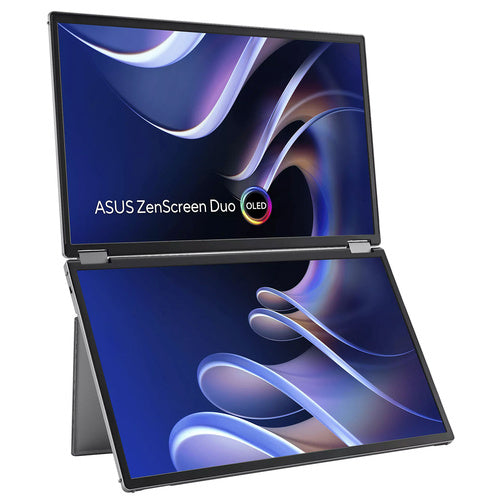
The portable dual monitor with 14-inch screens is designed for users who need additional workspace for office work, programming, or collaboration in various environments.
The Asus ZenScreen Duo MB14FCD is a portable monitor with 35.6 cm (14-inch) IPS displays, designed for users who need an extended and flexible workspace even when working on the go. This model offers two separate WUXGA (1920 x 1200) displays in one device, allowing you to manage multiple applications or documents simultaneously, anywhere – in the office, on the go or at home. A distinctive feature of this monitor is the 360° folding option, which makes it easy to adapt the screens to work habits and limited space, for example when used in cafes, hotel rooms or small conference rooms.
The combination of two 14-inch displays with IPS technology provides wide viewing angles and natural colors even in different monitor layouts, which is especially useful when collaborating with others or giving presentations. WUXGA resolution brings clear display of details when working with spreadsheets, programming or editing photos. In practice, this means greater clarity and reduced need to constantly move between open windows.
Connectivity via USB-C port enables image transfer and power supply via a single cable, making use fast and cable-free – especially for users of modern laptops or tablets. There is also an HDMI input for connecting to various devices, which further expands the possibilities of use both at work and during gaming or multimedia content. The screen brightness of up to 350 cd/m² ensures good visibility even in brighter environments.
The 5ms response time is suitable for everyday tasks and occasional entertainment, but not for intensive gaming of the most demanding games, where refresh rate is at the forefront. The device is not a touchscreen, is not curved and does not contain a built-in docking station, which simplifies use and reduces weight and dimensions for easier portability.
Key product features
| Property | Value | Rating |
|---|---|---|
| Field of application | Portable monitor | |
| Size | 35.6cm (14) | 🟢 9.0 |
| Resolution | 1920 x 1200 (WUXGA) | 🟢 9.0 |
| Panel type | IPS | 🟢 9.0 |
| HDMI connector | Yes | |
| USB-C connector | Yes | 🟢 10.0 |
| Built-in docking station | No | |
| Aspect ratio | 16:10 | 🟢 9.0 |
| Touch screen | No | |
| Curved screen | No | |
| Response time (ms) | 5 | 🟡 7.0 |
| Brightness (cd/m2) | 350 | 🟢 8.5 |
⚖️ Compare features with other products of your choice
| Screen diagonal | 71 cm (14 inches) | ||
| Screen resolution | 1920 x 1200 pixels | ||
| type | LED monitor | ||
| Color | black | ||
| Manufacturer's no. | 90LM0CZ1-B01N71 | ||
| Suitable for | Business, multimedia | ||
| Picture | Type of glare | Anti-reflective | |
| format | 16:10 | ||
| Technology | LED light | ||
| Panel technology | IPS | ||
| functions | HDR Ready, HDR10 | ||
| brightness | 350 cd/m² | ||
| refresh rate | 60Hz | ||
| Viewing angle (10:1) | Horizontal | 178° | |
| Vertical | 178° | ||
| Pixel pitch | Horizontal | 0.157mm | |
| Vertical | 0.157mm | ||
| Colors | 16.7 million | ||
| reaction time | GtG | 5ms | |
| contrast | Static | 1,000 : 1 | |
| frequency | Vertical | 59–61 Hz | |
| Horizontal | 30–75 kHz | ||
| Links | 1x Mini-HDMI input, 2x USB-C | ||
| ergonomics | Portable | Yes | |
| Energy Star | Yes | ||
| power supply | Eco-off | 0.3 watts | |
| Standards | video | 100% sRGB | |
| Features | 21" Work Surface, Power Pass-Through, 360-degree Hinge, 1/4" Stand Mount, DisplayWidget Center Software, Eye Care, Flicker-Free, Low Blue Light, Tent Mode, SPLENDID Technology, QuickFit | ||
| Kensington Castle | |||
| Additional information | Can be used in both portrait and landscape mode (auto-rotate) | ||
| Notice | Contrast (HDR, max.): 100,000,000:1 | ||
| Accessories | Available | 2x USB-C cables, power adapter, mini-HDMI to HDMI cable, protective case, quick start guide | |
| Dimensions | Width: 316 mm x Height: 214 mm x Depth/Length: 19 mm | ||
Before purchasing the ASUS ZenScreen Duo MB14FCD, it's essential to consider how and where you'll use the monitor most often. An important feature of this model is its unusual dual 14-inch screen layout and complete portability, which has advantages but also some compromises in terms of long-term comfort and connectivity with individual devices. The biggest decision you'll make will be between the practicality of mobile use and the limitations of a smaller diagonal and resolution.
Source of editorial recommendations: ENAA guides and team experience.
The monitor is well suited for hybrid work, field meetings, and travel, where you want to gain additional screen space without the added burden of carrying it.
For long-term, intensive office work or analytics, two 14-inch displays are useful primarily where space constraints outweigh the need for large displays. They may be limited for extensive work with graphical content and spreadsheets.
A great addition for situations where you already have a larger monitor at home, but need extra help or portability outside the office.
It is possible to provide basic transparency by reviewing code on one screen and documentation on another, but due to the limited size, the benefit is more pronounced in transient rather than long-term workflows.
Less suitable due to smaller dimensions, the resolution and size of the screens do not meet expectations for modern games or advanced graphics tasks.
Both displays work as separate monitors if your system and drivers support them. Please check if your device supports them.
The device is designed to be powered via USB-C, but sufficient power is required on the USB-C port, otherwise using both displays simultaneously may not be possible.
The monitor is foldable and allows for flexible placement, but both screens always remain physically connected.
Description updated: August 2026
If you are still deciding, the following content may also be helpful.
Best products
Products for various purposes
Monitors for working from home


