Your shopping cart
😊 Product added to cart successfully
Product removed to cart successfully

Couldn't load pickup availability
Izdelek bomo predvidoma poslali čez: 1 dni


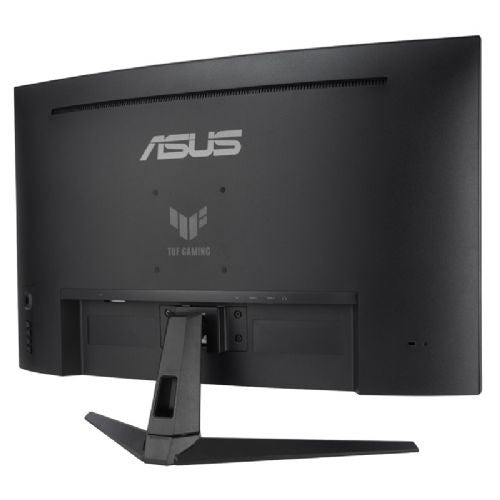
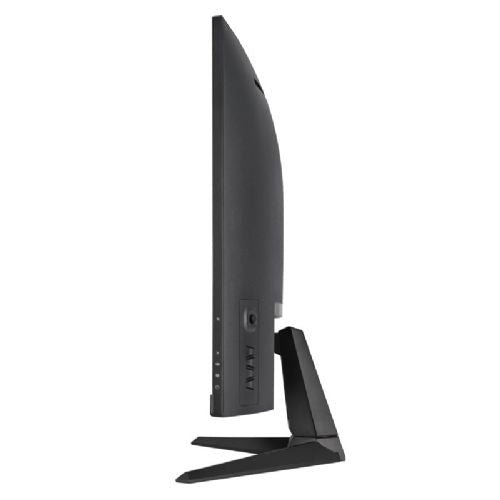

ASUS TUF VG32VQM5B 80.01cm (31.5") FHD VA 250Hz DP/HDMI FreeSync HDR10 speakers curved gaming monitor
Built for fast and responsive gameplay
The TUF Gaming VG32VQM5B is a 31.5-inch Full HD monitor with a pronounced 1500R curvature that puts the gamer at the center of the action. A high refresh rate of up to 250 Hz provides an extremely smooth image, which is especially noticeable in fast-paced action games, racing games and e-sports games. A short response time of 0.5 ms (GTG, min.) further reduces motion blur and allows for precise tracking of on-screen action.
Stable image without tearing
The monitor supports FreeSync Premium technology, which eliminates screen tearing and reduces lag with adaptive refresh rates. Combined with ELMB Sync, it also works at high refresh rates, allowing for sharper images in fast-paced scenes without ghosting.
Color accuracy and HDR
With 120% sRGB color space coverage, the monitor delivers vibrant and natural colors suitable for both gaming and multimedia content. HDR support enhances contrast and highlights bright and dark areas of the image, contributing to a more realistic visual experience.
Advanced features for gamers
The VG32VQM5B features ASUS Variable Overdrive, which automatically adjusts the overdrive level based on frame rate to maintain optimal sharpness across different games. There are also GamePlus, GameVisual, Shadow Boost, and Low Blue Light mode for long-term gaming.
Easy settings management
DisplayWidget Center allows you to quickly change monitor settings with the mouse, without using OSD menus. This is convenient when switching between different profiles or adjusting the image during gaming.
Connectivity and compatibility
The monitor offers DisplayPort 1.2 and two HDMI 2.0 ports, allowing you to connect a variety of devices - from powerful gaming PCs to next-generation consoles.
The TUF Gaming VG32VQM5B is a great choice for gamers who want a large curved display, high refresh rate, and fast response time at an affordable price. It is suitable for e-sports enthusiasts, fans of fast-paced action games, and anyone who wants a smooth, stable, and visually appealing gaming experience.

The Asus TUF VG32VQM5B monitor with a 31.5-inch curved screen surface, a high refresh rate of 250 Hz and FreeSync HDR support is an interesting solution for gamers who want a smooth image and an immersive experience in dynamic games. Due to its larger diagonal and Full HD resolution, it is mainly suitable for casual gaming or multimedia use, and less so for users who need exceptional text sharpness or professional color accuracy in their daily work. The curvature and built-in speakers contribute to the feeling of space and comfort in use, but it is also a good idea to check the available space on the desk and the viewing distance for an optimal experience.
Recommendation source: Enaa guides and team experiences.
This monitor stands out among gamers who appreciate fast screen response and smooth images, which are crucial for modern, action-packed games. In addition to gamers, it is also used by consumers looking for a larger screen for watching movies or connecting to a game console, but the Full HD resolution at 32 inches makes it less suitable for those who spend a lot of time working with text and small fonts. An added value is the built-in speakers, which makes it easy to use even where there is no space for a separate audio system. For more information on choosing a monitor size and purpose, we recommend our guide on choosing a monitor size .
Users who want optimal component coordination and are loyal to proven solutions often choose Asus products, as they are renowned for their durability and quality support in the field of computer peripherals.
When you buy a monitor at Enaa, you have access to our team's extensive expertise, the ability to compare different models, and clear guides tailored to the most common user scenarios in one place. The selection is focused on current trends in gaming and business use, so it's easier to find a monitor that meets your needs without unnecessary compromises.
Due to the Full HD resolution and VA panel, the monitor is not best suited for professional graphic design or work where high color accuracy and text sharpness are key.
The optimal viewing distance for this monitor size is around 80-100 cm, with the curvature helping to provide better visual comfort when working or gaming. For more tips on monitor placement, you can read our guide on choosing a monitor size .
The monitor is suitable for basic office work and multitasking, but its biggest advantage is in gaming or occasional multimedia use. For long-term text work, we recommend considering a higher resolution on such a large diagonal.
A high refresh rate is a great addition for playing fast-paced games where movement and responsiveness are key, while in everyday office or online use these differences are not so noticeable.
The monitor has multiple inputs (HDMI and DisplayPort), allowing you to connect various devices, but it is recommended to check the compatibility of the inputs with your computers or game consoles before use.
Description updated: May 2026


