Your shopping cart
😊 Product added to cart successfully
Product removed to cart successfully

Couldn't load pickup availability
Izdelek bomo predvidoma poslali čez: 5 dni


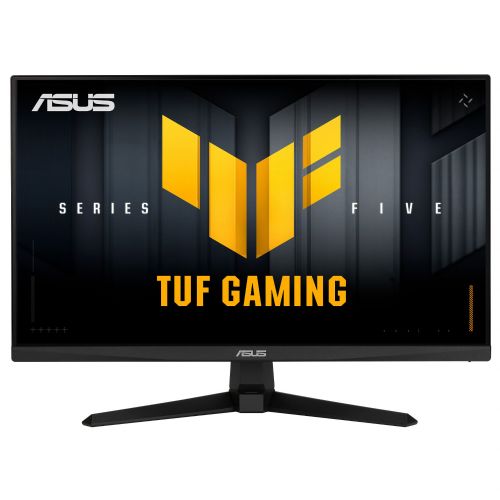
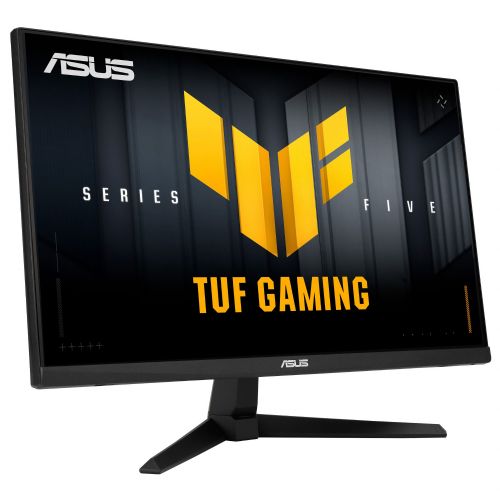
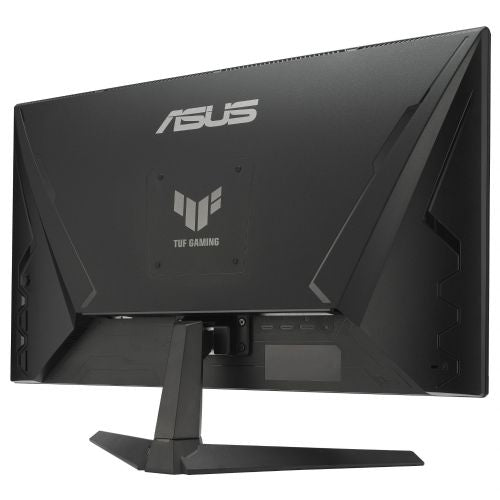

The 23.8" diagonal monitor is designed for gamers and users looking for a responsive, clear display for gaming, work, or multitasking in a limited space.
The Asus TUF Gaming VG249Q5A monitor is a 23.8-inch gaming monitor designed for gamers and users who need extremely smooth images and reliable graphics display. This model is based on Fast-IPS technology, which, in addition to a wide color gamut, provides fast response times, which is crucial for dynamic games and fast display switching. The monitor is intended for use in a home environment, office or gaming corner, where a combination of performance and viewing comfort is important.
The combination of Full HD (1920 x 1080) resolution and a refresh rate of up to 200 Hz enables extremely smooth motion without any lag or tearing. The high refresh rate means that in-game movement or fast scrolling across the screen is very fluid, which is especially noticeable in action titles or competitive games where responsiveness and image clarity are crucial.
Fast-IPS technology provides a fast response time of 1ms (GtG), which reduces image blurring during fast-moving scenes and helps preserve details even in the fastest scenes. The IPS panel also allows for wide viewing angles, so colors and contrasts remain accurate regardless of the viewing angle. Brightness of up to 300 cd/m² ensures that the display is adequately clear even in daylight or in bright room lighting.
The monitor connects via HDMI or DisplayPort, making it easy to connect to the latest graphics cards and gaming devices. The standard 16:9 aspect ratio is suitable for both gaming and everyday use and multi-window work. The flat, non-curved screen is suitable for most desktop layouts where a clear and accurate display is preferred over immersion in the image.
Key product features
| Property | Value | Rating |
|---|---|---|
| Field of application | Gaming monitor | |
| Size | 60.45 cm (23.8") | 🟢 9 |
| Resolution | 1920 x 1080 (FHD) | 🟡 7 |
| Panel type | IPS | 🟢 9 |
| HDMI connector | Yes | |
| USB-C connector | No | |
| Built-in docking station | No | |
| Aspect ratio | 16:9 | |
| Touch screen | No | |
| Curved screen | No | |
| Response time (ms) | 1 | 🟢 10 |
| Brightness (cd/m2) | 300 | 🟡 6 |
⚖️ Compare features with other products of your choice
Basic features such as full support for high refresh rates, fast response time and accurate color reproduction mean that the monitor is very suitable for gamers who want a reliable display without interference and poor image transitions. At the same time, the favorable screen size allows for clarity even when multiple windows are open at the same time or working in documents for a long time. Combined with balanced brightness and display ergonomics, it is suitable for use in various work environments and for everyday use in addition to gaming.
In practice, it enables smooth gameplay of fast-paced action titles and a very good user experience for tasks that require fast reactions and precise graphics. Thanks to IPS technology, it is also suitable for working with graphic content or viewing multimedia, where accurate colors and wide viewing angles are important for display quality. HDMI and DisplayPort connectors ensure wide compatibility with various devices, making it easy to switch between PCs, game consoles or laptops.
| Screen diagonal | 60.5 cm (23.8 inches) | ||
| Screen resolution | 1920 x 1080 pixels | ||
| type | Gaming monitor | ||
| Color | black | ||
| series | 5 | ||
| Suitable for | Games | ||
| Picture | Type of glare | Anti-reflective | |
| format | 16:9 | ||
| Technology | LED light | ||
| Panel technology | Fast IPS | ||
| functions | Full HD, HDR ready | ||
| brightness | 300 cd/m² | ||
| refresh rate | 200Hz | ||
| Viewing angle (10:1) | Horizontal | 178° | |
| Vertical | 178° | ||
| Pixel pitch | Horizontal | 0.275mm | |
| Vertical | 0.275mm | ||
| Colors | 16.7 million | ||
| reaction time | GtG | 1ms | |
| contrast | Static | 1,000 : 1 | |
| frequency | Vertical | 48–200 Hz | |
| Horizontal | 30-240kHz | ||
| Links | 2x HDMI input (HDMI version: 2.0), 1x DisplayPort input (DisplayPort version: 1.4), 1x headphone output | ||
| ergonomics | type | Tilting | |
| Tilting | 5° forward, 23° backward | ||
| power supply | Eco-off | 0.3 watts | |
| Speakers | Number | 2 | |
| Total capacity | 4 watts | ||
| Standards | video | 99% sRGB | |
| wall bracket | VESA compatible (100 x 100 mm) | ||
| Features | ELMB SYNC, DisplayWidget Center, Gaming AI, Dynamic Crosshair, Timer, FPS Counter, Stopwatch, Screen Alignment, AI Visual Technology, Eye Care Technology, Flicker-Free, Low Blue Light, Traceless Technology, SPLENDID Technology, GamePlus, GameFast Input Technology, Shadow Boost, ASUS Power Sync | ||
| Adaptive Sync, AMD FreeSync, Kensington Lock, NVIDIA G-Sync Compatible | |||
| Accessories | Available | DP cable, power cable, quick start guide | |
| Dimensions | Width: 54.1 cm x Height: 39.4 cm x Depth/Length: 17.4 cm | ||
Before purchasing this monitor, it's crucial to evaluate how the screen format, resolution, and refresh rate you choose align with your usage style. While it offers several features aimed primarily at gamers, there are also important tradeoffs that will mean more or less to different types of users. Pay special attention to the combination of screen size, layout ergonomics, and connectivity needs.
Source of editorial recommendations: ENAA guides and team experience.
With a refresh rate of 200 Hz and a Fast-IPS panel, the monitor is very suitable for playing fast-paced games, as it provides a smooth image and fast response.
Suitable with limitations - it is suitable for basic office tasks and working with one or two windows, but due to its size and resolution, it quickly becomes limited when working with multiple spreadsheets or programs at the same time.
Suitable with limitations – the IPS matrix provides good color representation and wide viewing angles, but for advanced graphics work where high resolution and color accuracy are key, there are more suitable alternatives.
Suitable with limitations - useful as a second monitor for a laptop or desktop setup, but pay attention to the resolution and size for optimal user experience.
Very suitable - due to its compact diagonal, it is an excellent choice for smaller work surfaces or where space is limited.
Yes, the monitor allows connection via HDMI, supporting FullHD resolution and high refresh rate, if the laptop also supports it.
Thanks to the Fast-IPS panel and 23.8" FullHD display, the image is sharp enough for the basics, but for all-day work with a lot of text, larger or higher-resolution screens can reduce eye fatigue.
A monitor is a good choice as a second display, especially if both monitors are of similar size and resolution; for the best consistent experience, we recommend checking the parameters of the second monitor.
The height adjustability of the stand is not confirmed, but the monitor may be usable on a monitor arm due to its standard size and often enabled VESA compatibility.
Description updated: August 2026
If you are still deciding, the following content may also be helpful.
Best products
Products for various purposes
Monitors for working from home


