Your shopping cart
😊 Product added to cart successfully
Product removed to cart successfully

Couldn't load pickup availability
Izdelek bomo predvidoma poslali čez: 0 dni
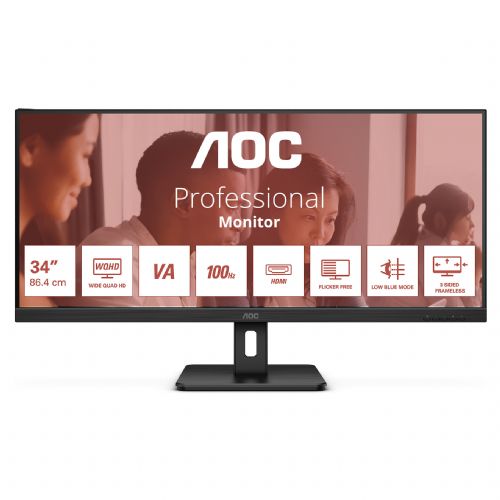


The ultra-wide monitor is designed for business users, gamers, and anyone who needs to see multiple content at once. Suitable for working with documents, spreadsheets, media editing, or multiple windows on a single screen.
screen
Screen diagonal: 86.4 cm (34")
Screen resolution: 3440 x 1440 pixels
Native aspect ratio: 21:9
Touch screen: No
HD Type: Wide Quad HD
Panel type: VA
Screen shape: Flat
Contrast ratio: 4000:1
Maximum refresh rate: 100 Hz
Number of display colors: 16.7 million colors
Backlight type: W-LED
Response time: 4ms
Contrast ratio (dynamic): 20000000:1
Viewing angle, horizontal: 178°
Viewing angle, vertical: 178°
Pixel pitch: 0.23175 x 0.23175 mm
Pixel density: 109.7 ppi
Screen diagonal (cm): 86.4 cm
Color depth: 8 bits
RGB color space: DCI-P3
Color gamut: 91%
sRGB coverage (classic): 115%
NTSC coverage (typical): 100%
Adobe RGB coverage: 98%
Services
VESA Adaptive Sync Supported: Yes
Flicker-free technology: Yes
Low Blue Light Technology: Yes
multimedia
Built-in speakers: no
Built-in camera: no
design
Market position: home
Product color: Black
Frameless design: Yes
Front bezel: black
Detachable stand: Yes
connections and interfaces
HDMI: Yes
Headphone output: Yes
Number of HDMI ports: 2
HDMI version: 2.0
Number of DisplayPort connectors: 1
DisplayPort version: 1.2
ergonomics
VESA mount: Yes
Cable lock slot: Yes
Panel mounting interface: 100*100mm
Cable lock slot type: Kensington
Tilt angle range: 3.5 - 21.5°
Tilt adjustment: Yes
Execution
Power consumption (standard operation): 35 W
Power consumption (standby): 0.5 W
Power consumption (off): 0.3 W
Power supply type: Internal
scope of delivery
Included cables: AC, HDMI
HDMI cable length: 1.8 m
weight and dimensions
Device width (including stand): 817.5 mm
Device depth (including foot): 253.8 mm
Device height (including stand): 475 mm
Weight (with stand): 7.67 kg
Width (without stand): 817.5 mm
Depth (without stand): 55.3 mm
Height (without stand): 370.7 mm
packaging information
Packaging width: 940 mm
Packaging depth: 506 mm
Package height: 174 mm
Package weight: 10.7 kg
WIDE QHD (WQHD) RESOLUTION
With a resolution of 3440 x 1440 Wide Quad HD (WQHD), it delivers superior picture quality and sharp images that show every detail. The 21:9 widescreen ratio is ideal for watching large-format movies or immersing yourself in an exciting game, plus it gives you more space when it's time to work. True 8-bit color offers a wide range of colors for vivid, natural-looking images.
VA PANEL
The VA (Vertical Alignment) panel delivers deeper blacks and higher contrast for particularly vivid and bright images.
REFRESH RATE 100 HZ
Experience frame rates twice as fast as other monitors and say goodbye to screen judder and motion blur. With a 100Hz refresh rate, every frame is rendered crisply with seamless transitions, so you can frame your shots precisely and enjoy fast-paced racing to the fullest.
HDMI
HDMI (High-Definition Multimedia Interface) is supported by the latest gaming consoles, graphics cards, and set-top boxes that include the HDCP digital content protection system. HDMI versions 1.3–1.4b support refresh rates up to 144Hz at 1080p and 75Hz at 1440p, while HDMI versions 2.0–2.0b support 240Hz at 1080p, 144Hz at 1440p, and 60Hz at 2160p (4K).
PICTURE BY PICTURE (PBP)
"Picture-by-Picture" is a feature that allows you to use multiple sources (e.g. from your laptop and desktop computer) simultaneously, displayed on the same screen. Optimal clarity provides more control and efficiency while streaming, working or gaming.
FLASHLESS
AOC Flicker-Free technology uses a DC (Direct Current) backlit panel that reduces flickering. Eye strain and fatigue are minimized, so you can enjoy long, intense games in comfort!
LOW BLUE LIGHT
Short-wavelength blue light can damage your eyes. AOC Low Blue Light technology blocks harmful blue light rays without changing the displayed color. Other methods to reduce blue light use filters or changed settings, but result in dark/yellow images.
FRAMELESS DESIGN
In addition to their modern and attractive appearance, frameless models also allow for seamless use of multiple monitors at the same time. Your cursor or window will no longer get lost in the dark abyss of frames when multiple monitors are placed side by side.
ADJUSTABLE SYNCHRONIZATION
Adaptive Sync matches your monitor's vertical refresh rate to the refresh rate provided by your GPU for an even smoother gaming experience by eliminating stuttering, tearing, and stuttering. This feature is also useful when playing videos and other visual media to ensure smooth entertainment.
VESA BRACKET
AOC's Ergo Base stands offer versatility, durability and ease of use in one package. But do you want to continue using your wall mount or multi-monitor setup with table mounts? VESA mounts provide maximum flexibility. Face down, in swivel mode, on top of each other: mount your monitor wherever you want thanks to VESA mounts on third-party mounts and stands.
The text is machine translated.
Before purchasing an ultrawide 34-inch monitor, it's worth considering whether this format and aspect ratio meet your actual work or home needs. Using such a large screen allows for exceptional visibility and multitasking, but it also requires a spacious desk and attention to choosing the right connection to your laptop or computer. When choosing between an ultrawide monitor and a classic dual-display setup, it's crucial to weigh up visibility, ergonomics, and connectivity options.
Source of editorial recommendations: ENAA guides and team experience.
The monitor is very suitable for users who work with multiple documents or applications at the same time - the wide, borderless workspace of two screens allows for excellent visibility.
Wide-format and high resolution are an excellent choice for displaying very wide tables or multiple reports. It allows you to monitor multiple data sets simultaneously.
Due to its large diagonal and aspect ratio, it is suitable for home needs, where it is often necessary to have email, chat, the web, and documents open on the same screen.
Refresh rates above 100 Hz are an advantage, but they are not on the level of the fastest gaming monitors, so the monitor is suitable with limitations for games, especially in genres where screen width is an advantage.
The ultra-wide format allows you to work in multiple windows or timeline editors, but for the most demanding color-sensitive tasks, check the panel's specificity (e.g. IPS) and color space coverage.
The monitor has two HDMI and one DisplayPort inputs, allowing you to connect two different devices simultaneously, but switching between sources is done manually via the monitor menu.
For a comfortable user experience, the recommended viewing distance depends on the size of the table, but is usually optimal between 70 and 100 cm - this ensures visibility of the entire screen.
The monitor supports connecting multiple sources, but the PBP (Picture-by-Picture) function is not confirmed for this model in the specifications - this is worth checking before purchasing if simultaneous display of two sources is a requirement.
It is less suitable for users who have limited desk space, or who often need completely separate windows (e.g. for testing different environments), where two separate monitors may be a better choice.
High refresh rates (100 Hz or more) are primarily achievable via DisplayPort; with HDMI, it may be limited depending on the capabilities of the connected devices.
Description updated: September 2026
If you are still deciding, the following content may also be helpful.
Best products
Products for various purposes
Monitors for working from home


