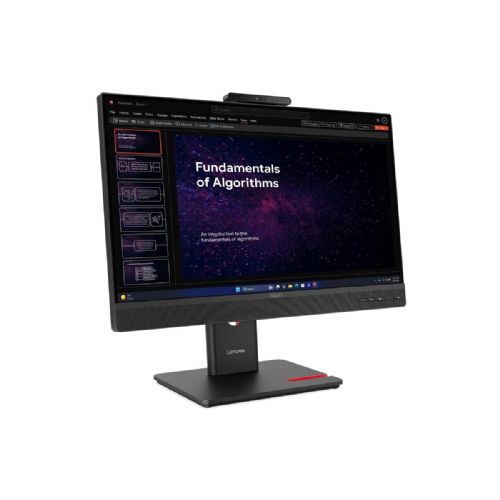
Lenovo ThinkCentre TIO24 Gen6 Touch
For business and home use Suitable for multitasking Emphasis on text readability
The 23.8-inch FHD touch monitor, suitable for office, home and combined use, allows you to comfortably work with documents, spreadsheets and communicate in multiple windows.
- IPS matte screen for clear viewing and reduced glare during extended work.
- 120Hz refresh rate for smooth scrolling and greater visual response.
- Touch support makes it easy to manage apps and participate in meetings.
- The compact size also fits smaller desks or dual-monitor setups.
The Lenovo ThinkCentre Tiny-in-One 27 Gen 6 is a versatile 27-inch monitor designed to enhance any workspace. Equipped with a vibrant 2560 x 1440 QHD resolution, this LED-backlit LCD monitor displays images with lifelike colors and supports up to 16.7 million colors. Its IPS technology provides wide 178-degree viewing angles, enabling impressive image clarity from virtually any position. The monitor also features a range of built-in devices, including a webcam and USB 3.2 Gen 1 hub, making it ideal for video conferencing and easy peripheral connectivity. With multiple display adjustment options such as height, pivot, swivel, and tilt, users can adjust their viewing position for comfort and increased productivity. The anti-glare matte finish reduces reflections, making the display suitable for a variety of lighting conditions. In addition, the Lenovo ThinkCentre monitor is EPEAT Gold rated and ENERGY STAR certified, highlighting energy efficiency and environmental responsibility. The integration of Natural Low Blue Light technology ensures comfortable viewing and reduces eye strain during prolonged use.
It is important to know
Before choosing this monitor, it is crucial to consider how the 23.8" diagonal and FHD resolution match your actual work needs and desk layout. Technological support, such as the type of connectors and screen refresh rate, is also an important factor, as these affect the user experience when multitasking or working for longer periods. Before purchasing, pay attention to compatibility with your computer and any wishes regarding the use of two monitors or more demanding work scenarios.
- On a 23.8-inch FHD monitor, text sharpness is adequate for most office use, but for demanding graphics and development tasks, a higher resolution or larger diagonal allows for more content to be open at the same time and a better overview.
- 120 Hz refresh rate offers noticeably smoother window movement and more pleasant browsing - this is an advantage during long-term use, especially if you scroll a lot through documents or web pages.
- The IPS panel and matte screen provide better color reproduction at different angles and less glare, which means more comfortable viewing and less eye fatigue.
- The monitor has a touch function, which is useful mainly for specialized business applications or quick navigation, but in everyday use it is not essential for all users.
- Connectivity and placement options are essential if you're considering a dual-monitor setup - compatibility and stand height can impact the ergonomic experience.
Source of editorial recommendations: ENAA guides and team experience.
In practice
🟢 Working with two screens
The 23.8" diagonal monitor with FHD resolution is an optimal match for another identical monitor, as it provides a uniform view without differences in sharpness; it is suitable for editing documents, spreadsheets and multitasking.
🟢 Long hours of office work
The IPS panel and matte screen ensure relaxed, glare-free use for extended periods with consistent image quality; the higher refresh rate offers an advantage when working with extensive text.
🟢 Monitor and laptop combination
The size and resolution ratio is consistent for connection to standard laptops – enabling a clear work environment and quick sharing of content between screens.
🟡 Graphic design and video editing
The monitor is suitable for basic graphics work, but FHD at this diagonal means less workspace than on higher-resolution models, and the color accuracy is not calibrated for professional editing.
🟡 Gaming and fast response
120 Hz provides a significantly smoother image than most classic office monitors, but the lack of specific gaming features means this monitor is a better choice for occasional gaming than for more demanding gaming scenarios.
🔴 Use as a single monitor for wide spreadsheets
23.8" with FHD resolution limits the amount of information on a single screen, so for work where you need many open applications or wide spreadsheets, consider a larger diagonal or higher resolution.
Answers to frequently asked questions
Can the monitor be combined with another monitor of the same size?
Yes, the coordinated diagonal and resolution allow for a uniform display without differences in sharpness, which is suitable for dual-monitor setups.
What does 120 Hz mean in practice for this monitor?
A higher refresh rate means smoother window movement, less tiring work with dynamic content, and faster image refresh.
Is touch use practical for everyday tasks?
The touch function is most useful in specialized business applications; for basic office use, it is not necessarily an advantage for all users.
Is an IPS panel suitable for working in bright rooms?
Yes, IPS combined with a matte surface effectively reduces glare and ensures stable colors even at side viewing angles.
Which connectors are essential when connecting to a laptop?
Before purchasing, check if your laptop supports the monitor's selected video outputs (e.g. HDMI, DisplayPort), as this will ensure smooth connection and operation.
Description updated: October 2026
Read also
If you are still deciding, the following content may also be helpful.
Best products
Best monitors 2026
Products for various purposes
Monitors for office work
Monitors for working from home
Hybrid Work Monitors
Monitors for home use
Gaming monitors
Graphic design monitors
Why buy from ENAA?
- The leading choice for monitors in Slovenia - the largest selection and professional support.
- Descriptions and recommendations are based on reliable data, allowing for an informed decision without unnecessary pressure.