Your shopping cart
😊 Product added to cart successfully
Product removed to cart successfully

Couldn't load pickup availability
Izdelek bomo predvidoma poslali čez: 0 dni
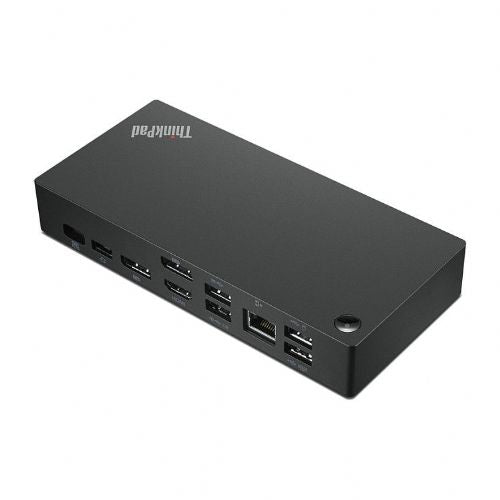
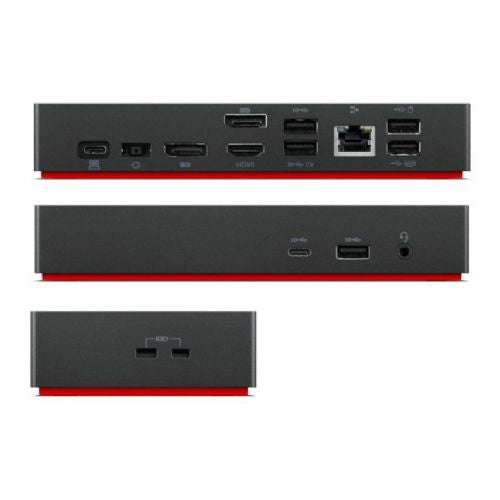
Lenovo 135W Universal Docking Station - USB-C is designed for demanding users who need a stable and powerful connection between their laptop and multiple peripherals, whether at home or in a professional environment. It allows users to easily expand their connections and enhance the functionality of their laptop with a single USB-C port.
Evaluation of key product features
| Property | Value | Emoji rating |
|---|---|---|
| Number of USB-C ports | 1 | 🟢 9.0 |
| Purpose of use | Portable | 🟢 9.5 |
| Dock type | USB-C | 🟢 10.0 |
| Docking station power | 135W | 🟢 9.8 |
| Network connection | Yes | 🟢 9.5 |
| Number of HDMI ports | 1 | 🟡 6.5 |
| Number of USB-A ports | 3 | 🟢 8.5 |
| Number of DIsplayPort connectors | 2 | 🟢 8.8 |
| Card reader | No | 🟡 5.0 |
| Warranty | 12 months | 🟡 7.0 |
⚖️ Compare features with other products of your choice
This docking station is an ideal choice for business users, gamers, and demanding consumers who want a seamless connection between their laptop and monitors, keyboards, mice, and additional peripherals. It provides a stable desktop extension, tidy cable management, and easy work in both the office and at home.
The key advantage of this docking station is its high power capacity—135W, which allows you to simultaneously charge your computer and use multiple external devices without compromising performance. Connectivity is provided by a single USB-C port that simultaneously transfers data, powers the device, and allows you to connect up to three displays (1x HDMI, 2x DisplayPort).
A special feature is the reliable network connection via RJ-45, so it is also suitable for users who need a fast and stable internet connection. With an additional three USB-A ports, it is possible to connect a variety of peripherals, from classic devices to more advanced accessories. Fast switching between multiple devices and a tidy work surface contribute to greater productivity, while the robust Lenovo quality ensures flawless operation.
Whether you frequently work from home, switch between different work environments, or want to enhance your gaming experience, this docking station offers a reliable solution for centralized management of all the devices on your desk.
Connections and interfaces
Transmission technology: Wired
Host interface: USB 3.2 Gen 1 (3.1 Gen 1) Type-C
Number of USB 2.0 ports: 2
USB 3.2 Gen 1 (3.1 Gen 1) Number of Type-C ports: 1
USB 3.2 Gen 2 (3.1 Gen 2) Number of Type A ports: 3
Number of HDMI inputs: 1
Number of DisplayPort connectors: 2
Feature: Headphone/microphone combo jack
network
Function: Ethernet/LAN
Number of Ethernet LAN ports (RJ-45): 1
Ethernet LAN data transfer rates: 10, 100, 1000 Mbit/s
Services
HD type: 4K Ultra HD
Resolution (maximum, digital): 3840 x 2160 pixels
Number of supported displays: 3
Feature: Cable lock slot
Cable lock slot type: Kensington
Product color: Black
Feature: On/Off switch
Certification: FCC/ICES; CE; KCC; RCM; BSMI; VCCI; CB; cULus; EAC; TUV mark; Serbia Quality; LoA; Israel SII; Ukraine DoC; NOM
energy
Power source: USB
Power plug: USB Type-C
Power: 135W
software
Supports Windows operating systems: Windows 10, Windows 11, Windows 7
Feature: Supported Linux operating systems
Working conditions
Operating temperature: 0–35°C
Relative humidity during operation: 20 - 95%
Weight and dimensions
Width: 171 mm
Depth: 80 mm
Height: 31 mm
Weight: 340g
Packaging information
Quantity per package: 1 piece(s)
Packaging width: 210 mm
Packaging depth: 158 mm
Packaging height: 75 mm
Package weight: 955g
Scope of delivery
Included cables: USB Type-C
Technical details
Certificates of conformity: CE
The text is machine translated.
The Lenovo 40AY0135EU docking station with 135W capacity and support for multiple monitors via HDMI and DisplayPort connectors is suitable for users who want to quickly turn their laptop into an efficient workstation or gaming station. It offers easy connectivity expansion with a single USB-C cable, making it suitable for business users, as well as for home use with multiple external devices. Due to its single USB-C port and predominantly USB-A inputs, it may be less optimal for more advanced users who need multiple USB-C outputs or the highest Thunderbolt throughput. The powerful power supply allows you to power most laptops, but we recommend checking compatibility with your device.
Recommendation source: Enaa guides and team experiences.
This docking station model is most often used by business users who want to easily connect their laptop to a monitor, keyboard, mouse and network both in the office and at home. It is also suitable for those who want a tidy desk and quick switching between working in different locations - as one USB-C cable enables both data connection and power supply for the laptop. Gamers or users with more demanding scenarios can take advantage of multiple video outputs to use multiple monitors simultaneously, but they should pay attention to the need for higher throughput or more USB-C ports.
Users often choose Lenovo products because of their reliability and guaranteed compatibility with the laptop of the same name, as well as the extensive ecosystem of accessories that enable uninterrupted work.
At Enaa, you can expect professional support in choosing IT equipment and clear information on compatibility, which is especially important when choosing docking stations for different brands and models of laptops. In addition, the platform allows you to compare with other models within the category, making it easier to find a solution that meets your actual needs.
Most Lenovo laptops with USB-C support will work with the listed docking station, however, we recommend checking the individual model as some functionalities, such as power supply or multi-monitor support, may vary depending on your laptop.
To connect multiple monitors, you need available HDMI or DisplayPort cables and your laptop and graphics card support for multi-display. First, check if your model allows simultaneous image output to multiple displays via USB-C.
The Lenovo 40AY0135EU laptop docking station may be compatible with other brands that support USB-C connectivity. Full functionality and power supply should be checked in advance according to your laptop manufacturer's specifications.
For reliable wired network operation, it is recommended to install the latest drivers for the docking station and regularly update your laptop software. If you experience connection problems, first check the cable and network settings on the system.
If your laptop doesn't charge via the docking station, first check if it supports USB-C Power Delivery. Some older or specific models may not have this feature or may only support it with the original power adapter.
Description updated: May 2026


