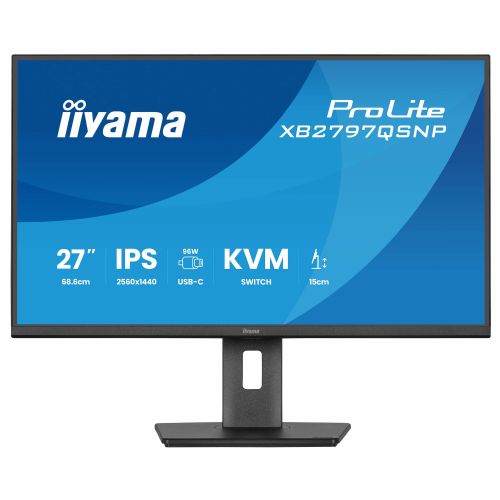
Iiyama XB2797QSNP-B1 – extended display for productive work
Good for office work Suitable for home multi-user use 27" large screen
The Iiyama XB2797QSNP-B1 is a 27-inch monitor designed for offices, home use, and multitasking. It's great for working with documents, spreadsheets, and online activities.
- Wide diagonal allows more space to work
- Good for multiple open windows and multitasking
- Also suitable as an additional screen for a laptop
- Designed for comfortable reading of texts and spreadsheets
- Versatile for family use
Screen Screen diagonal: 68.6 cm (27")
Screen resolution: 2560 x 1440 pixels
HD type: four-wheel HD
Native aspect ratio: 16:9
Display technology: LED
Panel type: IPS
Brightness (typical): 350 cd/m²
Response time (MPRT): 1 ms
Screen surface: Matte
Screen shape: Flat
Contrast ratio: 1000:1
Maximum refresh rate: 75 Hz
Horizontal viewing angle: 178°
Vertical viewing angle: 178°
Number of colors on the screen: 16.7 million colors
Pixel pitch: 0.233 x 0.233 mm
Horizontal scan range: 30 - 112 kHz
Visible size (horizontal): 59.7 cm
Visible size (vertical): 33.6 cm
Screen diagonal (cm): 68.5 cm
sRGB coverage (classic): 100%
NTSC coverage (typical): 72%
Services Feature: AMD FreeSync
Feature: Flicker-free technology
multimedia Number of speakers: 2
RMS power: 4W
Feature: Built-in speakers
design Market positioning: Office
Product color: Black
Connections and interfaces Feature: Built-in USB hub
USB Hub Version: 3.2 Gen 1 (3.1 Gen 1)
USB input connector type: USB Type-C
Number of data transfer inputs: 4
Number of USB Type-C ports for data transfer: 1
Function: USB powered
USB power adapter up to: 96 W
Feature: HDMI
Number of HDMI inputs: 1
Number of DisplayPort connectors: 1
Number of DisplayPort outputs: 1
Feature: Headphone output
Feature: Built-in KVM switch
Function: HDCP
network Function: Ethernet/LAN
ergonomics Feature: VESA mount
Panel mounting interface: 100 x 100 mm
Feature: Improved cable management
Feature: Cable lock slot
Cable lock slot type: Kensington
Feature: Height adjustment
Adjustable height (max.): 15 cm
Function: Pivot
Feature: Rotatable
Rotation angle range: -60 - 60°
Feature: Tilt adjustment
Menu languages: Czech, German, English, Spanish, French, Italian, Japanese, Dutch, Polish, Russian, Ukrainian
energy Energy efficiency class (EER): E
Energy efficiency class (HDR): Not available
Energy consumption (SDR) per 1000 hours: 21.4 kWh
Power consumption (standard operation): 21 W
Power consumption (standby): 0.5 W
Power consumption (off): 0.3 W
AC input voltage: 100-240 V
AC input frequency: 50/60 Hz
Power supply type: Internal
Weight and dimensions Device width (including stand): 613 mm
Device depth (including stand): 209.5 mm
Device height (including stand): 547.5 mm
Weight (including stand): 5.9 kg
Height (without stand): 403.5 mm
Packaging information Packaging width: 691 mm
Packaging depth: 142 mm
Packaging height: 447 mm
Package weight: 8 kg
USB cable length: 1.5 m
Scope of delivery Cables included: AC, USB, HDMI, USB Type-C
HDMI cable length: 1.5 m
Power cable length: 1.5 m
sustainability Sustainability certificates: ErP, TCO
Other functions Package contents: quick start guide, safety instructions
Weight: 5.9 kg
Width: 613 mm
Depth: 209.5mm
Control panel: Joystick: Power/Menu (center), Up/Signal Select, Down, Left/Shortcut, Right/Volume
Conformity certificates: CE, EAC, PSE, REACH, RoHS, TÜV mark, UKCA, VCCI, WEEE
Manufacturer's warranty: 5 years (for details and countries where the warranty is valid, please check the warranty section on our website)
Number of Ethernet LAN ports (RJ-45): 1
Stay connected and reduce cable clutter with the ProLite XB2797QSNP. The built-in 96W USB-C docking station lets you transfer video, audio, data, and power over a single cable for a clean and efficient workspace. The RJ45 port provides fast and stable wired network connection without the need for additional adapters. The built-in KVM switch lets you control two computers with a single keyboard and mouse, making it easy to switch between systems and ensuring a smooth workflow. The 27-inch (68.5 cm) QHD IPS panel delivers high resolution, accurate color reproduction, and wide viewing angles, ideal for detailed work such as content creation, spreadsheets, or design tasks. DisplayPort output allows you to quickly set up a dual-monitor configuration to expand your screen space and increase productivity. The stand offers 150 mm of height adjustment, as well as tilt, swivel, and pivot functions, including portrait mode, so you can work comfortably in your preferred position. The TÜV Rheinland Eye Comfort certified XB2797QSNP monitor reduces eye strain during prolonged use, supporting long-term concentration and well-being at work. Also available without USB-C docking station: XB2797QSU-B1.
The text is machine translated.
Same summary
The iiyama XB2797QSNP-B1 monitor with a 27-inch diagonal and QHD resolution is well suited to the needs of business users and home office use, where the working area and text sharpness are important. Due to its higher resolution compared to conventional Full HD models, it is more suitable for multitasking, analytics or working with multiple windows, where clarity is key. However, a larger diagonal requires sufficient desk space and an appropriate viewing distance; for thorough graphics work or professional color accuracy, more demanding users may look for even higher specifications or more advanced color options.
The model is particularly useful as a primary or secondary display in a productive environment, and in case of long working hours, we recommend also checking the ergonomics and the possibility of height adjustment or VESA mounting. As it is a balanced choice in terms of size, resolution and usability, it is a suitable compromise between multitasking, comfort and price.
Recommendation source: Enaa guides and team experiences.
User view
This monitor is more often chosen by users who need more screen space for working with documents, spreadsheets or software, and those who want to improve the work-from-home experience with greater visibility. It is also suitable for those who want better image sharpness than with basic models, although for the most demanding graphics users or professional gaming, you should go for models with advanced color gamut and faster refresh rates. When deciding on size and working dynamics, our monitor size guide can be useful, where the differences between different diagonals are practically presented.
Users often appreciate the tradition and quality of the Iiyama brand, which is recognized among connoisseurs for its reliable, practical solutions for professional and home use.
Why buy at Enaa
At Enaa you can find a wide selection of monitors from renowned brands, which makes it easy to compare different models according to resolution and size. The clear offer and professional information make the choice easier even for more demanding users who want to align the needs of office use or the home environment with the latest market trends.
Answers to frequently asked questions
For what purposes is the iiyama XB2797QSNP-B1 monitor most useful?
It works best for office use, multitasking, or as an upgraded home screen, where image sharpness and enough space to work with multiple applications simultaneously are important.
Is the monitor suitable for connection to modern laptops?
Yes, the monitor supports modern connectors, but before purchasing, it is recommended to check which connections your laptop supports, especially if you want a single-cable connection or multiple monitors at once. You can find more information in our dual monitor setup guide .
What should I consider when setting up a 27-inch monitor?
Proper viewing distance and proper height adjustment are important to avoid eye strain or awkward posture. If you have limited desk space, consider mounting on a bracket (VESA).
Is this monitor suitable for more advanced graphics work or professional design?
Due to its QHD resolution and larger diagonal, it can meet basic needs for editing graphics or photos, but for professional color accuracy, we recommend models with extended color coverage and additional settings.
What do different resolutions mean on larger monitors?
A higher resolution, like QHD on a 27-inch monitor, means better sharpness and more screen space, which is crucial when multitasking or working with details. If the diagonals are too large and the resolution is too low, the image can appear grainy.
Description updated: April 2026