Your shopping cart
😊 Product added to cart successfully
Product removed to cart successfully

Couldn't load pickup availability
Izdelek bomo predvidoma poslali čez: 5 dni
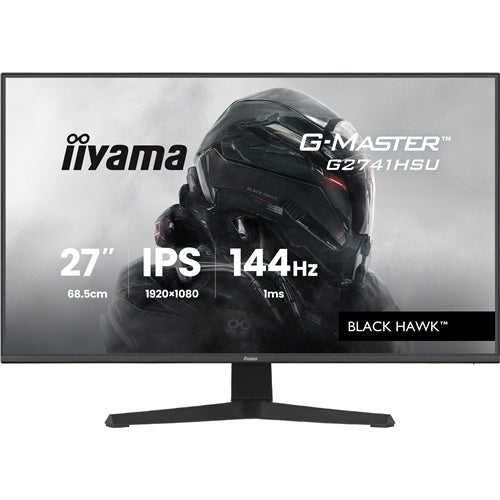
The Iiyama G-Master G2741HSU-B1 Black Hawk monitor (68.6 cm (27"), black (matte), FullHD, IPS, HDMI, DP, Free-Sync, USB hub, 144Hz display) is a reliable choice for anyone who expects excellent images, fast response times, and advanced connectivity options in a modern work or gaming environment. It is intended for demanding business users, enthusiastic gamers, and all consumers looking for a high-quality and versatile monitor for home or office.
It is a high-quality 27-inch monitor that provides a smooth experience in everyday use, thanks to a 144 Hz refresh rate and a 1 ms response time. The monitor excels in multitasking, professional work, as well as demanding games, where image details, color accuracy and fast reactions are crucial. With IPS technology, it offers wide viewing angles and equivalent color reproduction, which is especially important in graphic work or multi-user environments.
Evaluation of key product features
| Property | Value | Emoji rating |
|---|---|---|
| Field of application | Gaming monitor | 🟢 9.5 |
| Size | 68.58 cm (27") | 🟢 9 |
| Resolution | 1920 x 1080 (FHD) | 🟡 6.5 |
| Panel type | IPS | 🟢 8.5 |
| HDMI connector | Yes | 🟢 9 |
| USB-C connector | No | |
| Built-in docking station | No | |
| Aspect ratio | 16:9 | 🟢 9 |
| Touch screen | No | |
| Curved screen | No | |
| Response time (ms) | 1 | 🟢 10 |
| Brightness (cd/m2) | 250 | 🟡 6 |
The monitor boasts an extremely fast refresh rate of 144 Hz and a response time of 1 ms, which provides a smooth image without blurring and is essential for fast-paced games or video work. The IPS panel provides vibrant colors and wide viewing angles, meaning the image is clear and displayed correctly even when viewed from the side.
With AMD FreeSync, HDMI and DisplayPort connections, and a built-in USB hub, this monitor allows for easy and flexible connection of various devices – from computers, game consoles, to additional peripherals. Due to the combination of FullHD resolution and large diagonal, it remains very suitable for clear work with multiple windows or diverse digital content.
The ergonomically designed, matte finish reduces glare and improves comfort during prolonged use by preventing light reflection in the office or home environment. Iiyama stands out with this model for its balanced ratio between price, performance and functionality, allowing users to benefit from the benefits of a high-performance monitor without compromise.
| Screen diagonal | 68.6 cm (27 inches) | ||
| Screen resolution | 1920 x 1080 pixels | ||
| type | Gaming monitor | ||
| Color | black (matte) | ||
| EAN | 4948570126330 | ||
| Manufacturer's no. | G2741HSU-B1 | ||
| Suitable for | Games | ||
| Picture | Type of glare | Frozen | |
| format | 16:9 | ||
| Technology | LED light | ||
| Panel technology | IPS | ||
| functions | Full high definition | ||
| brightness | 350 cd/m² | ||
| refresh rate | 144Hz | ||
| Position (5:1) | Horizontal | 89° | |
| Vertical | 89° | ||
| Viewing angle (10:1) | Horizontal | 178° | |
| Vertical | 178° | ||
| Pixel pitch | Horizontal | 0.311mm | |
| Vertical | 0.311mm | ||
| Colors | 16.7 million | ||
| reaction time | MPRT | 1ms | |
| contrast | Dynamic | 80,000,000 : 1 | |
| Static | 1,500 : 1 | ||
| frequency | Horizontal | 30–163 kHz | |
| Links | 1x HDMI input (HDMI version: 1.4), 1x DisplayPort input (DisplayPort version: 1.2), 1x headphone output, 2x USB-A 2.0, 1x USB-B 2.0 | ||
| ergonomics | type | Tilting | |
| Tilting | 4° forward, 22° backward | ||
| power supply | Eco-off | 0.3 watts | |
| power supply | Integrated | ||
| Speakers | Number | 2 | |
| Total capacity | 4 watts | ||
| wall bracket | VESA compatible (100 x 100 mm) | ||
| Features | Blue light reduction, flicker-free, USB hub, cable management, black level receiver | ||
| AMD FreeSync, Kensington lock | |||
| Accessories | Available | Power cable (1.5 m), USB cable (1.5 m), HDMI cable (1.5 m), installation instructions, safety instructions | |
The Iiyama G-Master G2741HSU-B1 Black Hawk monitor is designed for users who want more screen space at work or at home and are looking for a balanced compromise between price, size and image responsiveness. The 27-inch IPS monitor with Full HD resolution offers a clear display and wide viewing angles, and due to its high refresh rate, it will also be suitable for casual gaming or faster work with multiple windows. It is worth noting that Full HD on this diagonal may not be quite suitable for the most demanding reading of small text or professional graphics work, so it makes sense to choose it mainly for everyday use, multimedia and classic office tasks. Users who value universality and want a fast but affordable larger screen will cover most of their basic needs with this model.
Recommendation source: Enaa guides and team experiences.
This monitor is most often the choice of home users, students or employees who need a simple and clear larger screen for typical office applications, learning, occasional gaming or monitoring multiple content at the same time. Due to the fast refresh rate and Free-Sync technology, it is also often used as a primary monitor by casual gamers when perfect sharpness for the smallest details is not a priority. The larger screen area is especially useful when connected to multiple open windows, such as documents and browsers. If you are comparing several options, you can help with the guide to choosing the right monitor size .
Users also like to choose Iiyama products because of their reliability and high-quality IPS display, which is appreciated during prolonged use and working in different lighting conditions.
At Enaa, you have a clear insight into the technical features and professional support of our team, as well as the opportunity to choose from a wide range of monitors tailored to the needs of business users, gamers, and home use.
For general use, such as working with documents, browsing the web, or watching multimedia, Full HD is perfectly serviceable on this screen size. For the most demanding tasks, where perfect text sharpness is key, consider models with higher resolutions, which is further explained in our monitor selection guide .
Yes, a 27-inch monitor with an IPS panel is suitable as a primary or secondary display for both home and office use; before choosing two monitors, we recommend that the size and resolution be as close as possible to each other.
The monitor offers a 144Hz refresh rate and Free-Sync support, which is enough for a smooth experience for casual gaming. However, for very demanding or competitive games, a higher resolution or a more specialized model will be more suitable.
Yes, the matte coating reduces reflections and allows for more comfortable work, especially when the monitor is placed near windows or in a brighter room, which helps reduce eye strain during prolonged use.
Before purchasing, check if your laptop or computer supports at least one of the monitor's ports (HDMI, DisplayPort, or USB hub). If your device does not have the appropriate port, you may need to use an adapter or additional cable.
Description updated: April 2026


