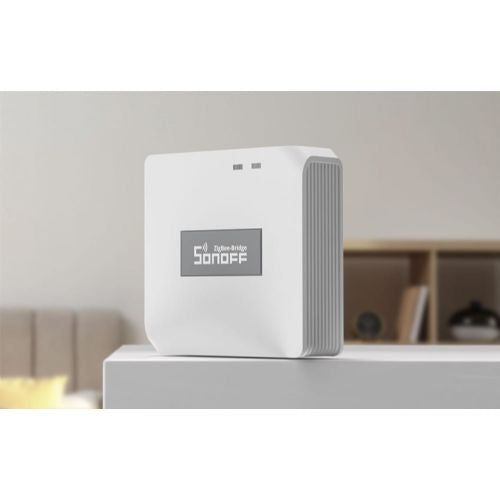
Sonoff ZigBee 3.0 Pro HUB – central smart home management
Suitable for larger smart systems Good choice for Zigbee ecosystems App-controlled
This HUB is designed for users who want to group and manage up to 128 Zigbee devices from one place via an app or voice assistants.
- Connects smart devices from different manufacturers
- Allows remote management and automation
- Upgrade without major interventions in the house or apartment
- Works with eWeLink, Alexa and Google Assistant
- Stable and efficient Zigbee connection
Smart ZigBee 3.0 WiFi Bridge Pro Sonoff ZB Bridge-P – The Heart of Your Smart Home
Are you looking for a reliable, fast and extremely efficient solution to manage all the smart devices in your home? The Smart ZigBee 3.0 WiFi Bridge Pro (Sonoff ZB Bridge-P) is a central control panel that connects the world of Wi-Fi and ZigBee 3.0 wireless technologies. This advanced gateway allows you to connect up to 128 devices into a single and stable system, creating a fully automated and secure home tailored to your needs.
Thanks to compatibility with leading smart home platforms such as eWeLink, Amazon Alexa, Google Assistant and Samsung SmartThings, you will have complete control over your lights, sensors, sockets and security systems directly via your smartphone or simple voice commands.
---
Why choose Smart ZigBee 3.0 WiFi Bridge Pro?
Exceptional performance and stability with ZigBee 3.0
The newer ZigBee 3.0 protocol brings significantly higher reliability, faster data transfer, longer range and extremely low power consumption of connected devices. Unlike classic Wi-Fi devices that can overload your home router, ZigBee smart devices operate on their own network. In addition, connected devices act as routers, meaning that each additional device expands and strengthens the reach of your smart network throughout the house.
Local operation without internet and built-in real-time clock
Are you worried that your smart home will stop working when your internet connection goes down? Sonoff ZigBee Bridge Pro solves this problem by allowing you to create local smart scenarios. This means that connections between sensors and switches will work smoothly even when Wi-Fi is unavailable. The built-in real-time clock (RTC) ensures that any power outages won't affect the synchronization of your devices - when power returns, all your set schedules will work exactly as they should.
Advanced security and flexible protection methods
Combine the Pro bridge with separate sensors (motion sensors, door/window sensors) to create a complete security system. You can easily switch between different security modes, such as "Home" and "Away" in the eWeLink app. If the sensor detects unauthorized entry, you will immediately receive a security notification on your mobile phone. The built-in buzzer on the control panel can also be used as a warning alarm or as a doorbell when connected to a wireless button.
---
Key features and benefits
Support for up to 128 devices: Connect a wide range of devices, including smart switches, outlets, sensors, and thermostats.
Dual Protocol: Seamless integration and communication between Wi-Fi (2.4 GHz) and ZigBee 3.0 devices.
Exceptional compatibility: Perfect cooperation with eWeLink, Sonoff applications, as well as Amazon Alexa, Google Assistant and Samsung SmartThings platforms.
Voice control: Control your devices hands-free with simple voice commands.
Local smart scenes: Automations work locally even when the internet connection is down.
Built-in buzzer: Useful for audible alerts, alarms, or as a doorbell.
Smart schedules and sharing: Set operating schedules and share control of your smart home with other family members.
---
Technical specifications
Entry
5V - 1A
Wireless connectivity
Wi-Fi IEEE 802.11 b/g/n 2.4 GHz, ZigBee 3.0
Operating temperature
-10°C to 40°C
Housing material
PC V0 (fireproof polycarbonate)
Weight
35g
Dimensions
62 x 62 x 20 mm
Application support
eWeLink, Sonoff
Compatibility with voice assistants
Google Assistant, Amazon Alexa, Samsung SmartThings
---
Frequently Asked Questions (FAQ)
1. How many devices can I actually connect to this bridge?
The Smart ZigBee 3.0 WiFi Bridge Pro (ZB Bridge-P) supports up to 128 devices. Devices that operate on constant power (e.g. smart sockets and switches) also act as routers (repeaters), which helps extend the range and stability of the entire ZigBee network.
2. Will my automations work if my internet goes out at home?
Yes, this advanced Pro control panel allows you to create local smart scenes. This means that connected devices will communicate with each other and perform automations even if the Wi-Fi connection is lost. And the built-in real-time clock (RTC) ensures that schedules are maintained even during temporary power outages.
3. How does this bridge help with the security of my home?
You can connect the bridge to various sensors (e.g. motion sensors or door and window sensors). You can select security modes (e.g. "Away from home") in the eWeLink app, and you will receive an immediate alert on your phone when motion is detected or the door is opened. The bridge also has a built-in buzzer that can trigger an audible alarm in the event of an unwanted event.
Responsible persons:
sonoff - INNPRO Robert Błędowski Sp. z o. o., Rudzka 65c, 44-200 Rybnik, Poland, contact@innpro.eu (+48) 696 323 914
Distributor for Slovenia: Haloorodje.si, Online Sales, Rok Groznik sp, Podturn 42, 8350 Dolenjske Toplice, info@haloorodje.si, +38669731944, Slovenia
Product origin: China
Instructions for using the product:
• Connect the device
• Connect the ZigBee Bridge Pro to power using the included USB cable and adapter.
• Connection with eWeLink application
• Download and open the eWeLink app (iOS/Android).
• Press "Add device" and follow the instructions to connect via WiFi.
• After a successful connection, name the device and add it to your system.
• Connecting ZigBee devices
• Select "Add ZigBee device" in the app.
• Put the device you want to connect into pairing mode (see its instructions).
• After successful connection, name the device and set its functions.
• Integration with Alexa / Google Assistant
• Connect your eWeLink account to the Alexa or Google Home app.
• After synchronization, you will be able to control your smart ZigBee devices with voice commands.
Useful tips:
💡 Create smart scenarios - e.g. automatically turn on lights when motion is detected.💡 Automate heating or cooling using ZigBee thermostats and smart plugs.💡 Connect smart curtains and shades that rise at sunrise.💡 Combine ZigBee switches and lights for easy night lighting.💡 Use door and window sensors for additional security in your home.
Warnings:
⚠️ Works only with ZigBee devices - check the compatibility of your devices.⚠️ The WiFi network must be 2.4 GHz - the ZigBee bridge does not support 5 GHz networks.⚠️ The device must always be connected to power, as it does not run on batteries.⚠️ Do not expose to moisture and water, as the device is not waterproof.⚠️ For greater coverage, use ZigBee devices that support a "mesh" connection.
Same summary
This ZigBee 3.0 Pro Router HUB is a practical solution for users who want to connect multiple smart devices and create a connected smart home with support for up to 128 devices. It is especially suitable for those who already use or plan to build a wider Zigbee ecosystem and who value a centralized management point via an app.
Using a hub is recommended when you want to connect multiple devices to a single point, automate your home, and take advantage of advanced scenario and schedule options. It is important to note that such a HUB is not intended for those who want to control only one or a few separate devices - in this case, a solution without a hub will be simpler.
Before purchasing, it is recommended to check whether your existing smart elements (e.g. switches, sensors) are compatible with the Zigbee protocol. Users who are not experienced in setting up smart systems should familiarize themselves with compatibility options in advance or choose reliable brands.
Recommendation source: Enaa guides and team experiences.
User view
Most users of this ZigBee HUB are households or individuals who want to easily manage their smart home without complicated procedures. It is useful in situations where you decide to set up automated routines, such as turning on the lights when you arrive home or setting schedules for various devices in the apartment.
It is especially convenient for those who already use multiple devices of the same brand - the smart HUB can connect different brands of Zigbee devices under one application. Users often trust Sonoff solutions, as they allow the expansion of a smart home in a modular way with a greater degree of flexibility.
Why buy at Enaa
When purchasing a smart ZigBee HUB at Enaa, you can count on a clear comparison of accessories and protocols in the offer, which greatly facilitates the selection of the device that best suits your smart environment, and contributes to better compatibility and satisfaction in use. The offer is based on customer experience and real feedback from practice, so you have a better overview of how the product performs in everyday situations.
Answers to frequently asked questions
Can I use this ZigBee HUB with different smart devices from different manufacturers?
Yes, if your devices are compliant with the Zigbee protocol, you can control them via this HUB, regardless of brand, but it is important to check the compatibility of individual devices beforehand.
How many devices can I connect to this HUB at the same time?
This model allows the connection of up to 128 Zigbee devices, which is also suitable for larger households or more extensive smart systems.
Can I also control the devices remotely?
Yes, with the appropriate connection via the app, it allows you to monitor and manage devices even when you are not at home, as long as you have internet access.
Is this HUB suitable for a beginner in the world of smart home?
For users who are not yet experienced, it is recommended to familiarize themselves with the basics of protocols and compatibility options before setting up, as the central HUB introduces some complexity into the system.
What apps or smart assistants can I use to manage?
This ZigBee HUB is compatible with the eWeLink app and also supports integration with voice assistants such as Alexa and Google Assistant.
Description updated: April 2026