Your shopping cart
😊 Product added to cart successfully
Product removed to cart successfully

Couldn't load pickup availability
Izdelek bomo predvidoma poslali čez: 5 dni
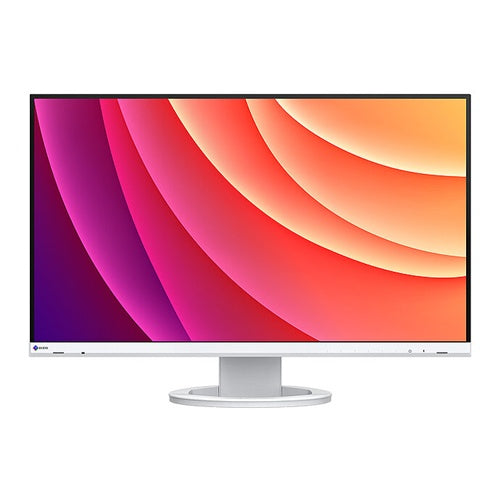
The Eizo EV2740S FlexScan monitor (68.5 cm (27"), white, UltraHD/4K, IPS, USB-C, HDMI, DP, USB hub) is a high-performance display designed for users who demand excellent images and advanced connectivity in their work or home environment. With its exceptional resolution and ergonomic design, it opens up new possibilities for efficient work, gaming, or a superior visual experience.
This monitor is suitable for business users looking for a reliable and color-accurate workstation, avid gamers who will appreciate perfect images and stable performance, and demanding consumers who want a modern display with flexible connections. It solves the challenges of multitasking, quality images, and workspace organization with a single cable thanks to USB-C connectivity.
Evaluation of key product features
| Property | Value | Rating |
|---|---|---|
| Field of application | Business use, gaming, home multitasking | 🟢 9.5 |
| Size | 68.5 cm (27") | 🟢 9 |
| Resolution | Ultra HD/4K (3840 x 2160) | 🟢 10 |
| Panel type | IPS | 🟢 9 |
| HDMI connector | Yes | 🟢 8.5 |
| USB-C connector | Yes (power and data transfer) | 🟢 10 |
| Built-in docking station | USB hub | 🟢 9 |
| Aspect ratio | 16:9 | 🟢 9.5 |
| Touch screen | No | |
| Curved screen | No | |
| Response time (ms) | 5ms (typical) | 🟢 8 |
| Brightness (cd/ m2 ) | 350 | 🟢 8.5 |
The monitor boasts UltraHD/4K resolution on a 68.5 cm (27") diagonal, providing exceptionally sharp images and more space for multiple windows or detailed work. The IPS panel delivers accurate colors and a wide viewing angle, which is crucial for professional graphics, photo editing or group presentations.
Connectivity is advanced – in addition to HDMI and DP, it includes a USB-C port that allows for fast data transfers, connecting multiple devices, and even powering your laptop with a single cable. A built-in USB hub makes it easy to connect additional USB devices directly to the monitor, further streamlining your workspace.
Office work is more comfortable thanks to ergonomic height, tilt, pivot and swivel adjustments. The 5 ms response time and 350 cd/ m2 brightness are sufficient for modern games and more demanding applications, while the monitor saves energy through advanced automatic brightness adjustment.
The product stands out with its color uniformity, stable display and minimalist appearance that fits seamlessly into modern offices or home workstations. With the optimal balance between image quality, functionality and style, it represents an excellent choice for a demanding user experience.
Specifications
| Suitable for | Business | ||
| Picture | Type of glare | Anti-reflective | |
| format | 16:9 | ||
| Technology | LED light | ||
| Panel technology | IPS | ||
| functions | Ultra HD/4K | ||
| brightness | 350 cd/m² | ||
| refresh rate | 60Hz | ||
| Viewing angle (10:1) | Horizontal | 178° | |
| Vertical | 178° | ||
| Pixel pitch | Horizontal | 0.155mm | |
| Vertical | 0.155mm | ||
| Colors | 16.7 million | ||
| reaction time | GtG | 6ms | |
| contrast | Static | 1,000 : 1 | |
| frequency | Vertical | 29–61 Hz | |
| Horizontal | 31–136 kHz | ||
| Links | 1x HDMI input, 1x DisplayPort input, 4x USB-A 3.2 Gen 1 (5 Gbit/s), 1x USB-C 3.2 Gen 1 (5 Gbit/s) | ||
| ergonomics | type | Swivel, swivel, tilt, height adjustable | |
| Rotating | 172° left, 172° right | ||
| Tilting | 5° forward, 35° backward | ||
| Adjustable height | 169 mm | ||
| Energy Star | Yes | ||
| power supply | Eco-off | 0.3 watts | |
| electricity consumption | Maximum 149 watts | ||
| power supply | Integrated | ||
| Speakers | Number | 2 | |
| Total capacity | 2 watts | ||
| wall bracket | VESA compatible (100 x 100 mm) | ||
| Features | USB-C docking station, DICOM tone characteristics, EcoView automatic brightness control, EcoView Index, EcoView Optimizer, Overdrive, flicker-free, PbP, USB-C PD 70 Watt, power management | ||
| Additional information | Suitable for RadiCS Class VIII use, total stand height in low position: 376.3 mm | ||
| Accessories | Available | USB-C cable, power cable, quick start guide | |
| sustainability | Environmentally friendly production (TCO) Efficient energy consumption (TCO) |
||
The Eizo EV2740S FlexScan monitor with a 27-inch diagonal and 4K resolution is particularly suitable for business users and anyone who often works with multiple windows or requires more workspace on the screen. Thanks to the modern IPS panel, wide connection options (USB-C, HDMI, DP) and advanced ergonomic options, the monitor is well-balanced for long-term use in the office, as well as for home users who value image sharpness and comfort at work. It is primarily adapted to everyday productivity, creativity and working from home, and somewhat less demanding gamers looking for higher refresh rates. It is important to consider the space on the desk and the appropriate viewing distance, as high resolution comes into its own with appropriate ergonomics.
Recommendation source: Enaa guides and team experiences.
This monitor is most often used by business users who spend a lot of time reading and editing documents, spreadsheets or data tables, as well as those who want to improve productivity by using multiple open applications at the same time. The USB-C connector makes it very convenient for hybrid work with laptops, as it allows you to connect and power at the same time through a single cable, which is also recommended by experienced users - you can find more about this in the guide to using dual monitors for greater efficiency .
In the premium monitor segment, Eizo is recognized for its reliability and image quality, which is why users often choose Eizo monitors for professional work, where both ergonomics and display accuracy are key.
At Enaa, you have access to a wide range of monitors, allowing you to compare different sizes and resolutions within the same class. Expert guides are available to explain the key differences between each model and help you choose the right monitor based on your requirements and usage.
It works best for everyday office and home use, multi-window work, spreadsheet processing, and digital creation, where high resolution and eye comfort are important.
Yes, its USB-C port makes it particularly suitable as a second display for modern laptops, making it easy to set up and connect — read more about this in our dual monitor guide .
A distance of between 60 and 90 cm is recommended to take advantage of high resolution and make reading text comfortable even with smaller fonts.
Although it offers excellent sharpness and colors, it is not focused on advanced gaming features such as very high refresh rates, so it will be more suitable for casual gaming or general use.
Due to its versatility, size and various connections, it is also suitable for multi-user environments where the monitor is used by several family members for work, school or relaxation.
Description updated: April 2026


