Your shopping cart
😊 Product added to cart successfully
Product removed to cart successfully

Couldn't load pickup availability
Izdelek bomo predvidoma poslali čez: 1 dni


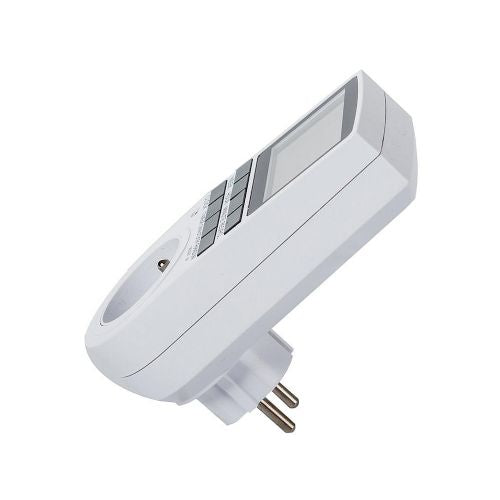
A digital timer for consumers who want to automatically manage the on time of a connected electrical device.
Digital LCD time switch - timer 3680W (SKU: 11295 / 00011747)
Are you looking for an effective way to reduce your monthly electricity costs and fully automate your home? The 3680W Digital LCD Switch Timer is a premium device for smart control of electrical appliances. With exceptional performance, advanced programming and ease of use, this device will become an indispensable part of your household, office or workshop.
Why choose the 3680W digital LCD time switch?
Modern life demands smart solutions. This digital timer allows you to take full control over the operation of your electrical devices. With its help, you can automatically turn heaters, lamps, chargers, air conditioners or holiday lighting on and off. This not only extends the life of your devices, but also actively contributes to saving electricity.
One of the biggest advantages of this time switch is its high capacity. It supports devices with a power of up to 3680W (16A), which means that it can easily control even larger energy consumers. The built-in rechargeable battery ensures that your settings and programs will not be erased even in the event of a power outage.
Key benefits and features of the timer
High operating capacity: Supports loads up to 3680W and 16A, allowing safe use with most household appliances.
Clear LCD display: Large and clearly readable display (size 5 cm x 3.5 cm) allows easy setting and monitoring of remaining operating time.
Built-in memory backup: The integrated battery maintains the set programs and time even in the event of a power outage.
Flexible programming: Possibility to set different time intervals for individual days, groups of days or the entire week.
RANDOM function (Presence simulation): An ideal security function that randomly turns the lights on and off between 6:00 PM and 6:00 AM, thus deterring potential burglars.
Easy time switching: Quick and easy switching between 12- and 24-hour format and between winter and summer time (SUMMER function).
Product technical specifications
Reliability and accuracy are key features of this time switch. Below are all the technical data that confirm the top quality of workmanship:
Voltage: 230V~ / 50Hz
Maximum load: 16A, 230V~, 50Hz, 3680W
Device accuracy: +/- 1 minute per month
Screen dimensions: 5 cm x 3.5 cm
Total length of the device: 13 cm
Depth without plug: 4 cm
Depth with plug: 8 cm
Color: Elegant white color that fits into any space
SKU code: 11295 or 00011747
Category: Lighting and technology
Instructions for first use and programming
1. Preparing the device before first use
Before using the device for the first time, plug it into a power outlet for about 5 to 10 minutes without any consumers connected. This is necessary to charge the built-in battery. During this time, nothing may appear on the display, which is completely normal. Repeat the same procedure if the device has not been used for a long time. Then gently press the RESET button with a paper clip to reset all settings to the factory defaults.
2. How to set the schedule (Example: turn on at 18:15 and turn off at 22:15)
Programming the device is extremely simple and takes place in the following steps:
Press the TIMER button to enter the setting mode. The display will show 1_ON (time to turn on the first program).
Press the WEEK button until the desired combination of days appears on the display (e.g. "MO TU WE TH FR SA SU" for each day of the week).
Press the HOUR button to set the hour to 18.
Press the MINUTE button to set the minutes to 15.
Press the TIMER button again until the display shows 1_OFF (time to turn off the first program).
Repeat the hour and minute setting procedure (steps 3 and 4) until the display shows 22:15.
Press the time button or wait a few seconds to confirm and return to clock mode.
To pause a specific program, simply press the RES/RCL button. Pressing the same button again will reactivate the program.
Frequently Asked Questions (FAQ)
What to do if the screen is completely blank when first plugged in?
Don't worry, this is completely normal. The built-in memory storage battery is probably empty. Leave the device plugged into a wall outlet for 5 to 10 minutes without any load to charge the battery. After this time, the display will start working, then press the RESET button with a paper clip to prepare the device for programming.
How does the "RANDOM" function work and when to use it?
The RANDOM function is a great security tool when you are not at home. When you press the RANDOM button, the device will automatically turn the connected light or radio on and off at random intervals between 6:00 PM and 6:00 AM. This creates the impression that someone is present in the house, which is an effective deterrent to intruders.
Does the time switch retain its settings if I unplug it?
Yes, the device has a built-in high-quality rechargeable battery for memory backup. Even if you unplug the timer or if there is a power outage in the house, all your set programs and the exact time will remain safely stored.
Responsible persons:
VERK GROUP - VERK GROUP SIKORSKI SPÓŁKA KOMANDYTOWA WYGODY 16, 05-090 PODOLSZYN NOWY, POLAND, zamowienia@verk.sklep.pl, +48 888055550
Distributor for Slovenia: Haloorodje.si, Online Sales, Rok Groznik sp, Podturn 42, 8350 Dolenjske Toplice, info@haloorodje.si, +38669731944, Slovenia
Product origin: China
IZOKSIS - ISO TRADE Spółka z oo, Hangarowa 15, 59-220 Legnica, POLAND, +48 666 002 003, b2b@maxy.eu
Distributor for Slovenia: Haloorodje.si, Online Sales, Rok Groznik sp, Podturn 42, 8350 Dolenjske Toplice, info@haloorodje.si, +38669731944, Slovenia
Product origin: China
Instructions for using the product:
• Connecting the Device: Plug the timer into a suitable electrical outlet.
• Time Setting: Press and hold the time setting button, then use the hour, minute, and second buttons to set the desired time.
• Programming Time Intervals: Press the programming time interval button and set the desired time interval during which the device should be turned on or off.
• Save Settings: After completing the settings, press the save button to save your settings.
• Turning the Device On and Off: After programming the time intervals, turn on the timer to start the set functions.
• Manual Control: If necessary, you can manually turn connected electrical devices on or off with a timer.
Useful tips:
• Before first use, read the operating instructions and make sure you understand the functions and settings of the device.
• Regularly check the settings and operation of the time switch to make sure they are working according to your expectations.
• Do not overload the time switch with devices whose total power exceeds its capacity to prevent damage or interruption of operation.
Warnings:
• Do not exceed the maximum load of 3680 W / 16 A at 230 V. (turn0search0)
• Only use the timer with electrical devices whose power and load type are compatible with its specifications.
• Do not use the device for equipment where automatic switching on or off could cause danger to people or property. (turn0search3)
• Use the timer in dry indoor areas unless a different protection is explicitly stated on the specific model. (turn0search0)
• Do not expose the device to water, moisture or splashing.
• Do not insert objects into the timer or disassemble it.
• Do not use if the casing is damaged, cracked, deformed, or shows signs of overheating.
• Unplug the timer from the electrical outlet before cleaning. (turn0search12)
• Do not connect larger consumers if their starting or inductive load exceeds the allowed value of the timer.
• Do not allow children to play with the timer or tamper with electrical connections.
• If you are using the timer for a device that should not be switched on unattended, do not use automatic programming.


