Huepar Construction Point Green Laser Level - Accurate and Fast Alignment for Home and Small Construction Work
Suitable for indoor work 2 lines for basic tasks Working distance up to 15 m
A compact laser level is the right choice for those who need reliable alignment when installing shelves, laying tiles or decorating their home.
- Green laser line for better visibility in space
- Covers up to 15 m – ideal for rooms and smaller outdoor projects
- Easy to use for precise marking of lines and points
- Built-in powerful rechargeable battery for long-lasting work
- 2 lines for basic assembly and setup
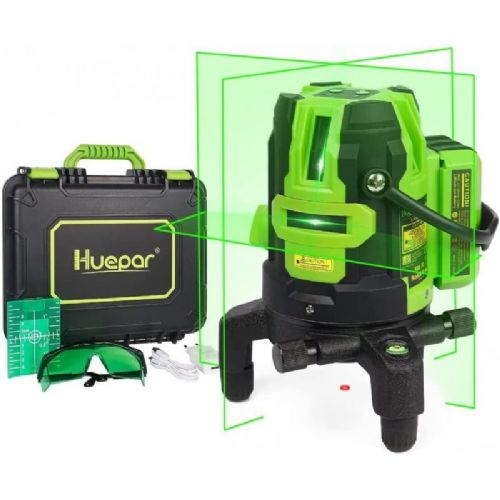
Construction Point Green Laser Level 5200mAh (SKU: L141G)
Looking for ultimate precision and reliability for your construction projects? The 5200mAh Construction Green Laser Pointer is designed for professional builders, tradesmen and demanding DIYers who don't compromise on their work. With advanced green laser beam technology, an extremely powerful battery and a robust housing, this leveler is an indispensable partner for every construction challenge - from interior design to demanding exterior construction work.
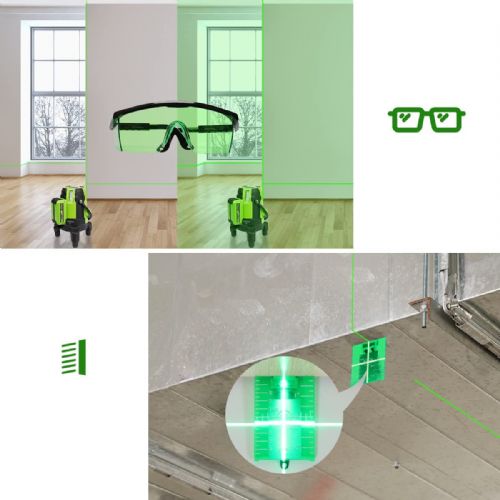
The green laser beams are up to 4 times more visible than conventional red lasers, allowing you to work smoothly and quickly even on bright and sunny construction sites. And with the built-in powerful 5200mAh lithium-ion battery, you will forget about constantly interrupting work for charging.
---
Key benefits and features of a laser level
Exceptional visibility with green laser: Green beams provide superior visibility up to 30 meters (up to 60 meters with laser receiver), allowing for accurate measurements even in brighter environments.
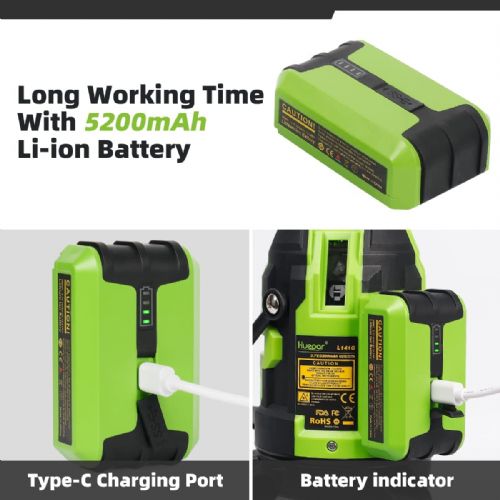
Powerful 5200mAh Battery: Provides up to 5 hours of continuous operation with all laser beams turned on. Supports direct charging or use of Li-ion battery.
Multi-directional projection: The device projects 4 vertical green lines, 1 horizontal green line and 1 red vertical dot below the device, allowing for complete coverage of the ceiling, walls and floor.
Self-leveling and alerts: In self-leveling mode, the device automatically levels itself within ±3°. If it is outside this range, it alerts you with a beep and a rapid flashing of the beam.
Manual mode for any angle: The pendulum lock allows you to switch to manual mode, where you can position the laser at any angle to project slanted lines (e.g. for stairs or attics).
Robust IP54 protection: Dust and water resistance ensures worry-free use in demanding construction site conditions.
Finely adjustable base: Built-in 360-degree rotating base with bubble level (with backlight) allows for precise micro-adjustment even on uneven terrain.
---
Technical specifications
This professional level offers precise technical parameters that ensure top results on every project:
Property
Specification
Color laser line
Green laser beam (red vertical dot)
Projection
4 green vertical lines + 1 green horizontal line + 1 red vertical dot
Laser class
Class 2 (IEC/EN60825-1/2014), output power <1 mW
Laser wavelength
505-520 nm
Horizontal/vertical accuracy
±2mm / 10m
Vertical point accuracy
5mm / 10m
Leveling/compensation area
±3°
Working space (distance)
30 m (up to 60 m with Huepar laser receiver)
Continuous operation time
Up to 5 hours with all laser beams on
Power source
5200mAh lithium-ion battery or direct charging
Tripod thread size
5/8"-11 (internal thread)
Protection class
IP54 (dust and splash water resistant)
---
Versatile use and ergonomic design
This multi-line laser level is designed with practicality in mind. The four vertical lines effectively divide the space and cover the ceiling, walls and floor, making it ideal for laying drywall, tiling or erecting partitions. The lower red vertical dot (plumbing point) is indispensable for precise pipe laying, electrical installations and drain installation.
For easy carrying and safe use at height, a wide portable wrist strap allows for a firm grip with one hand. The built-in bubble level with backlight ensures that you can quickly and accurately position the level even in poor lighting conditions or in darker rooms.
---
Frequently Asked Questions (FAQ)
1. How does self-leveling mode work and what happens if the device is tilted?
When the pendulum is in the unlocked position, the self-leveling mode is automatically activated, aligning the laser lines within ±3°. If the device exceeds this tilt angle (is outside the self-leveling range), the laser beam will start to flash rapidly and the leveler will also warn you with an audible signal (beep).
2. Can I use this laser level outdoors in bright sunlight?
Yes. Green laser beams are up to 4 times more visible than red ones, allowing for excellent visibility up to 30 meters. For working at longer distances (up to 60 meters) or in extremely bright outdoor conditions, we recommend using a compatible Huepar laser receiver.
3. How do I use the slant line projection device?
To project slanted lines, switch the pendulum to the locked position and hold down the "V" button for a long time to activate manual mode. In this mode, you can tilt the laser at different angles as desired. The laser beam will flash every 3-5 seconds, reminding you that the device is not currently performing self-leveling.
Responsible persons:
HUEPAR - DELARI GmbH – Kirchstraße 3 – 56242 Selters Deutschland, Germany, info@delari-gmbh.de, (+49) 26263494093
Distributor for Slovenia: Haloorodje.si, Online Sales, Rok Groznik sp, Podturn 42, 8350 Dolenjske Toplice, info@haloorodje.si, +38669731944, Slovenia
Product origin: China
Instructions for using the product:
• Check that the leveler is fully charged. Plug the charger into a suitable outlet and let the leveler charge until the full battery icon appears.
• Select a suitable location for the level. Make sure the surface is flat and stable.
• Place the level in the selected location and secure it with the supplied bracket or stand. Make sure the level is firmly attached and stable.
• Turn on the leveler by pressing the on/off button. After turning on, the leveler will automatically start self-leveling. Wait for the self-leveling to finish.
• Set the desired projection mode (spot, horizontal, vertical) by pressing the appropriate buttons on the leveler. Precisely aim the laser beam according to your needs.
• After use, turn off the level by pressing the on/off button. Remove the level from the mounting location and store it in a safe place.
Useful tips for work:
• Before using the level, make sure that the surface on which you will place it is flat and stable. This will ensure accuracy and stability of the leveling.
• When using the level in bright environments or at a distance, use the green laser beam, as it is more visible and allows for easier aiming.
• Check the level's battery level regularly and charge it when necessary. A fully charged battery ensures long-term, uninterrupted use.
• When using the level outdoors, use additional protection, such as a protective bag or case, to prevent damage from dust, dirt, or drops.
• When using the level, be careful not to expose the laser beam directly to your eyes. Use safety glasses if necessary.
• Maintain the level regularly by cleaning it after each use and checking that all parts are in good condition. Replace damaged or worn parts as necessary.
Warnings:
⚠️ Never look directly into the laser beam or point it towards your eyes.
⚠️ Do not point the laser beam at vehicles, aircraft or other people.
⚠️ Do not use the device if it is damaged or if the laser is not working properly.
⚠️ Do not expose the device to water, moisture or extreme temperatures.
⚠️ Do not disassemble, puncture, or expose the battery to high temperatures.
⚠️ When working at height, make sure the level is securely attached.
⚠️ Keep the product out of the reach of children.
Same summary
The 5200mAh Construction Point Green Laser Level is best suited for basic tasks such as setting up shelves, aligning pictures or installing smaller elements indoors where you need precise marking of points and straight lines. Its line type and two projections make it particularly useful for home users looking for a multi-purpose solution for less demanding construction or installation tasks with a working distance of up to 15 meters. For more complex alignments or work on larger outdoor areas, this model may not be the best choice, as the limited number of lines and distance can be an obstacle for more advanced or larger projects.
Recommendation source: Enaa guides and team experience.
User view
This laser level is typically used by home craftsmen or small craftsmen looking for an easy solution for installing shelves, frames, furniture or basic tiling. In practice, it is particularly useful when you want to quickly check the level or accurately mark a point without using traditional measuring tools. Due to its basic configuration, it is mainly suitable for indoor spaces or small garden projects.
It is not uncommon for users of Huepar products to trust this equipment due to its ease of use and good quality-price ratio.
Why buy at Enaa
At Enaa, the range of laser levels is tailored to the different needs of users, and the product descriptions are transparent and designed to make it easier to compare and choose based on your expectations and type of task.
Answers to frequently asked questions
What types of tasks is this laser level most useful for?
The model is intended primarily for interior work, such as aligning shelves, frames, basic tile laying, and smaller installations, where two lines and a distance of up to 15 meters are sufficient.
Is the laser beam visible enough in daylight?
A green laser beam is usually more visible than a red one, but visibility in bright daylight or outdoors may be limited, especially at longer distances.
Is it suitable for precise kitchen installations or larger projects?
For more demanding projects or installations where greater accuracy over longer distances or the simultaneous use of multiple lines is required, it is better to consider a more advanced model with more projections and a longer range.
Is the power of the level suitable for outdoor use?
It may be suitable for occasional use around the house or in the garden, but for larger outdoor construction projects, we recommend choosing a model with a longer working distance and the option of using a tripod.
How easy is it to use for beginners?
The use is quite simple and intuitive, allowing even less experienced users to quickly achieve the desired results without additional learning.
Description updated: April 2026