Your shopping cart
😊 Product added to cart successfully
Product removed to cart successfully

Couldn't load pickup availability
Izdelek bomo predvidoma poslali čez: 0 dni


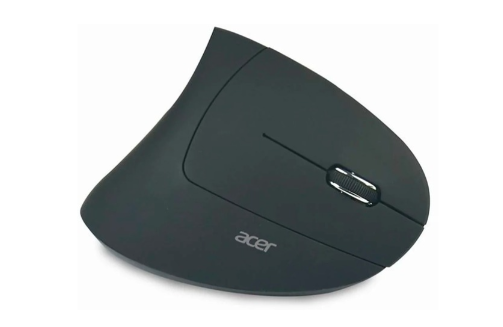
The Acer Vertical Ergonomic Wireless Mouse is ideal for preventing wrist fatigue during everyday work by placing your hand in a more natural position. The mouse features an optical sensor with up to 1600 dpi, six buttons including forward/backward buttons, and a rechargeable battery. The Vertical Ergonomic Wireless Mouse is suitable for right-handed users and establishes a secure and stable connection to your end device via a 2.4 GHz USB nano dongle.
Specifications:
| Suitable for | PC, laptop | ||
| Connection | Wireless | ||
| Connectivity | 2.4GHz USB receiver | ||
| Connection | 1x USB | ||
| query | optical | ||
| resolution | 1600dpi | ||
| service | 6 pieces | ||
| Sliding wheel | 1 piece | ||
| ergonomics | for right-handed people, vertical shapes | ||
| Power supply | Integrated battery, rechargeable | ||
The Acer HP.EXPBG.009 mouse is particularly suitable for users who spend a lot of time at the computer and want to reduce wrist strain due to its upright ergonomic design. Wireless connectivity and a built-in rechargeable battery make everyday use easier, especially in business environments or on the go. The 1600 dpi resolution provides reliable accuracy for office work and general use, but this model is less suitable for demanding gamers or professionals who need higher dpi values or advanced features such as programmable buttons. The upright design means some compromises in terms of versatility, but brings added value in terms of comfort during long-term use.
Recommendation source: Enaa guides and team experiences.
An upright mouse is a common choice for business users and those who want more ergonomic comfort when working with a computer for a long time. It is also suitable for home users who want to reduce the strain on their wrists, especially during everyday tasks, browsing and editing documents. Advanced gamers or creators may miss adjustable DPI or additional buttons, but for many users who want simple, wireless and comfortable use, this model is a good fit.
Users often trust Acer products for their reliability and wide range in the computing ecosystem, which makes it easier to choose and later complement their workspace.
At Enaa, you can count on professional support when choosing computer peripherals and an up-to-date presentation of the offer, so you can choose the mouse that best suits your user habits. We offer exclusively proven models from renowned brands, ensuring additional safety and reliability in everyday use.
An upright ergonomic mouse is best suited for those who spend most of their time working at a computer and want to reduce wrist fatigue or pain, especially in office or home environments.
It can serve basic gamers for casual gaming, but due to its 1600 dpi and less adjustability, it is not the best choice for demanding or competitive games.
Charge the battery with the included cable; the rechargeable battery allows you to use the mouse for a long time without the need to regularly change batteries.
The upright shape is specifically designed for a more natural hand position and typically reduces wrist strain during prolonged use.
The mouse uses a standard wireless connection, so it is usually compatible with most modern operating systems, but it is recommended to check the requirements on the manufacturer's website for specific cases.
Description updated: April 2026


